A Windows SID is a unique, variable-length identifier Windows assigns to every user, group, and computer account. Windows checks the SID, not the account name, when deciding what a logged-in user is allowed to do.
That distinction matters during an incident. An MSP engineer might see a familiar username in a logon event, yet the underlying security identifier can reveal that the account was renamed, replaced, or granted an unexpected identity. The same idea also helps connect exposed credentials to the permissions an attacker may inherit after replaying them.
The term SID is overloaded, though. In UK public-sector reporting, it can mean Statistics on International Development, the official series for UK aid and Official Development Assistance, while in corporate governance it commonly means Senior Independent Director. Windows administrators, security analysts, and incident responders use SID to mean security identifier. This article stays with that Windows meaning, then connects it to practical monitoring for service providers.
What a Windows SID Actually Identifies
An MSP engineer triaging a flagged logon might see the account name svc_backup. The name suggests a backup service, but it doesn't prove that the account is legitimate. A sensible next step is to inspect the SID attached to the event and compare it with the expected account object, group memberships, and host activity.
A security identifier is a unique, variable-length value assigned to a security principal when that principal is created. Security principals include:
- User accounts, including ordinary employees and administrators.
- Group accounts, such as Administrators or domain security groups.
- Computer accounts, which represent joined Windows devices.
- Service accounts, whether they're dedicated identities or accounts used by scheduled tasks and applications.
Windows documentation explains that each principal receives its own SID, and that the identifier is used to recognise the principal independently of its friendly name. The Microsoft explanation of security identifiers is useful background for engineers who want the formal definition.
Names are for people, SIDs are for Windows
A username is a label. Administrators can rename it, display names can change, and a deleted name may later be reused. The SID belongs to the security principal created by Windows and remains the identity Windows associates with that object during its lifetime.
That's why an access control list can show a raw identifier when Windows can no longer resolve the original account name. The permission entry may still refer to the old SID, even though the account has been removed. In an investigation, that unresolved entry isn't automatically malicious, but it deserves an explanation.
Built-in identities appear regularly in access control lists and event logs. LocalSystem, Administrators, and Everyone are examples that junior engineers should learn to recognise. Microsoft maintains a list of well-known Windows SIDs, including the Null SID S-1-0-0, the World SID S-1-1-0, and NT Authority S-1-5. Their values remain constant across operating systems.
Practical rule: Trust the SID as the identity reference, then use the account name as supporting context.
During response work, look for unknown trustees in ACLs, duplicate or unexpected identifiers, and SID history entries that don't fit the organisation's migration record. This is also where identity review meets exposure monitoring. If a credential leak points to an account that owns privileged group memberships, the SID tells you which identity and permissions need checking. For a plain-language explanation of permissions and resource decisions, use the GoSafe access control guide.
The Structure of a SID Explained Step by Step
A SID looks intimidating until you read it like an address. A common domain-style pattern is:
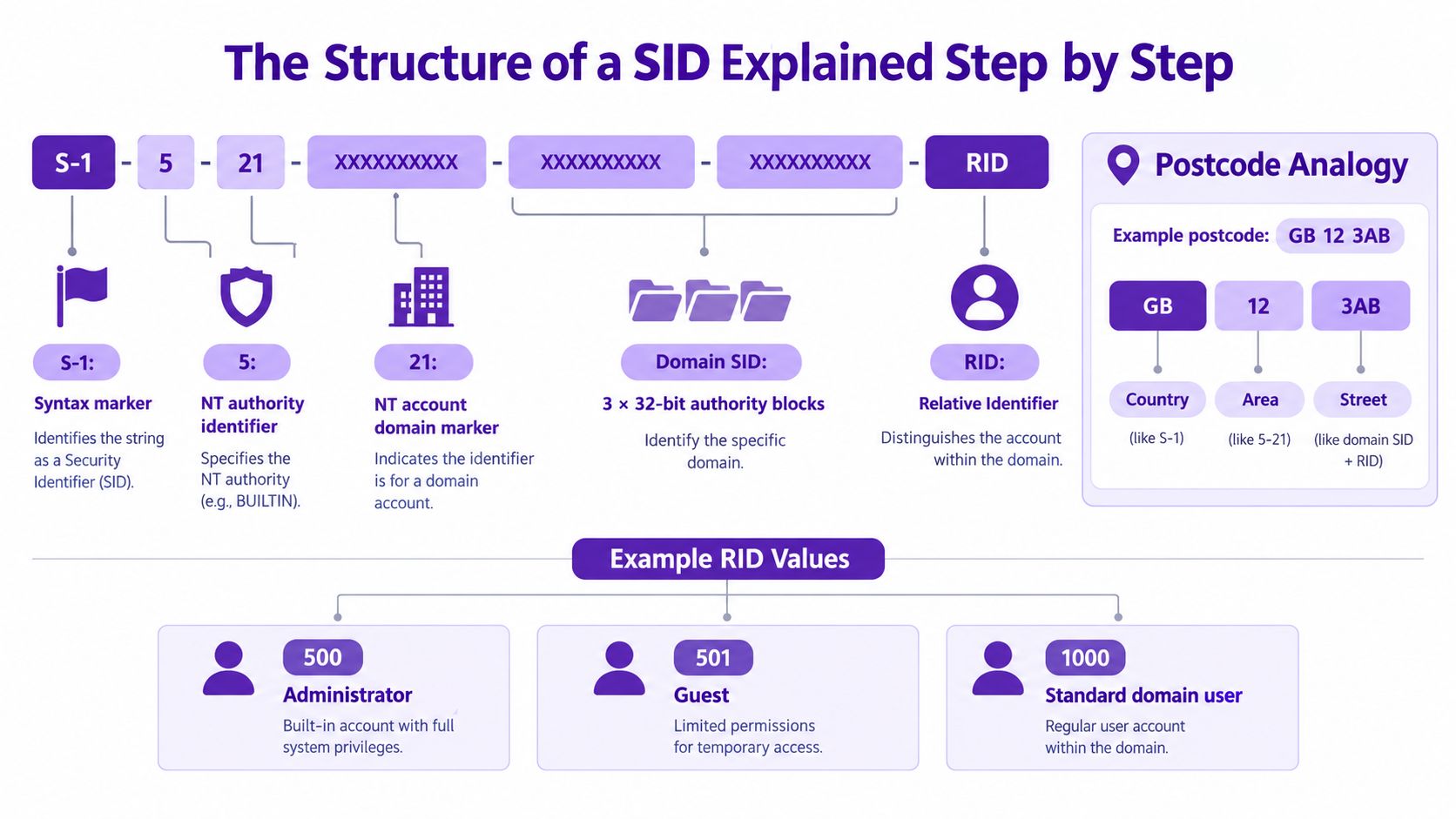
S-1-5-21-XXXXXXXXXX-XXXXXXXXXX-XXXXXXXXXX-RID
Microsoft's protocol documentation defines a SID string beginning with S-1-, followed by an identifier authority and subauthority values. The underlying structure can contain a 6-byte identifier authority, up to fourteen 32-bit subauthorities, and a final relative identifier, or RID, as described in the Microsoft SID structure specification.
Read the components as an address
Start from the left:
S-1is the syntax marker. It tells Windows that the value is a SID string using revision one.5is the NT authority identifier. In a postcode analogy, this is the broad issuing authority.21identifies the account-domain pattern. It signals the familiar domain or local-machine SID structure that follows.- The three long values identify the domain or machine. Together, they form the base SID for that environment.
- The final RID identifies the object within that base. It distinguishes the individual user or group from other objects in the same domain or machine.
The analogy isn't a protocol definition, but it helps when reading logs. The base portion is like the area and street, while the RID is the house number. Two accounts can share the same base SID and still be different principals because their RIDs differ.
Examples worth recognising
The local Administrators group uses S-1-5-32-544. A built-in domain Administrator commonly ends with RID 500, giving a pattern such as S-1-5-21-...-500. The important point is that the account's position within the domain is encoded in the final component, not in the visible name.
A SID is variable length because different authorities and principal types can require different numbers of subauthority values. Don't assume every SID will fit the domain pattern above. Built-in and well-known SIDs use other structures, so learn the common forms rather than applying one template to every event.
Two machines shouldn't share the same machine SID in a properly prepared environment. If cloned systems carry an unsuitable identity, directory and access-control troubleshooting can become confusing. During an audit, compare the base SID with the device inventory and domain records, then investigate any unexpected match instead of treating the text string as harmless noise.
Where SIDs Fit in Windows Authentication
Logon processing is easier to understand as a chain of decisions. A user submits credentials, Windows validates them, and the Local Security Authority, or LSA, builds an access token. That token contains the user's SID, group SIDs, and applicable privileges.
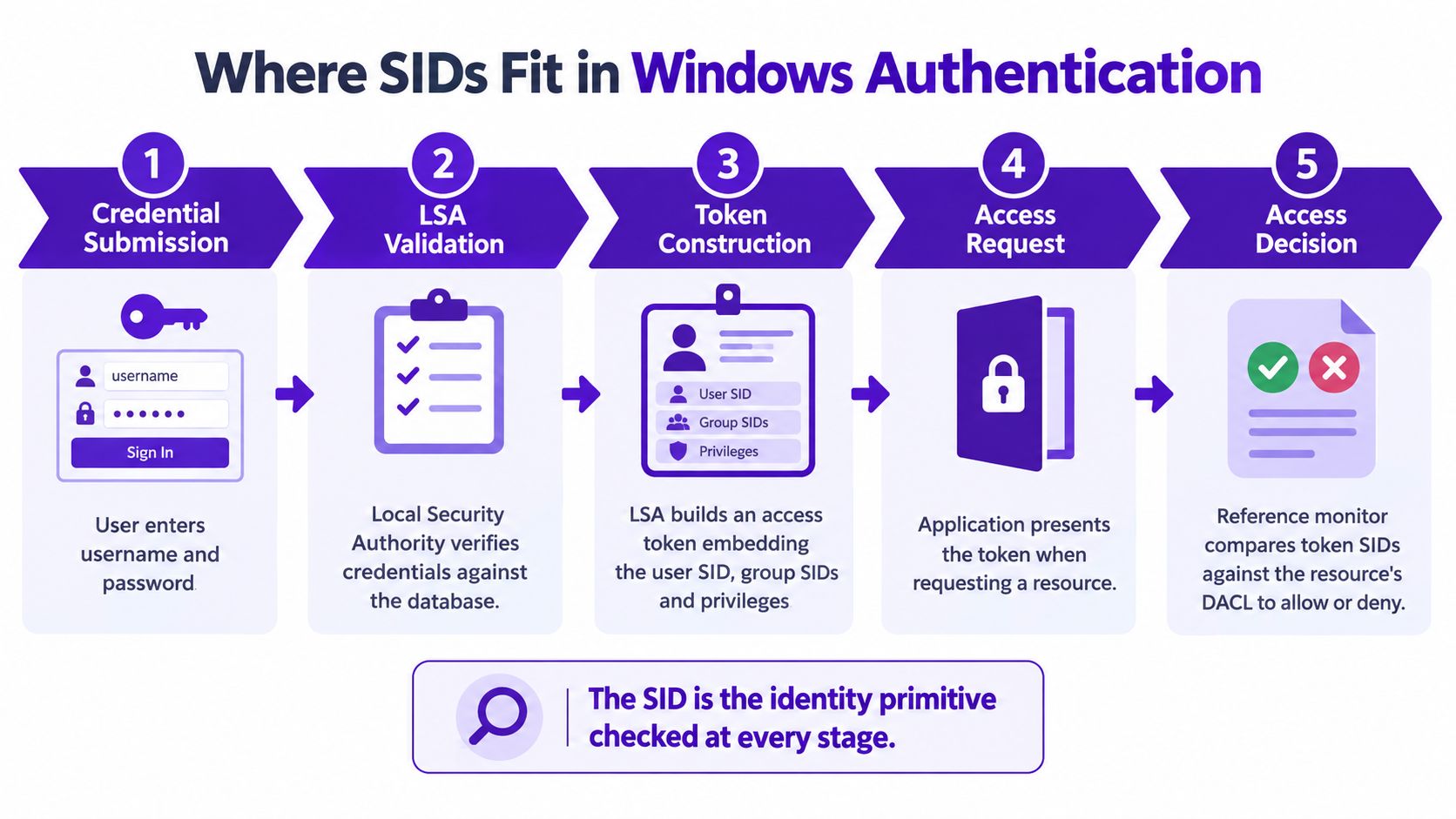
Windows then uses that token when the user opens a file, connects to a share, starts a service, or requests another protected resource. The resource has a discretionary access control list, or DACL, containing access control entries that reference SIDs. The Security Reference Monitor compares the token's SIDs with those entries and makes the allow or deny decision.
Microsoft states that Windows uses the SID in the access token for subsequent security checks, rather than relying on the account name. The Microsoft access-token explanation is the authoritative reference for that behaviour.
A shared-folder example
A helpdesk user opens a shared folder. Their token contains the user's own SID and the SID for a group such as Domain Users. The folder's DACL grants read access to the relevant built-in or domain group SID, so Windows finds a match and permits the request.
Rename the account and the SID in the token remains the same. Delete the account and its old SID can remain in the DACL as an unresolved entry. That persistence is useful for forensic review because it can expose stale permissions, former ownership, or an access path that administrators forgot to remove.
The same mechanism creates risk when an attacker obtains or manipulates authentication material. Lateral movement and pass-the-hash activity aim to make Windows accept credentials or token material associated with a legitimate identity. A display name may look ordinary in a dashboard, while the SID and group list reveal the privilege context that matters.
Investigation habit: Record the username, SID, group SIDs, logon type, source device, and target resource together. One field rarely tells the complete story.
For service desks, a failed or suspicious logon often needs correlation with account-lockout activity, especially where repeated attempts precede a successful session. The MSP guide to 4740 troubleshooting provides a practical route into that investigation.
Common SID-Related Security Risks
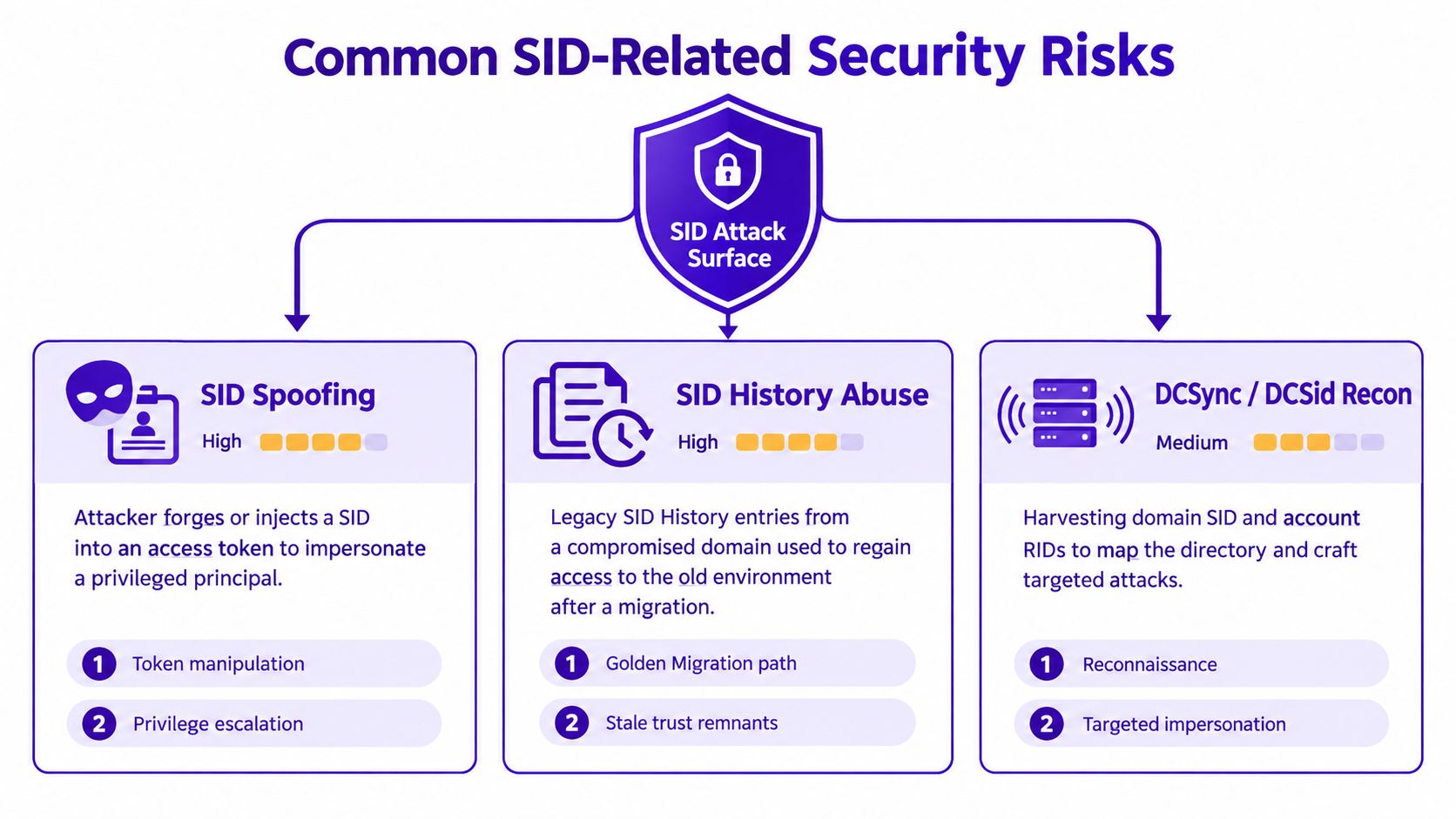
SID-related attacks are easier to handle when separated into identity manipulation, migration mistakes, and stolen-credential reuse. They don't all require the same controls, and an MSP shouldn't treat every unfamiliar SID as proof of compromise.
SID spoofing and token manipulation
An attacker may try to forge or inject a SID into an access token so Windows treats the session as a more privileged principal. A worked example would be a compromised helpdesk account producing token data that appears to include a Domain Admins SID. If the operating system accepts that manipulated token, the attacker may reach resources reserved for administrators.
The defensive question is not merely, “Did the helpdesk account log on?” It is, “Which SIDs and privileges were present in the resulting token, and did that combination make sense for the device and task?”
SID history abuse after migration
SID history exists to preserve access during domain migrations, but a legacy entry can become a hidden route back to an old environment. For example, a marketing account might retain the SID history of a former Enterprise Admins group after a forest merge. If that entry remains usable and trusted, the account may carry rights that its current role doesn't justify.
Review migration documentation against directory attributes. Remove stale entries after access dependencies have been tested, and treat an unexpected privileged SID history value as a high-priority identity finding.
Credential theft and replay
A stolen username and hash can be replayed so Windows issues a token for the legitimate account. An attacker who extracts a domain administrator hash from a compromised host may use it to pivot across file servers, even though no account name has changed. The SID remains the recognised identity, so existing file ACLs, service permissions, and group memberships can apply.
These risks are also part of wider information protection. Organisations reviewing identity exposure may benefit from guidance on government-grade data protection, particularly when security records and customer data must be handled carefully.
A practical response process should preserve the evidence:
- Capture the token context: Record user SID, group SIDs, privileges, source host, and logon type.
- Check directory history: Review SID history and migration records for privileged remnants.
- Validate the route: Identify the first host, authentication method, and resources reached.
- Contain proportionately: Disable or reset affected credentials, remove unsafe entries, and verify that legitimate business access still works.
SIDs and the Dark Web Monitoring Connection
A dark web credential dump doesn't normally publish a neat Windows access-control report. It may contain a corporate email address, a password, an NTLM hash, a domain name, or information collected by an infostealer. The security value comes from connecting that exposed credential to the identity object and SID inside the customer's tenant.
Consider the chain. An employee's corporate email appears in a leaked dataset. An attacker buys or downloads the associated stealer log, then tries the password against remote access, email, or another exposed service. If the credentials work, Windows authenticates the original account and creates an access token containing that account's SID and group SIDs.
Why the display name isn't enough
A SIEM alert that says Alex Smith authenticated from an unusual device is useful, but the SID is the stable identity reference for correlation. The display name may be changed, duplicated, or formatted differently across systems. The SID lets a defender connect directory records, file access events, group membership, and endpoint activity to the same security principal.
The same reasoning applies to service accounts. A leaked credential for a backup, monitoring, or integration account may look less urgent than a named administrator, yet its SID could be authorised on sensitive shares or permitted to run scheduled tasks. Review the permissions attached to the identity, not just the label used by the service owner.
Building useful alert logic
Service providers can make the connection operational by joining three data streams:
- Exposure data, including leaked email addresses, passwords, hashes, and breached domains.
- Identity data, including the account SID, group SIDs, SID history, privilege assignments, and account type.
- Activity data, including logon events, source devices, remote access, process creation, and resource access.
A dark web hit shouldn't automatically trigger an outage. It should create a risk signal that raises the priority of password reset, session review, MFA verification, token inspection, and endpoint investigation. The best response depends on whether the exposed credential is active, privileged, reused, or already protected by effective controls.
For MSPs developing a service around this workflow, dark web credential monitoring for MSPs explains how exposure signals can support a broader customer response process.
Useful correlation: Match a dark web hit to the account SID first, then assess what that SID could access and whether it has recently authenticated.
Mitigation and Monitoring Best Practice for MSPs
An MSP can package SID hygiene as a repeatable identity-control service rather than a one-off technical exercise. Start by building an inventory of privileged accounts, service accounts, domain controllers, sensitive file servers, and known migration remnants.
Clean up identity objects
Remove stale SID history entries after each domain migration, once the customer has confirmed that legitimate access no longer depends on them. New starters should receive clean accounts with role-appropriate group memberships, while leavers and orphaned identities should be disabled and reviewed for remaining ACL access.
Audit well-known SIDs in privileged tokens. A built-in administrator or broad group may be expected on a specific host, but the same identity appearing in an unusual remote session needs context. Keep a documented baseline so analysts can distinguish a normal administrative workflow from an unexpected privilege path.
Reduce token exposure
Use layered controls rather than relying on one setting:
- Protected Users: Place suitable privileged identities in the Protected Users security group after testing compatibility.
- Credential Guard: Use Credential Guard where the Windows edition, hardware, and workload support it.
- UAC restrictions: Prevent routine elevation from becoming an unreviewed path to powerful tokens.
- Tiered administration: Keep workstation, server, and directory administration separated so a low-rights SID can't directly reach a Domain Admin identity.
- Privilege review: Restrict powerful rights such as SeTakeOwnership and SeDebug to accounts that strictly require them.
Monitor the identity, not just the name
Build detections around SIDs and their context. Alert on new SID history attached to privileged accounts, unusual token impersonation, and service-account logons outside the customer's normal operating pattern. Review interactive and network logons, including logon types associated with remote desktop and network access, when they coincide with a dark web exposure hit.
A manageable reporting cadence keeps the work visible:
- Weekly: Produce a SID hygiene report covering stale entries, orphaned accounts, and unusual privileged-token patterns.
- Monthly: Review privileged SIDs, group membership changes, service-account activity, and unresolved ACL trustees.
- Ongoing: Ingest dark web credential alerts into the same SIEM used for identity and endpoint events.
The aim isn't to overwhelm a customer with a complex dashboard. It's to provide a short list of exposed identities, affected SIDs, likely access paths, and actions that an administrator can complete.
Turning SID Awareness Into a Recurring Service
SID awareness becomes commercially useful when it produces a regular customer outcome. An MSP can combine identity hygiene, access-token review, and dark web credential checks into a managed service with clear boundaries and repeatable reporting.
A sensible package starts with a baseline. Document the customer's domains, privileged accounts, service identities, sensitive resources, known SID history, and existing monitoring coverage. Then give the customer a concise remediation list, separating urgent exposure from routine housekeeping.
Package the work around deliverables
A service catalogue might include:
- Core identity review: Maintain an inventory of privileged SIDs, review group membership changes, and identify unresolved ACL entries.
- Exposure monitoring: Monitor customer email addresses and breached domains for compromised credentials, then map relevant hits to active accounts.
- Access review: Examine remote logons, service-account use, token privileges, and suspicious SID history changes.
- Remediation support: Help reset credentials, remove unsafe legacy entries, validate permissions, and document closure.
- Management reporting: Provide a recurring summary that explains what changed, what matters, and what the customer should approve next.
The commercial model can remain simple. Partners may structure recurring revenue security services around endpoint coverage, domains, or service scope, then reserve hands-on SID-history remediation and access reviews for a higher service tier. The exact price should reflect analyst time, customer risk, and the responsibilities included, rather than an arbitrary bundle of features.
Make it easy to sell
Dark web monitoring for MSPs is easier to explain when the customer hears a practical outcome: “We'll tell you when a business credential appears exposed, identify the affected account, and help you check what that identity could reach.” That message connects naturally with IT support, cloud services, hosting, connectivity, telecom systems, web services, and existing identity projects.
GoSafe Dark Web monitoring can be offered as a fully white-label dark web monitoring tool. It continuously scans for compromised email addresses, exposed passwords, and breached domains, then provides clear alerts that business users can understand. Partners can brand the service as their own, sell dark web monitoring under their own brand, and manage it without building security tooling internally or maintaining a specialist security team.
That model keeps the partner in control of the customer relationship. It also creates a practical reason for monthly contact, because exposure findings, account changes, and remediation status all need ongoing attention.
GoSafe Dark Web monitoring gives service providers continuous scanning for compromised email addresses, exposed passwords, and breached domains, with clear alerts that can support SID-focused incident response. Visit GoSafe Dark Web monitoring to explore how to add white-label monitoring to your service portfolio and start a conversation about recurring customer protection.