When it comes to spotting a phishing email, the details are everything. It requires scrutinising the sender, questioning any urgent or unusual requests, and always hovering over links to see where they lead before clicking.
A cardinal rule for any business is to never trust an email based on the display name alone. It is remarkably easy for attackers to impersonate a trusted brand or even a colleague to trick an employee into handing over sensitive information.
Understanding the Commercial Risk of Phishing for UK Businesses
For any telecom provider, MSP, or IT support company, phishing has moved far beyond a simple technical headache for your clients. It is now one of the most significant and rapidly growing commercial risks they face.
A single successful phish can set off a disastrous chain reaction, leading to everything from direct financial loss and crippling data breaches to severe operational downtime. This is why knowing how to identify a suspicious email is no longer just an IT skill—it is a core part of modern business resilience. When an employee clicks a malicious link, they are not just putting their own account at risk; they are potentially opening the door to the entire organisation.

This reality, however, creates a clear commercial opportunity for the IT channel. Your clients are more aware of these threats than ever, but they often lack the in-house expertise or resources to manage them. They are looking for practical, reliable solutions to protect their operations without adding complexity. This is the ideal moment to offer proactive security services that solve a very real and urgent problem.
The Scale of the Threat in the UK
The threat is real and the numbers are stark. Phishing continues to dominate the UK cyber threat landscape, with official data showing just how prevalent it is across every type of organisation.
According to the UK Government's Cyber Security Breaches Survey 2024, phishing was the method used in 93% of businesses and 95% of charities that identified a cyber attack. That is a staggering concentration of attacks coming directly through the inbox. With an estimated 3.4 billion phishing emails sent globally every single day, the scale of the problem becomes clear.
For MSPs, this data highlights a crucial point: your clients are not just at risk—they are being actively and constantly targeted. The financial consequences can be immense, from direct theft through Business Email Compromise (BEC) to the significant costs of ransomware recovery and regulatory fines.
A successful phishing attack is no longer a matter of 'if' but 'when' for any unprepared business. The reputational damage alone can shatter customer trust that took years to build, making proactive defence a non-negotiable part of business operations.
The Hidden Costs Beyond the Initial Breach
The money stolen in the initial attack is often just the beginning. The subsequent costs can be far greater and linger for months, if not years, creating a compelling business case for managed IT security services.
Consider the downstream impact on your clients:
- Operational Downtime: A ransomware attack that starts with a single phishing email can bring a business to a halt for days or even weeks, leading to huge losses in revenue and productivity.
- Data Recovery Costs: The expense of restoring systems, retrieving data from backups (if they are viable), and conducting a forensic investigation can easily run into thousands of pounds.
- Reputational Damage: Informing customers that their personal data has been compromised is highly damaging to a brand. It leads to customer churn and makes winning new business more difficult.
- Regulatory Penalties: Under GDPR, a data breach resulting from inadequate security measures can attract substantial fines from the ICO.
These are the risks that concern business owners, and it is why many are now seeking proactive security partners. By offering services like white label dark web monitoring, you can provide an early warning system. When a client's credentials appear for sale on the dark web, you will be alerted, allowing you to reset passwords and secure their accounts before they can be exploited in a targeted phishing campaign.
To better understand how these online threats are connected, our guide explaining the difference between the deep web vs dark web is an excellent starting point. It helps you position yourself not just as a reactive IT support provider, but as a strategic security advisor invested in your clients' commercial success.
Advising people to "be careful with emails" is one thing. Providing them with a simple, repeatable process is another. The goal is not to turn every employee into a cybersecurity analyst, but to give them a mental checklist they can run through in seconds.
This is not about deep technical knowledge. It is about building a healthy habit of scepticism. Attackers rely on your clients' teams being busy, distracted, or too trusting. A quick inspection process turns a potential weak link into the first line of defence.
Here is a breakdown of what to look for, step by step.
Look Closer at the Sender
This is where the most common tricks hide in plain sight. An email can display "HMRC Tax Office" as the sender, but the actual email address tells a very different story.
Encourage your clients' teams to form the habit of always checking the full sender address. It is often the first and easiest giveaway.
- Suspicious Domains: Attackers frequently register domains that look plausible at a glance. For example,
docusign-secure.comornatwest-support.co.uk. They seem credible, but they are fakes. - Character Swaps: A classic trick is to swap letters for similar-looking numbers or symbols, like
[email protected](using a zero instead of an ‘o’). - Incorrect TLD: A legitimate email from a UK government body will end in
.gov.uk. An address like[email protected]is a definite red flag. The part of the address after the ‘@’ symbol is what truly matters.
Another useful tip is to check the "Reply-To" address. Simply click the reply button (without sending anything). Often, attackers will use a legitimate-looking sender address, but the reply-to field is set to their own generic email account. If the sender is [email protected] but replies are directed to [email protected], the deception is revealed.
Hover Before You Click Anything
If you can instil just one habit in your clients' teams, make it this one. Malicious links are the primary way attackers steal credentials or deploy malware, and they have become very skilled at disguising them.
The technique is simple: on a computer, move the mouse cursor over any link or button in the email without clicking. A small box will appear showing the real web address it links to.
The only question the user needs to ask is: "Does this link go where it says it goes?" If the text says "Log in to your Microsoft account" but the link points to a strange, unrelated URL, it is a phish.
Watch out for these common link tricks:
- URL Shorteners: Services like Bitly are useful but they hide the final destination. Unless a shortened link is expected from a trusted source, it should be treated with suspicion.
- Subdomain Deception: A URL might look like
amazon.secure-login-portal.net. It is designed to make the user see the word "amazon" and trust it. However, the real domain here issecure-login-portal.net, which has no affiliation with Amazon. - Fake Link Text: The most subtle trick. The visible text of a link can be a perfectly valid URL, like
https://www.microsoft.com, but the hidden hyperlink beneath it points to a fraudulent website. Hovering is the only way to detect this.
Check the Message and Its Tone
Beyond the technical signs, the email itself often just feels off. Attackers frequently use psychology, creating a sense of urgency or fear to make people panic and click before thinking.
Train staff to pause and ask a few common-sense questions. Does the email create sudden panic, like "Your account will be suspended in 24 hours unless you act NOW"? Is it an invoice you were not expecting from a company you have never dealt with? Does it start with a vague greeting like "Dear Valued Customer" instead of your actual name?
While AI has helped attackers improve their spelling and grammar, many phishing emails still contain awkward phrasing or unusual sentences. This is often a sign it was written by a non-native speaker or an automated tool.
For telecom and IT partners, providing this kind of practical guidance shows you are more than just a supplier; you are a security advisor. You can build on this by offering services that reinforce these skills. For example, adding white-label dark web monitoring to your portfolio lets you proactively warn clients when their credentials appear in a breach, making them a much harder target for attacks that use this stolen data.
To see how you can offer these high-value security services under your own brand, view the GoSafe reseller programme.
The Evolving Tactics of Modern Cybercriminals
The days of identifying a phishing email by its obvious spelling mistakes and poor grammar are largely over. While those examples still exist, today’s cybercriminals use more sophisticated tools and techniques to construct far more convincing attacks. For telecom and IT providers, understanding this evolution is key to protecting your clients.
Modern attacks are not just a numbers game of sending out millions of generic emails. Instead, criminals are focusing on quality over quantity. They craft sophisticated messages designed to bypass traditional security filters and, most importantly, exploit human trust. These emails often mimic real business communications with concerning accuracy.
From Broad Nets to Targeted Spears
The most significant shift has been the move towards highly personalised attacks. Forget the vague "Dear Customer" emails of the past; attackers now use detailed, stolen information to tailor their messages directly to the recipient. This is where services like dark web monitoring truly prove their worth.
Criminals actively purchase breached credentials from the dark web—everything from email addresses and passwords to job titles and phone numbers. They use this data to build a profile of their target, which allows them to launch attacks like:
- Spear Phishing: These are emails that appear to be from someone familiar, like a manager or a trusted supplier. They might reference a real project or a recent conversation to seem legitimate before asking for a password reset or an urgent payment approval.
- Business Email Compromise (BEC): This is a particularly damaging and lucrative attack where criminals impersonate a senior executive—often the CEO or CFO—to trick an employee into making a large, unauthorised bank transfer. These emails often contain no malicious links at all, relying purely on social engineering and a sense of urgency.
Just a few simple checks can often be enough to expose a suspicious email for what it really is.
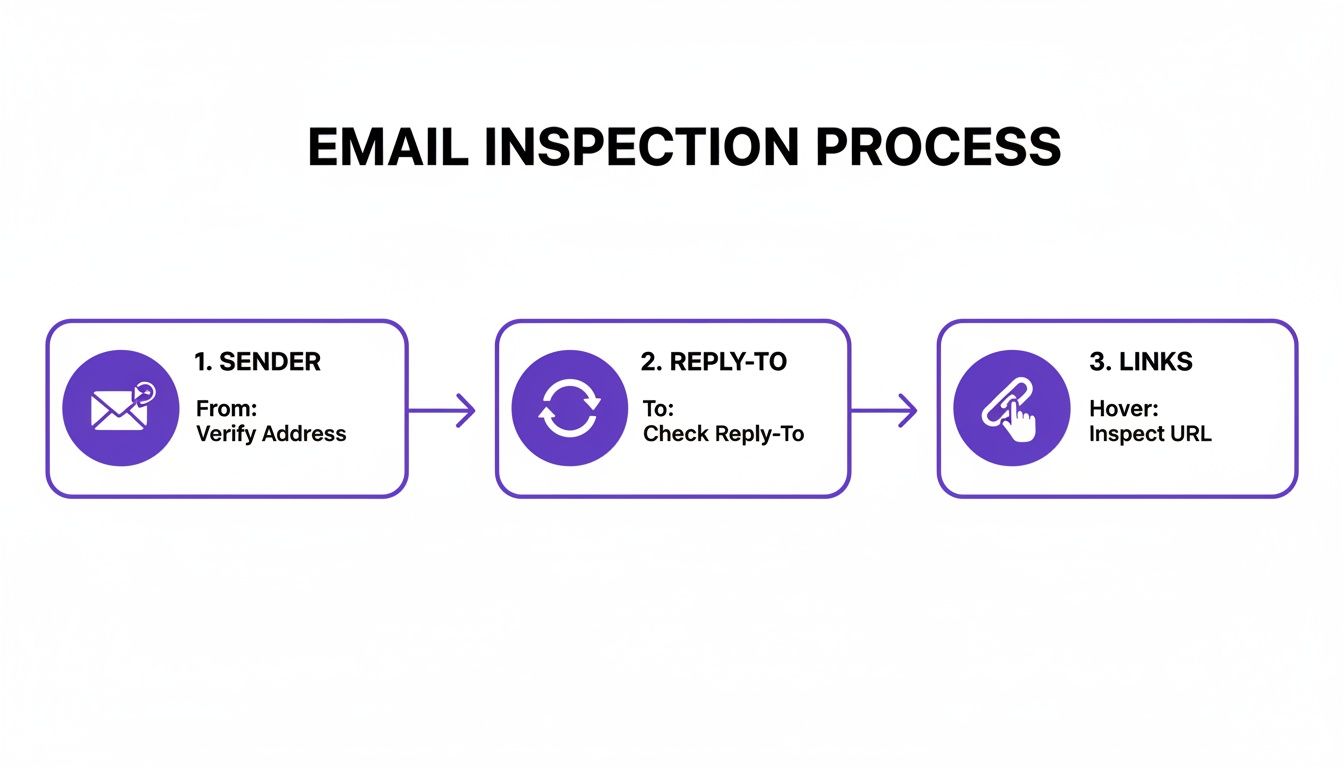
This process highlights the fundamentals: always verify the sender, double-check the 'reply-to' address, and hover over any links before clicking. These are non-negotiable steps in any email inspection workflow.
The Rise of New Attack Vectors
Attackers are also getting more creative with their methods, moving beyond the simple email link. They know people are becoming wiser to suspicious URLs, so they have adapted their approach.
Here are two emerging threats your clients need to be aware of:
- QR Code Phishing (Quishing): The email contains a legitimate-looking QR code, often presented as a secure way to log in or access a document. As soon as it is scanned with a phone, it directs the user to a malicious website designed to steal credentials. It is a clever method that bypasses most desktop security tools.
- Voice Phishing (Vishing): This usually starts with a phishing email but quickly moves to a phone call. The attacker might pretend to be from the user's bank, the IT helpdesk, or even a government agency to coax sensitive information out of them over the phone.
The sophistication and variety of these methods make identifying attacks harder than ever for UK businesses. A recent survey revealed that 52% of organisations felt that phishing threats were getting more advanced, with 96% reporting they had suffered at least one phishing attack in the last year. You can discover more about these evolving phishing trends and see why traditional detection rules are no longer sufficient.
For MSPs and IT companies, this new reality makes a strong case for proactive security. A tool like GoSafe provides that critical early warning. By offering white label dark web monitoring, you can alert clients the moment their credentials appear for sale online. This gives you the chance to secure their accounts before they can be used in a targeted spear phishing or BEC attack, transforming your service from reactive support into proactive protection—a powerful way to differentiate your business.
To see how you can add this high-value, low-overhead service to your existing stack, book a demo of GoSafe’s white-label dark web monitoring.
Building a Human Firewall Through Training and Technology
Technology is a powerful shield against phishing, but it is not infallible. Determined attackers know that the easiest way into a secure network is by tricking a person. This makes your clients' employees the last and most critical line of defence—what is often called the 'human firewall'.
Building this firewall is not about blaming staff for mistakes; it is about empowering them. Human error is a factor in many data breaches, not because people are careless, but because cybercriminals have become masters of manipulation. For telecom and IT providers, this reality is a clear opportunity to deliver tangible value beyond technology alone.

The Gaps in User Awareness
Even with constant warnings, the human element remains a significant vulnerability. UK-based research reveals some worrying gaps in behaviour. Despite the volume of threats, over one in five (22%) adults either delete password compromise warnings or only act if the message is from a source they already trust.
The problem is more pronounced among younger staff. Only 27% of 16-24 year olds report being more vigilant after being targeted by hackers. Alarmingly, one in eight people who have been attacked admit they have not changed their online behaviour at all. This highlights a critical need for continuous training, and you can read more about these UK cybersecurity survey findings to grasp the scale of the challenge.
This data underscores a simple truth for the IT channel: you cannot just hope your clients' staff will instinctively know what to do. A structured, ongoing training programme is essential.
Offering Practical Training as a Service
As a trusted IT partner, you are perfectly positioned to offer practical, hands-on security training as a recurring service. This moves you from a reactive support role to a proactive security advisor, strengthening client relationships and increasing your average revenue per user (ARPU).
GoSafe’s platform is designed to make this straightforward for MSPs and telecom providers. It includes live phishing simulations that you can deploy under your own brand. These are controlled, realistic campaigns that send benign phishing emails to your clients' employees, testing their awareness in a completely safe environment.
Here is why offering this service is a valuable addition:
- Demonstrate Real-World Risk: Instead of just talking about threats, you can show a client exactly what percentage of their team is susceptible to a phishing attack. The data provides clear evidence.
- Provide Actionable Insights: The results immediately highlight specific training needs, allowing you to deliver targeted guidance where it is most needed.
- Build a Security Culture: Regular simulations help build a culture of healthy scepticism, encouraging staff to pause and think before they click.
This is not about catching people out. It is about building muscle memory so that spotting a suspicious email becomes second nature.
Technology as a Safety Net
Training is vital, but even the best-trained employee can be distracted or have a lapse in judgement. That is where technology provides a crucial safety net, empowering users to verify threats without putting the business at risk.
A perfect example is GoSafe's Deep Scan AI feature. It allows any employee who is unsure about an email to simply forward it to a dedicated address for automated analysis. In moments, the AI engine safely inspects the message—including all its links and attachments—for malicious content and provides a clear, non-technical verdict.
This two-pronged approach combines human vigilance with technological support, creating a much more robust defence. To see how these two layers work in tandem, see the table below.
Phishing Defence: A Two-Pronged Approach
| Defence Layer | Technological Solutions (e.g., GoSafe) | Human Training Solutions (e.g., Phishing Simulations) |
|---|---|---|
| Initial Detection | Automatically scans and quarantines known malicious emails before they reach the inbox. | Teaches staff to recognise the subtle red flags in sophisticated phishing attempts that might bypass filters. |
| Verification | Provides an AI-powered 'second opinion' (like Deep Scan AI) for suspicious emails, giving a safe, instant verdict. | Builds employee confidence to question suspicious requests and follow verification procedures. |
| Response | Blocks malicious domains and attachments identified during scans, preventing clicks from causing harm. | Creates a clear reporting process, turning employees into an active part of the security system. |
| Adaptation | Learns from new threats and updates its detection algorithms in real time to counter evolving attack methods. | Helps staff develop a 'security mindset' that adapts to new types of social engineering tactics over time. |
For your team, this combination drastically reduces the number of "is this email safe?" support tickets, freeing up technicians for more strategic work. For your clients, it gives their staff a simple, immediate way to get a second opinion, removing guesswork and reducing the chance of a costly mistake. For a deeper dive into other proactive technologies, you can learn more by reading our guide on what dark web monitoring is.
By pairing GoSafe's training simulations with its AI-driven analysis tools, you can offer a complete, white-labelled solution that builds a truly effective human firewall. It is an easy-to-sell service that addresses a major client pain point and delivers tangible, recurring value.
Creating a Simple Phishing Response Plan for Clients
When an employee clicks on a phishing link, what happens next is critical. Those first few moments can be the difference between a minor issue and a full-blown business disaster.
The reality is that you cannot expect staff to follow a complex, technical procedure when they are in a panic. As an IT or telecom provider, your value lies in creating a response plan that is simple, clear, and easy for anyone to follow.
The goal is to minimise damage, contain the threat, and secure systems quickly. A good plan removes guesswork and empowers employees to do the right thing immediately.
Immediate Steps for the Employee
The first actions an employee takes are the most important. The focus must be on immediate containment and communication. There can be no room for trying to "fix" it themselves or, even worse, hiding the mistake out of fear.
Boil your instructions down to these three non-negotiable steps:
Disconnect Immediately: The first instinct must be to disconnect from the network. This means physically unplugging the ethernet cable or switching off the Wi-Fi. This simple action quarantines the machine and can stop malware from spreading across the company network. A key instruction here is not to shut down the computer, as that can destroy vital evidence needed for investigation.
Report Straight Away: The employee must inform you—their MSP or IT provider—without delay. Every minute counts. They should use a separate device, like their mobile phone, to call or send a message. It is crucial to emphasise there is no penalty for reporting; the real danger is in silence.
Change Critical Passwords: Using a different, trusted device, they should immediately change the password for the affected account (such as their Microsoft 365 login). It is just as important to change the password on any other service, personal or professional, that uses the same or similar credentials.
A simple, well-rehearsed plan is infinitely more effective than a perfect plan that nobody can remember. The aim is to build muscle memory around 'Disconnect, Report, Reset' so that staff can act decisively under pressure.
The IT Provider’s Essential Follow-Up Actions
Once the employee has raised the alarm, your team's response is crucial. It does not just solve a technical problem; it reinforces your value as a trusted security partner. A swift, professional response builds significant client loyalty.
Your follow-up workflow should include these core actions:
- Isolate and Investigate: First, ensure the affected device stays completely offline. Your team can then investigate the scope of the breach, checking for any malware installations, unauthorised access, or signs of data exfiltration.
- Force a Global Password Reset: Even if only one account appears to be compromised, it is prudent to enforce a password reset for every user on the network. Attackers often use one compromised account as a launchpad to move laterally across the organisation.
- Scan All Systems: Run thorough malware and virus scans on the affected device and other critical systems on the network to ensure the threat has been completely removed.
- Review Logs: Check access logs for anything unusual. Be on the lookout for logins from unfamiliar locations or at odd hours, which could be a sign the attacker has accessed other accounts.
By providing this clear framework, you are showing tangible value that goes beyond fixing equipment. You position yourself as a strategic partner in their business continuity. This proactive guidance is a huge part of delivering high-value managed IT security services, a space where many MSPs are finding significant growth. You can explore more strategies and insights on our blog for cybersecurity for MSPs.
Ultimately, a strong incident response plan shows clients that you are prepared. It turns a potential crisis into a demonstration of your expertise, strengthening the relationship and justifying your recurring service fees.
Your Top Phishing Questions, Answered
As an IT provider, you are on the front line of your clients' security. Here are some of the most common questions from MSPs and their customers about phishing defences, with direct answers.
Are My Standard Email Filters Enough to Stop Phishing?
In short, no.
The built-in filters in Microsoft 365 and Google Workspace are effective at catching large volumes of spam and known malware. They are an essential first line of defence.
However, they are not designed to stop a highly targeted spear phishing or Business Email Compromise (BEC) attack. These sophisticated scams often contain no links or attachments. They rely on clever impersonation and psychological tactics to fool an employee into making a payment or handing over credentials.
Relying solely on default filters leaves a significant gap in a company’s defences. This is where attackers strike, and it is why a layered approach—combining advanced tools, proactive monitoring, and robust user training—is the only way to stop the attacks that cause real financial damage.
How Often Should We Be Training Staff on This?
Phishing awareness is not a one-off annual event. The tactics attackers use change so quickly that what a team learned last year could be outdated by next quarter. A tick-box training exercise is no longer sufficient.
A continuous reinforcement model is far more effective. It is less like a lecture and more like building a security reflex.
We recommend a programme that includes:
- A solid foundation: Start with a session covering the fundamentals—how to spot a suspicious sender, inspect a link, and recognise deceptive language.
- Regular, practical tests: Quarterly phishing simulations are ideal for this. They give staff a safe space to make mistakes and learn from real-world examples without any risk.
- Constant, bite-sized updates: Keep security top-of-mind with quick, regular reminders about new threats and tactics.
This approach builds a genuine culture of security awareness, turning your clients' staff from a potential vulnerability into their strongest line of defence.
What's the Very First Thing to Do if Someone Clicks a Phishing Link?
If a user clicks something they should not have, the absolute priority is to contain the threat. Fast, decisive action is critical.
The first and most important step is to immediately disconnect the device from the network. Unplug the ethernet cable or turn off the Wi-Fi. This single action can prevent malware from spreading across the network to other machines or servers. Crucially, they should not shut the computer down, as this can destroy forensic data needed for the investigation.
Next, they need to report it to you—their MSP or IT provider—straight away. While you handle the technical side, they should use a separate, trusted device (like their phone) to change the password for the compromised account, along with any other accounts that share the same credentials.
A clear, well-rehearsed response plan is what minimises the fallout from a successful phish.
Helping your clients navigate these challenges is where you can show immense value as their trusted IT partner. With GoSafe, you can add a powerful, proactive layer of security with white-label dark web monitoring, helping you spot compromised credentials before they are ever used in a targeted phishing attack.
10 Comments
10 Key Types of Social Engineering Attack and How to Mitigate Them | GoSafe - Dark Web Monitoring
February 5, 2026[…] how to identify the tell-tale signs of a phishing attempt. GoSafe provides detailed guidance on how to identify phishing emails, covering everything from scrutinising sender addresses to checking for mismatched […]
What Is a Data Breach and How Can You Prevent One? | GoSafe - Dark Web Monitoring
February 7, 2026[…] As an IT or telecom provider, offering services that prevent that initial mistake is one of the most effective ways to protect your clients from this threat. A good starting point is our guide on how to identify phishing emails. […]
10 Essential Email Security Best Practices for MSPs and Telecom Providers | GoSafe - Dark Web Monitoring
February 10, 2026[…] Train Users on Reporting: An educated user base is a powerful sensor network. Provide a simple, one-click method for users to report suspicious emails and create a process to analyse these reports for emerging campaign patterns. Learn more about How to Identify Phishing Emails. […]
Human Firewall Meaning Your Business Cannot Ignore - Heights Consulting Group
February 13, 2026[…] A fundamental aspect of building a resilient human firewall from the ground up involves educating employees on how to effectively recognize and report suspicious activity. Learning the key indicators of malicious messages is an essential first skill. For a great starting point, check out this guide on identifying phishing emails. […]
10 Common Types of Cyberattacks Resellers Must Understand in 2026 | GoSafe - Dark Web Monitoring
April 1, 2026[…] Training: Your clients’ staff are the last line of defence. Regular training on how to identify phishing emails is crucial. This should include establishing clear procedures for reporting suspicious messages […]
hairtypes
May 16, 2026This is a really helpful guide! I particularly appreciate the emphasis on not trusting the display name alone. It’s easy to get caught up in the apparent sender without looking closer at the actual email address. Hovering over links is also a great, quick tip to avoid trouble.
Royal Mail Scam Email: A Guide for Service Providers | GoSafe - Dark Web Monitoring
May 29, 2026[…] can also support end-user education with practical material on spotting phishing attempts, especially when you want something clients can circulate internally without turning it into a […]
After Clicking on Phishing Link: MSP Incident Response 2026 | GoSafe - Dark Web Monitoring
June 6, 2026[…] phishing incident exposes gaps very quickly. Maybe staff need help to recognize phishing attempts. Maybe password controls are weak. Maybe nobody knows whether exposed credentials are already […]
prozone cc
June 23, 2026It’s in reality a great and useful piece of info. I am satisfied that you simply shared this useful info with us.
Please stay us informed like this. Thanks for sharing.
ccsauvr
June 27, 2026What’s Happening i am new to this, I stumbled upon this I have found It
absolutely helpful and it has aided me out loads.
I’m hoping to contribute & assist other customers like its helped me.
Great job.