38% of UK businesses experienced phishing attacks in the 12 months to April 2025, and phishing was the only attack type for 51% of affected businesses. That makes phishing the main route into many organisations, while spear phishing adds personal research and trusted context to make the deception harder to challenge.
For MSPs, IT support companies, telecom providers, VoIP providers, hosting firms and cyber consultants, the distinction matters. A generic phishing email may target anyone in a business. A spear phishing message may target the finance director, an administrator or a senior executive with access to money, credentials or sensitive data.
The practical response needs more than awareness training. Businesses need layered email protection, clear verification procedures and visibility of credentials that may already have been exposed. That last point is often missed. Compromised email addresses and passwords can give attackers the information they need to make future phishing and spear phishing messages more convincing.
Why Phishing Remains the Top Cyber Threat
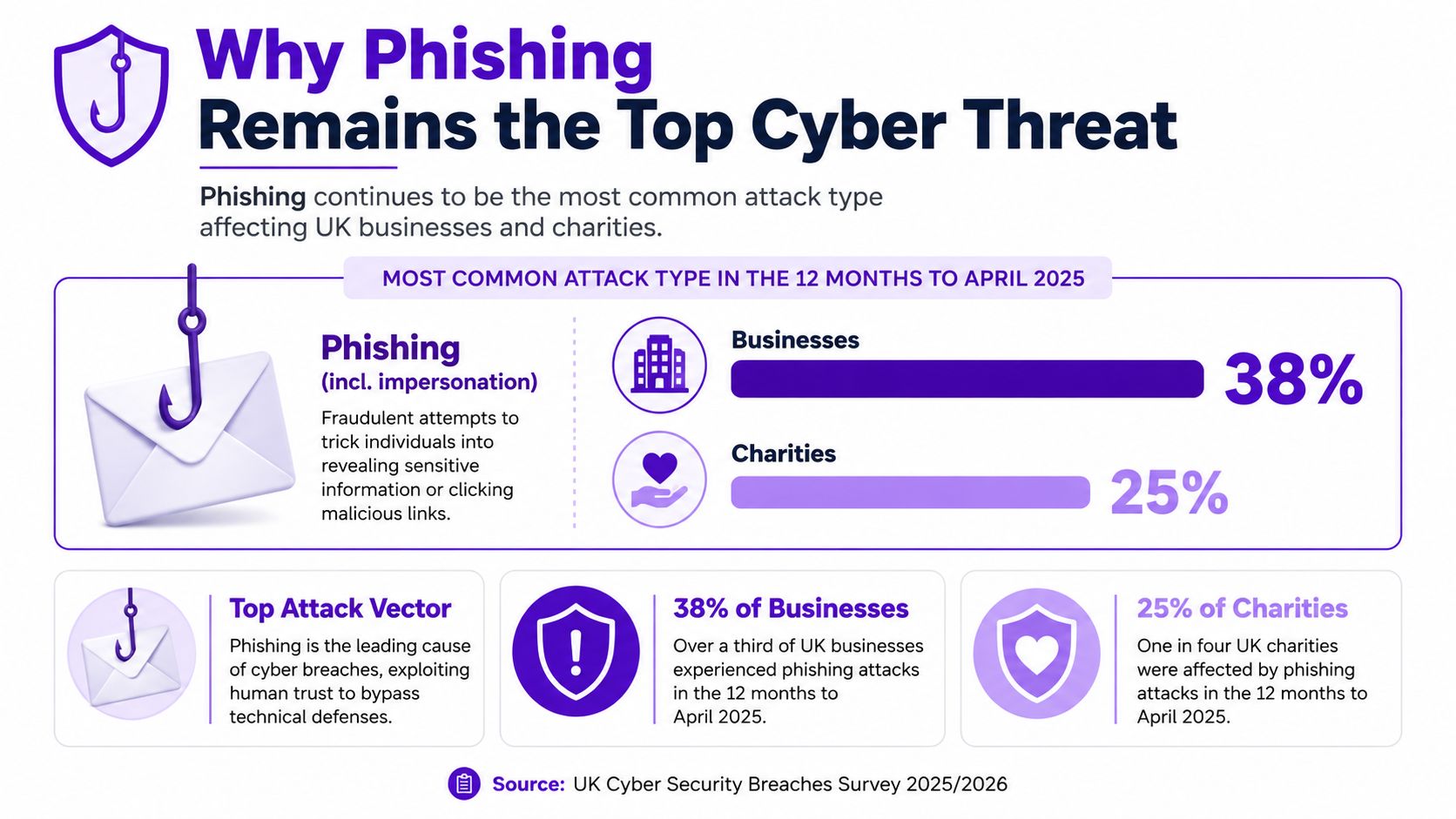
The UK Government's Cyber Security Breaches Survey 2025/2026 found that phishing was the most common attack type in the 12 months to April 2025. It affected 38% of businesses and 25% of charities. Among businesses that had experienced any breach or attack, phishing accounted for 85% of affected organisations.
The more revealing measure is what happened inside that affected group. Phishing was the only attack type reported by 51% of breached businesses, which shows that email deception often acts as the primary incident rather than a minor stage in a longer intrusion.
Why service providers need to care
Phishing works because it fits normal business behaviour. Staff already receive password notices, document-sharing requests, invoices, delivery updates and messages from colleagues. Attackers don't need to invent an entirely unfamiliar process. They only need to make a fraudulent message look close enough to one the recipient expects.
The UK Government's Cyber Security Breaches Survey 2025 recorded an estimated 7.87 million phishing cyber crimes in the relevant 12-month period. It also found that phishing remained the most common breach type overall, with nearly half of organisations that had suffered a breach or attack reporting phishing as the only attack type they encountered.
For a service provider, this creates a straightforward customer conversation. Email-based deception isn't an occasional nuisance that only affects large enterprises. It sits inside the routine operating risk of businesses that depend on cloud applications, online banking, shared documents and digital communications.
Practical rule: Treat phishing as an operational risk, not just a user-awareness problem.
Spear phishing increases the pressure because the attacker narrows the target. The UK Information Commissioner's Office describes spear phishing as an attack aimed at a specific person or organisation, customised with details such as names, job roles or social media cues. A generic warning can help someone spot an obvious scam, but it won't necessarily prepare them for a message that refers to their actual manager, supplier or current project.
That distinction is important when an MSP designs a protection package. Mass phishing calls for broad filtering and reporting controls. Spear phishing calls for role-based training, stronger approval processes and monitoring that can reveal whether a target's credentials have already appeared in a breach.
Phishing vs Spear Phishing Key Differences
Phishing and spear phishing use the same basic deception model, but they differ in precision. The attacker sends a fraudulent message, creates a reason to trust it and tries to make the recipient click, reply, open a file, disclose information or approve an action.
| Criterion | Phishing | Spear Phishing |
|---|---|---|
| Targeting | Broad groups or large recipient lists | A named person, role, team or organisation |
| Personalisation | Generic branding, urgency or account warnings | Details based on the target's role, relationships or public information |
| Delivery methods | Email, text message, phone call or fake website | Email, messaging platforms, text, voice calls or trusted collaboration tools |
| Typical objective | Credential theft, malware delivery or information gathering | Credential theft, account takeover, payment fraud, data access or malware delivery |
| Detection difficulty | Often easier to spot when the lure is generic | Harder to detect because the message appears relevant and familiar |
Targeting and preparation
Mass phishing is an efficiency play. Attackers send similar messages to many people and rely on a proportion of recipients responding. The lure may claim that an account needs attention, a payment has failed or a document is waiting for review.
Spear phishing requires more preparation. The attacker may examine a company website, public job information, social media activity or previously exposed credentials. They then use those details to make the message fit the recipient's working reality.
A finance employee might receive a request that appears to come from a director. An IT administrator might receive a fake access notification for a platform they manage. An executive assistant might be asked to arrange a payment or share a document. The message doesn't have to be perfect. It only needs to sound plausible at the moment the recipient reads it.
Risk and detection
The risk isn't defined only by how many people receive a message. A single targeted compromise can give an attacker access to a privileged account, payment process or sensitive mailbox. That makes spear phishing more demanding for attackers, but potentially more valuable when it succeeds.
Technical controls also have limits. SPF, DKIM and DMARC can help receiving systems identify unauthorised use of a legitimate domain. They can't prove that a genuine account holder wrote the message, and they won't automatically stop a lookalike domain or a malicious request sent through a compromised account.
Training should therefore address context, not just spelling mistakes and suspicious logos. Staff need to question unusual requests, verify payment changes through an established channel and report messages that use familiar details to push unfamiliar actions. MSPs can also help clients understand executive impersonation risks without presenting every suspicious email as the same threat.
Real-World Attack Scenarios
A useful test for any security policy is whether a non-technical employee can apply it during a busy working day. The following scenarios show how phishing and spear phishing can appear in a client environment.
A general phishing campaign might send staff an email saying their cloud account needs to be verified. The message uses a familiar logo, a short deadline and a button leading to a sign-in page. It isn't addressed to a particular department and contains no knowledge of the recipient beyond their email address.
The psychological trigger is inconvenience. The employee wants to avoid losing access, clicks the link and enters a password. The attacker can then attempt to use those credentials elsewhere, particularly if the password has been reused. Even where the fake page is blocked, the message may still create support work and confusion.

A targeted finance request
A spear phishing operation starts with a narrower target. The attacker identifies the finance director and learns from public information that the business is working with a particular supplier. A message then appears to come from the managing director, referring to that supplier and asking the finance team to approve an urgent payment to updated bank details.
The request feels credible because it uses the right names and business context. It may also arrive when the director is travelling or unavailable, giving the recipient a reason not to confirm the instruction directly. If the company doesn't require independent approval for payment detail changes, the attacker has found a process weakness as well as a human target.
The same technique can be used to steal credentials. A targeted message may refer to an actual project and send the recipient to a fake document portal. The page collects their login details, while the email's accurate context lowers suspicion.
A familiar name or real business detail proves that the sender has information. It doesn't prove that the request is genuine.
The hybrid attack
The most difficult incidents often combine both approaches. A broad phishing campaign captures credentials from several employees. The attacker identifies which account belongs to someone in procurement, IT or finance, then uses that access to read internal conversations.
The next message is targeted. It may reply within an existing thread, use internal language and refer to a real invoice or project. The first stage created the foothold. The second stage uses harvested intelligence to increase credibility and pursue a higher-value action.
For teams explaining this risk to customers, how Digital Footprint Check stops phishing provides a useful example of how exposed information and familiar document workflows can support deceptive campaigns. The lesson is practical: security teams should investigate both the message and the information that made it believable.
Detection and Prevention Strategies
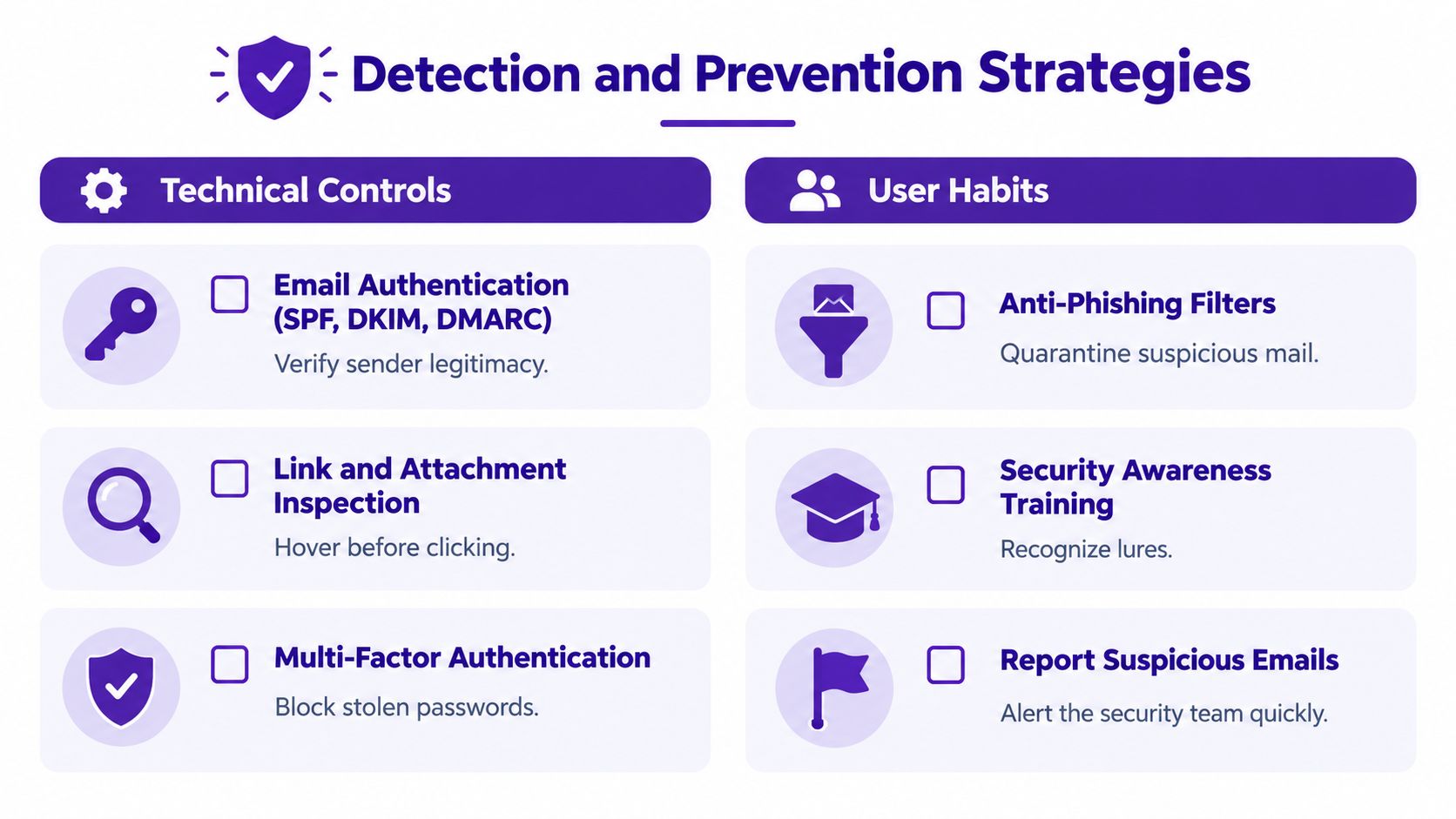
No single control reliably stops phishing and spear phishing. Email authentication, filtering, endpoint protection, multi-factor authentication, staff training and incident response each address a different part of the attack.
Build the technical baseline
Start with sender validation. SPF, DKIM and DMARC help reduce direct domain spoofing, but they shouldn't be treated as proof that every authenticated message is safe. A compromised mailbox can send a malicious message through legitimate infrastructure.
Add controls that inspect the content and destination:
- Link inspection: Check where links lead, scan destinations at the time of the click and block known credential-harvesting pages.
- Attachment analysis: Inspect files before delivery and isolate suspicious documents rather than relying on the recipient to decide whether they look safe.
- Endpoint protection: Detect malicious processes if a user opens an attachment or downloads a payload.
- Multi-factor authentication: Add a further barrier when a password has been stolen, while recognising that some attacks attempt to capture active sessions or manipulate the approval process.
- Mailbox monitoring: Look for unusual forwarding rules, suspicious sign-ins and messages sent from accounts that don't normally contact particular departments.
A security information page such as the Salesmsg security page can also help service providers explain why communication platforms need their own access controls and security processes. Protection shouldn't stop at the email gateway if employees conduct business through messaging and collaboration tools.
Train for the request, not just the appearance
Spear phishing often succeeds without obvious spelling errors. Training should rehearse the actions attackers want the employee to take, including changing payment details, sharing credentials, opening an unexpected document or bypassing an approval process.
A UK and Ireland phishing benchmark analysis reported that the average phish-prone percentage fell from 32.9% to 4.8% after one year of security awareness training, an 85.4% improvement across more than 67 million phishing simulations involving 14.5 million users. The same analysis reported a reduction from 36% to 5.3% in organisations with at least 1,000 employees. These figures come from the 2025 UK and Ireland phishing benchmark analysis.
That result supports regular, realistic testing, but training isn't a substitute for technical controls. A well-designed simulation should measure reporting behaviour as well as clicks, then give people a clear explanation of the tactic used.
Prepare the response before the incident
Create a simple playbook for suspected attacks:
- Report and preserve: Ask the recipient to use the approved reporting route and avoid deleting the original message before it can be investigated.
- Scope the exposure: Identify who received the message, who clicked and whether anyone entered credentials or opened an attachment.
- Contain quickly: Remove matching messages, block malicious destinations and reset credentials where necessary.
- Verify business actions: Contact banks, suppliers or customers through known channels if a payment, password or account change may have been requested.
- Learn from the event: Update filtering rules, train the affected role and review the public information or breached credential that helped the attacker.
MSPs can package these controls as a managed service rather than leaving each client to assemble them independently. Guidance on how to protect clients from phishing with GoSafe can support that conversation, particularly when a customer wants clear actions instead of another complex dashboard.
The Dark Web Connection to Phishing Threats
Phishing and spear phishing become more effective when attackers already know which email addresses, usernames and passwords belong to a real organisation. Breached data can supply that starting point. An exposed work email confirms that the address is in use, while an exposed password may encourage password-spraying or targeted credential-stuffing attempts.
The information can also improve the lure itself. An attacker who finds an address connected to a particular company, service or historic breach can write a message that feels more relevant. The target may receive a password-reset notice for a service they use, or a document request sent to an address that has already appeared in a leaked database.

Monitoring changes the timing
Most organisations find out about a phishing attempt when a message arrives. Dark web monitoring can provide an earlier warning by identifying exposed email addresses, passwords or company domains before an attacker uses that information in a new campaign.
That warning gives a business time to force password resets, review multi-factor authentication, check affected accounts and brief the people most likely to receive targeted messages. It won't remove every risk, and it won't reveal every private criminal channel, but it can reduce the period in which compromised information remains unnoticed.
The National Assessment Centre's 2025 fraud assessment says phishing is likely the most prevalent initial attack method used by organised crime groups against UK individuals and businesses. It also notes that large language models are facilitating growth in the volume and sophistication of phishing. That combination makes exposed credentials more useful to attackers because they can produce convincing messages with less effort.
What useful monitoring should show
A practical monitoring service should answer three questions quickly:
- Which email addresses or domains have appeared in a breach?
- What type of information was exposed?
- What should the business do next?
GoSafe Dark Web monitoring continuously scans billions of records, uses AI-driven risk scoring and provides breach breakdown reports. It monitors compromised email addresses, exposed passwords and breached domains, with clear alerts and a dashboard designed for business users. Domain monitoring, mobile number monitoring, instant breach searches and redacted breach previews help teams investigate exposure without displaying complete sensitive data.
For MSPs, the value is the conversation that follows an alert. A service provider can help the client reset an affected password, review access and train the relevant employee before the exposed information becomes part of a successful lure. More detail on how dark web threat intelligence works can help customers understand why credential exposure belongs in a phishing defence plan.
Offering Dark Web Monitoring as a Service
MSPs and other service providers already have trusted relationships with businesses that need practical security help. An IT support company can introduce monitoring during a password review. A hosting provider can add it to domain services. A telecom or VoIP provider can discuss it alongside account protection and user verification.
The offer is easy to explain: the service checks whether a customer's email addresses, passwords or domains appear in exposed data, then sends a clear alert when action is needed. Customers don't need to understand dark web terminology. They need to know whether a credential is at risk and what to do next.
A workable recurring service
White label dark web monitoring gives partners a way to sell dark web monitoring under their own brand. The partner presents it as part of its own product portfolio, owns the customer relationship and can include it in a monthly subscription.
The commercial case rests on three practical points:
- Low operational overhead: There's no need to build monitoring tools internally, hire a dedicated security team or develop specialist dark web expertise.
- Simple deployment: The service can sit alongside IT support, cloud services, hosting, connectivity, telecom systems and web services.
- Visible customer value: Clear alerts create proactive conversations, strengthen relationships and make the wider service portfolio more useful.
This is also a sensible route for technology resellers, SaaS resellers, web agencies and cyber consultants that want to add white label security services without taking on a complex security platform. Customers receive early warning and visibility. The partner gains a credible recurring revenue security service that can make its existing contracts stickier.
The product should be positioned with clarity. Dark web monitoring doesn't replace email security, MFA, backups or incident response. It adds visibility into a part of the risk that conventional controls don't cover, namely whether the organisation's credentials and data are already circulating among attackers.
GoSafe Dark Web monitoring helps service providers monitor compromised email addresses, exposed passwords and breached domains, with clear alerts that business users can understand. GoSafe Dark Web monitoring is available for companies that want to add white-label monitoring to their services, sell it under their own brand and build a practical monthly security offer.