Friday changes have a habit of turning into Monday incidents. A rule that looked harmless at 17:45 gets pushed above the wrong exception, a client's file server starts answering more broadly than it should, and by the time someone notices, the clean change note has become a support ticket, a phone call, and an awkward conversation about why an internal system was reachable from places it never should've been.
That's why how to configure firewalls properly is no longer just a box-ticking exercise. In the UK, firewall configuration sits inside the Government-backed Cyber Essentials scheme, launched in 2014, and the scheme had issued 160,000+ certifications by 2024 as reported in the Cyber Essentials summary. The practical reality is simple, a firewall is a baseline control, and misconfiguration is an operational problem, not a one-off mistake.
Practical rule: start with default-deny, keep zones documented, and make every exception auditable. If you can't explain why a rule exists, you probably shouldn't be running it.
For MSPs, resellers, and IT support firms, that discipline matters twice. It protects the client, and it creates a service model that can be reviewed, monitored, and billed as an ongoing managed control rather than a one-time install.
The Monday Morning Every MSP Dreads
The worst firewall calls usually begin with quiet symptoms. Someone in the office notices strange access, a storage host answers from the wrong segment, and the change that was supposed to be tidy now needs immediate triage before anyone can trust the network again.
That kind of failure is why firewall governance sits inside mainstream UK security practice. Cyber Essentials expects organisations to secure internet gateways and control inbound and outbound traffic as part of the certification standard, so configuration becomes a control you can review, test, and audit rather than a loose promise. For a reseller or MSP, that changes the commercial conversation too, because customers are not just buying a box, they are buying evidence that somebody is watching the rulebase and keeping it aligned with policy.
Weak firewall configuration is often invisible until it starts causing friction. A broad allow rule sits above a tighter one, a management interface is reachable from too many places, or an old inbound exception survives long after the project that justified it has ended. The risk lives in the exceptions, the order, and the rules nobody has revisited.
A useful way to frame it is simple.
A firewall that isn't documented, ordered, and logged is only partly configured. It may still pass traffic, but nobody can defend it properly during a review.
The question is whether the rulebase matches the business, whether changes are auditable, and whether the team can prove that the deny posture is carrying the load. That is the standard to aim for before a customer asks for new services, monitoring, or add-on security.
For partners building recurring revenue, that discipline becomes a platform. A well-run firewall estate gives you a reason to return each month, review changes, and keep the customer aligned with policy rather than letting drift set in. It also fits cleanly with partner with GoSafe Dark Web monitoring, because blocked IPs and dark-web alerts work better when they sit in the same operational loop instead of separate silos.
Planning Network Zones and Policies
Good firewall work starts before anyone opens the console. Inventory the services the business depends on, then split them into trust zones that match how the customer runs day to day, not how the vendor's default template lays them out.
Public-facing services belong in a constrained perimeter zone, usually a DMZ, while sensitive systems such as databases stay internal. Workstations, guest Wi-Fi, user subnets, management networks, and server segments should not all be treated the same just because they share a switch. That zoning choice keeps a temporary allowance from turning into a standing risk.
Build the shape of the network first
Start with the minimum access each zone needs, then add only the flows that are clearly justified. The NCSC's guidance on network security fundamentals backs a top-to-bottom allow and deny list model, with a final deny-all rule so the default posture stays at least privilege NCSC network security fundamentals. That approach forces the customer to explain each exception instead of assuming everything is allowed unless someone spots it later.
Use VLANs where layer-2 separation matters, and NAT where IPv4 overlap or public exposure needs translating cleanly. Keep admin access out of the broad user path, and document anything that has to cross from one zone to another. If a team cannot explain why a workstation needs access to a server, the rule belongs in the “not yet” pile.
The easiest way to keep the design sane is to sketch it as a service map, not a product diagram. A basic reference such as small business network topology tips helps junior engineers see where users, printers, servers, and guest access should separate before the firewall rules are written.

The GoSafe dark web monitoring platform fits this planning mindset, because the same customer that needs clean segmentation often also needs visibility into exposed credentials and domains.
Keep the policy model simple
Write the policy in plain business terms first, then translate it into source, destination, service, and action. That gives you a model you can defend during a change review, and it stops broad “temporary” allowances from drifting into the baseline. If the policy owner cannot explain the business purpose in one sentence, the rule usually needs more work.
Segmentation is only useful if the exception list stays small enough for humans to audit.
For MSPs, that is the ultimate design win. A customer with clear zones is easier to support, easier to monitor, and far less likely to generate midnight tickets because a rule was written against the wrong subnet.
Building and Ordering the Ruleset
A clean ruleset is written, not guessed. Every entry should spell out source, destination, service, action, logging behaviour, and, where the platform exposes it, hit counts that show whether the rule is doing work.
Order matters just as much as the fields inside the rule. The first matching rule wins, so a broad allowance sitting above a tighter exception can undo the design in one change window. I see this happen most often in MSP environments, not because the engineer misunderstood the request, but because no one tested how the firewall would evaluate the rules once they were stacked together.
Build from the narrowest real business need outward. If a finance application needs one port from one server, place that rule before any wider internal permit, then leave the final deny-all at the bottom so the default posture stays intact. Undocumented inbound rules become a tempting target, so every exception needs a clear owner and a justification that still makes sense when someone audits the change later.
A good way to pressure-test the rulebase is to ask whether an engineer can explain each entry without opening a ticket history. If the answer depends on memory, the rule is already drifting toward risk.
For home-style troubleshooting patterns, home router setup tips can help junior staff understand the logic, but enterprise firewall work is stricter. A customer rulebase should not depend on guesswork or “it worked last time” thinking.
Rulebase Hygiene Checks
| Check | What to Look For | Why It Matters |
|---|---|---|
| Rule order | Narrow allows above broad ones | Prevents accidental over-permission |
| Logging | Key allows and denies are logged | Gives you traceability during review |
| Hit counts | Rarely used entries are visible | Exposes dead or stale rules |
| Inbound exposure | Every public service is justified | Keeps attack surface minimal |
| Rule retirement | Old entries are disabled first | Preserves rollback if impact appears |
A clean production rulebase should read like a controlled exception list, not a pile of assumptions. It should be easy to explain, easy to audit, and easy to reverse if a business process turns out to need something slightly different after launch.
Configuring NAT, Threat Prevention, and Admin Hardening
The rulebase only does part of the work. The operational burden sits around it, NAT, threat prevention, VPN, and the awkward but necessary job of locking down admin access so the firewall itself does not become the weakest device in the rack.
What the major platforms make easy
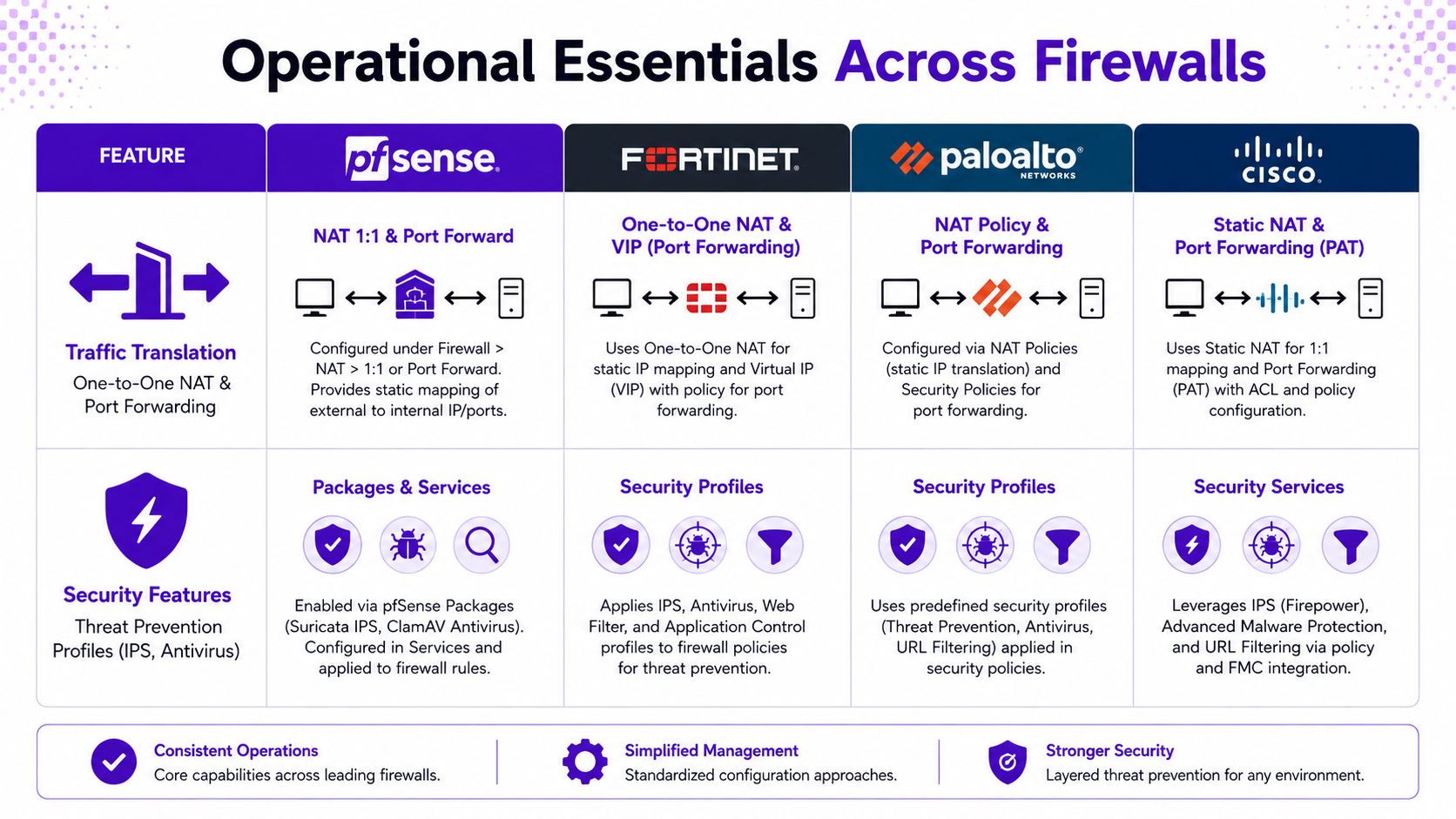
pfSense is usually straightforward for NAT and port forwarding, and engineers tend to value the clarity of its interface when they are handling simple one-to-one translation. Fortinet usually makes security profiles practical to attach at policy level, so IPS and antivirus sit close to the rules that need them. Palo Alto works well where teams want application-aware policy and more deliberate segmentation between traffic types. Cisco gives you familiar enterprise control points, but the work is often in keeping the policy tidy over time rather than merely technically functional.
That comparison matters because MSPs do not need “best in theory”. They need the platform that lets them add a service, review it, and hand it to another engineer without creating a mystery.
Hardening the management plane
SecurityMetrics' configuration guidance is clear about the basics, update firmware, remove or rename default accounts, change default passwords, create separate administrator accounts, and disable or secure SNMP SecurityMetrics firewall configuration. That lines up with Cyber Essentials, which expects default admin passwords to be changed or remote admin disabled, management exposure to be controlled with MFA or an IP allow list where internet exposure is justified, and unauthenticated inbound connections blocked by default Cyber Essentials requirements.
Public services such as web, email, and VPN usually belong in a DMZ, with internal systems kept separate, and VLANs and NAT used where the design needs both containment and reachability. That is a concrete implementation pattern, not a slogan.
Vendor guidance also gives MSPs a service cadence that clients can understand and budget for. The Cisco firewall setup guidance calls for firmware updates, log monitoring, vulnerability scans, and rule reviews on a recurring basis, which makes the work a repeatable service event instead of a vague “check in now and then” promise.
The Hosted Telecommunications PBX guide is a useful reminder that voice, VPN, and remote admin traffic often overlap in the same customer network, so the firewall design has to reflect real services, not just a theoretical perimeter.
The sharp edge here is simple. If a platform makes it easy to open a port, it also makes it easy to forget why that port was opened. The MSP's job is to make the hardening, logging, and review process harder to bypass than the original change request.
Logging, Metrics, and Alerting
A firewall without telemetry is just a box with opinions. The useful ones turn configuration into a feedback loop, so the team can see which rules are being used, where capacity is tightening, and whether a change has created a new bottleneck.
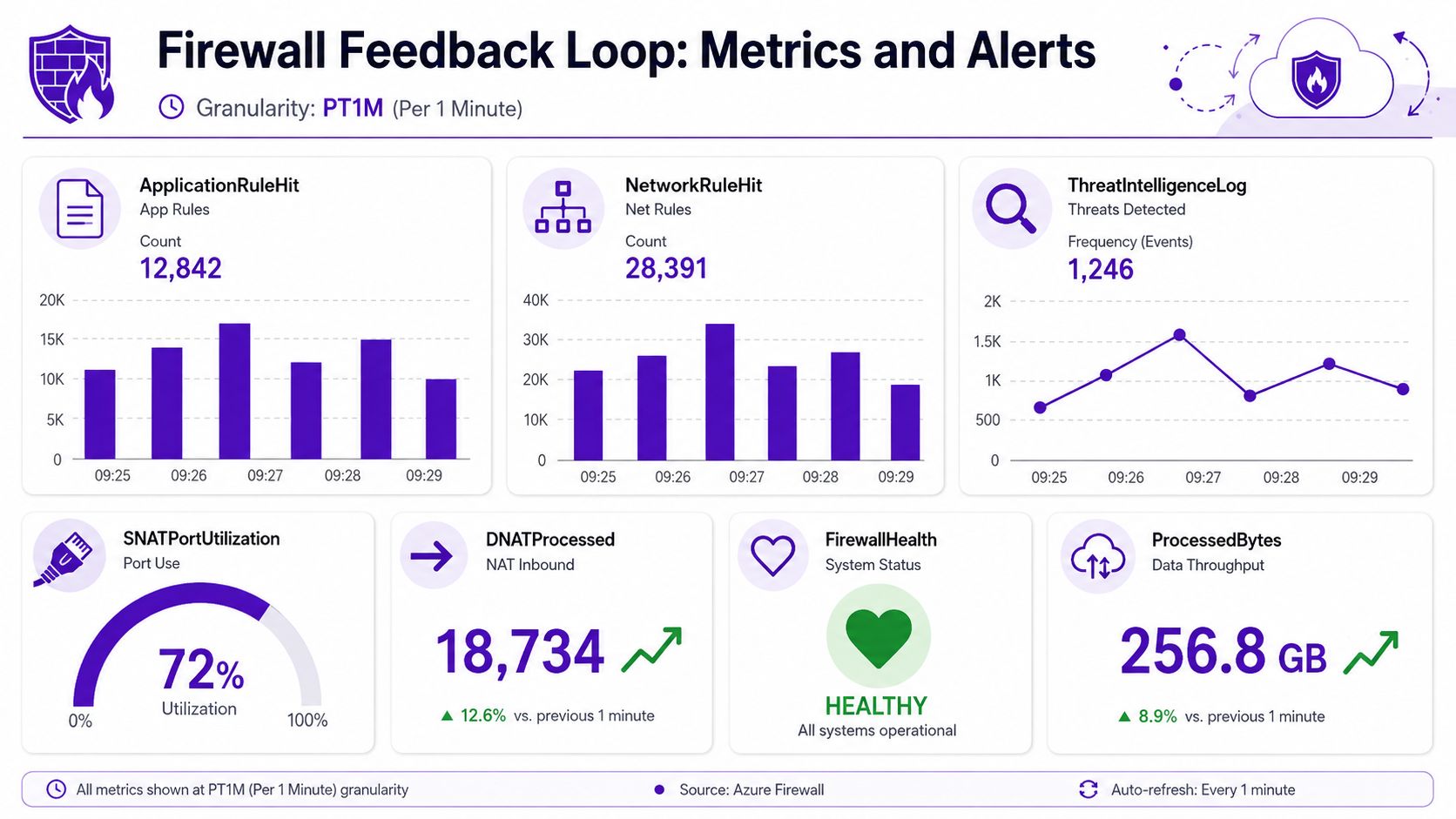
Microsoft's Azure Firewall documentation is a good example of how modern teams should think about this. At PT1M granularity in Azure Monitor, administrators can track ApplicationRuleHit, NetworkRuleHit, DataProcessed, Throughput, FirewallHealth, and SNATPortUtilization Azure Firewall metrics. Those aren't vanity numbers, they tell you whether the rulebase is working as intended and whether the firewall is being pushed into awkward capacity territory.
Read the dashboard like an operator
A healthy dashboard usually shows a few things. Application and network rule hits should make sense against known business traffic, firewall health should stay clean, and SNAT port utilisation shouldn't keep climbing without explanation. If throughput rises while rule hits stay flat, the customer may just be moving more data, but if denied traffic grows around a new service rollout, the rulebase probably needs attention.
Egress filtering deserves as much attention as inbound control. The NCSC's Cyber Security Breaches Survey reported that 50% of UK businesses experienced some form of cyber security breach or attack in the previous 12 months, which is a good reminder that containment and suspicious outbound activity matter in cloud and SaaS-heavy environments too Fortinet firewall configuration overview. Teams that only watch ingress are missing half the story.
The right workflow is boring in the best way. Forward logs into a SIEM, watch denied connections, look for unusual outbound flows, and set alerting on events that could indicate a rule error or a failed dependency. That's how the firewall stops being a static control and starts acting like an operational signal.
Denies are not noise. If the same denied connection keeps appearing, either the firewall is too tight or somebody has discovered a business dependency nobody documented.
For MSPs, that matters commercially as well as technically. Logging and alerting give you a monthly reason to speak to the customer, explain what changed, and adjust the policy before the problem becomes an outage.
Testing, Rollback, and Change Management
A firewall change that looks harmless in a ticket can still break a payroll app, a VPN path, or a vendor portal the moment it hits production. MSPs learn fast that the job is not just writing the rule, it is proving the rule behaves the way the business expects and having a clean way to undo it if it does not.
Use monitor mode before you block
The safest pattern is to stage in monitor mode first, collect flow logs, and identify recurring dependencies before you enforce anything hard. That gives you a live view of the intended source and destination, instead of trusting a ticket description that may already be stale.
Independent research has shown that firewall misconfigurations can expose hosts and services behind the firewall, which makes validation and controlled rollout a practical requirement rather than a theory exercise firewall misconfiguration research. Rollback should be part of the change record from the start, not something you invent after an outage.
A workable MSP workflow looks like this.
- Ticket and justification: record who asked for the change, what business process it supports, and when it should be reviewed.
- Scheduled window: deploy the rule during an agreed period, not in the middle of a production surprise.
- Monitor-mode validation: confirm the traffic pattern before enforcing.
- Promotion to enforce: move the rule only after the logs match the expected behaviour.
- Post-change review: check denied traffic, application errors, and user feedback.
- Rollback path: keep the rule disabled rather than deleted until the change is proven.
That last point saves money later. A disabled rule is easier to restore than a deleted one, especially when a customer's application vendor insists the firewall changed and you need a clean comparison.
Keep the review cadence fixed
ITIL-style change control gives you the discipline that ad hoc firewall work usually lacks. A recurring review interval is a practical anchor for cleaning up stale allows, removing forgotten exceptions, and checking that the business still needs what the firewall is permitting.

A good review loop also keeps the change record tidy. You can see who approved the rule, what got tested, what stayed in monitor mode, and what was rolled back, all without digging through old tickets.
The best rollback is the one you prepared before the change went live.
Good change management keeps the service predictable. It also makes the firewall a supportable managed asset, which is exactly what a reseller or MSP needs if the goal is recurring work instead of one-off installs.
Wiring Firewalls into GoSafe and Your SIEM
A useful firewall service doesn't sit on its own. It shares signals with the rest of the stack, and that's where the economics improve for MSPs, telecom providers, web agencies, and other resellers trying to build recurring revenue without hiring a security team.
The first connection point is the SIEM. Firewall denies, threat logs, and unusual outbound events should already be flowing there, because that gives the service desk a place to correlate what the network is rejecting with what the customer is experiencing. If you want to compare managed SIEM platforms, this is the point where platform choice starts to matter, since correlation quality affects how quickly the team can act on a noisy alert set.
The second connection point is dark-web monitoring. When compromised credentials, exposed passwords, or breached domains show up, the response is often faster if firewall actions and identity intelligence are handled as part of the same managed service. Temporary block rules for suspicious IPs, tighter review of exposed services, and renewed attention on remote access all make more sense when the business has one partner coordinating the response.
That creates a clean product story for white label dark web monitoring and related white label security services. Partners can sell dark web monitoring under your own brand, bundle it with IT support, cloud, hosting, telecom systems, or web services, and keep the customer relationship in-house. The operational overhead stays low because the alerts are simple and the service doesn't need a specialist security team to explain it every day.
For MSPs, that's the appeal of dark web monitoring for MSPs and broader reseller dark web monitoring. It's easier to sell a clear monthly service that tells a customer when their credentials appear in the wrong place than to push another dashboard nobody wants to look at. It also gives you a practical reason to revisit firewall policy, because the same customers who need clean rulebases often need help understanding where their exposure starts and stops.
Commercial logic: disciplined firewall configuration creates the operational review cycle, and dark-web alerts turn that cycle into a monthly service customers can understand and renew.
The result is straightforward. Strong firewall governance, visible logging, six-month rule reviews, and clear credential monitoring become one packaged offer, delivered under your brand, with the partner owning the account and the recurring relationship. That's a better business than selling isolated tools.
Visit GoSafe Dark Web monitoring to see how it fits alongside your firewall service if you're ready to add a practical, white-label subscription that customers can understand.