A receptionist answers a call from someone claiming to be from the company's software supplier. The caller knows the product name, sounds helpful, and says a password reset is needed to prevent an account problem. The request feels routine, but the caller wants the password or a reset code. One unverified conversation could give an attacker a foothold in the customer's systems.
Most social engineering succeeds because it persuades someone to act, not because it breaks a system. The UK Government defines phishing broadly, including fake emails, text messages and fraudulent online adverts that direct people to malicious websites or persuade them to disclose passwords and financial information (UK Government guidance).
This guide covers ten social engineering attack types, from phishing and vishing to smishing, pretexting, baiting and tailgating. Business email compromise, or BEC, is the finance-focused form of spear phishing and whaling, so it appears within those entries rather than as a separate category. Each type includes a business scenario, the verification step that can stop it, and the point at which dark web monitoring provides early warning after staff credentials have already leaked.
1. Phishing Attacks
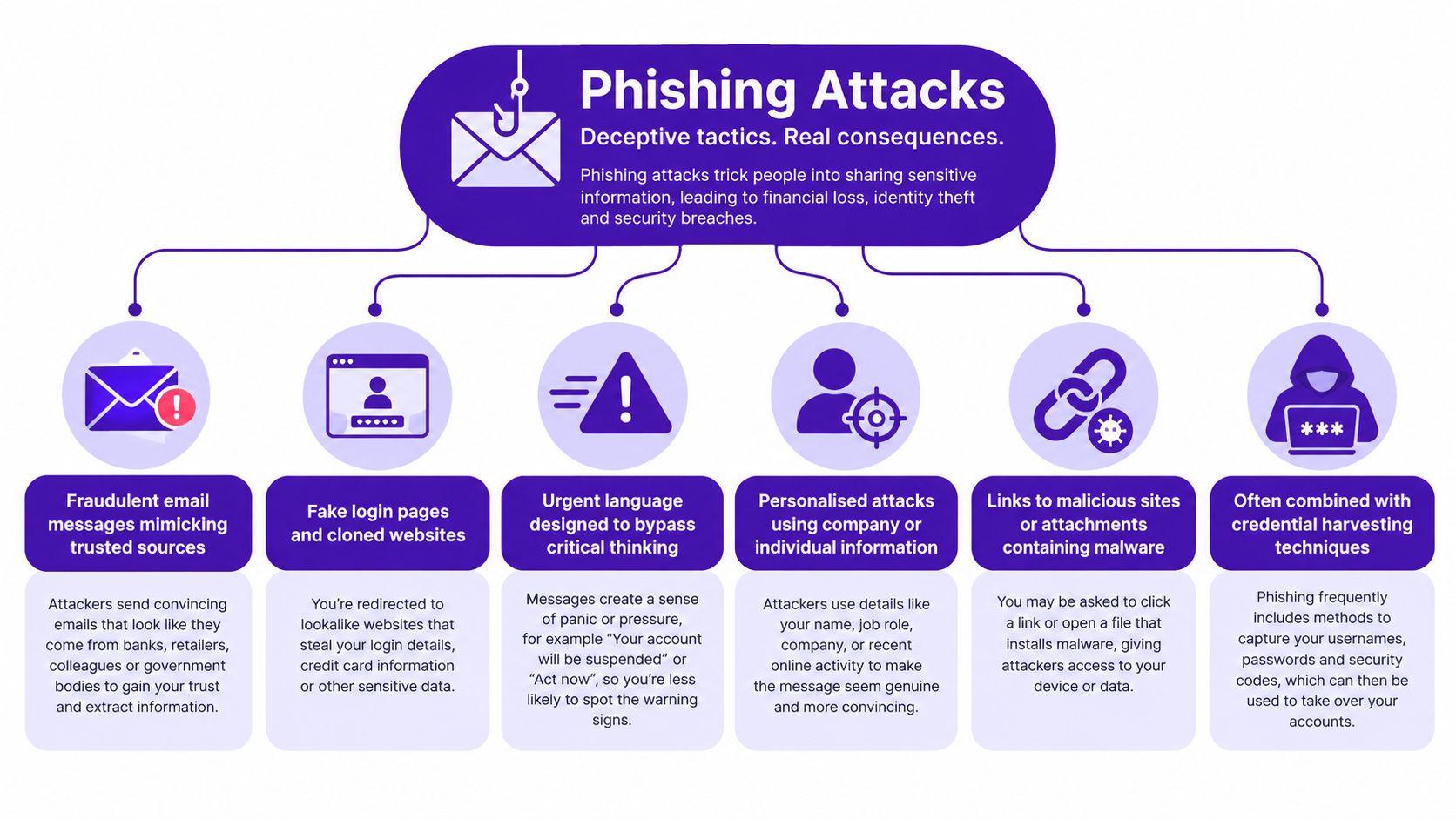
Phishing is the broadest and most common form of social engineering. Attackers send fraudulent emails or messages, build fake login pages, or place malicious adverts that imitate legitimate organisations. Their objective may be to steal credentials, collect payment details, install malware, or redirect a victim to a ransomware site.
The UK Government's Cyber Security Breaches Survey 2025 found that phishing affected 37% of UK businesses during the previous 12 months. It remained the most common reported attack type, even though the figure had fallen from 42% in 2024. Overall cybercrime affected 20% of businesses in the same survey.
A finance employee receives an email that appears to come from Microsoft 365. The message says the account will be closed unless the employee signs in immediately. The link opens a convincing login page, captures the password, and sends the attacker access to other services where the same password was reused.
The verification step that works
Train staff to inspect the sender address, preview links before opening them, and access important services through a known bookmark rather than an unsolicited link. Multi-factor authentication limits the damage from stolen passwords, but it shouldn't replace reporting procedures, email filtering, and live phishing simulations.
Practical rule: A message that creates urgency should create a pause, not an immediate click.
GoSafe's Dark Web monitoring can alert a service provider when customer email addresses or passwords appear in exposed data. That warning doesn't prove an attack is underway, but it gives the business a chance to reset credentials, review sign-ins, and contact affected users before an exposed password is reused.
For businesses that depend on clean customer and prospect data, an Email Validation API can support a separate part of the process by identifying invalid addresses before they enter operational systems.
2. Spear Phishing
Spear phishing uses the same basic mechanism as phishing, but the message is customized for a specific person. The attacker may use a name, job title, supplier relationship, recent project, or public company announcement to make the request feel credible. Finance teams, senior managers, IT administrators, and people with access to customer data are common targets.
A finance manager receives an email that appears to come from the CFO. It refers to a real supplier and asks for an urgent payment to a new bank account. There may be no malware or suspicious attachment. The danger comes from persuading the employee to bypass the normal payment process.
Business email compromise is the finance-focused form of spear phishing and whaling. In a BEC scenario, an attacker impersonates a senior executive or known supplier and requests a payment, change of bank details, confidential information, or access. The message works because it fits an existing business process.
The verification step that works
Require a callback using a verified number already held in the company's records. Don't use the number in the email or reply to the same thread. For high-risk requests, separate the person who enters a payment from the person who approves it.
SPF, DKIM and DMARC can make domain impersonation harder, while targeted simulations can test whether finance and executive teams recognise personalised lures. They won't eliminate attacks from compromised genuine accounts, so out-of-band verification remains essential.
Practical rule: A familiar name is not proof of identity. Verify the request, especially when money, credentials or confidential data are involved.
Dark web monitoring adds context when an employee's email address or password has already appeared in leaked data. A compromised mailbox can help an attacker study conversations and imitate supplier relationships more convincingly. Monitoring executive addresses and breached domains gives providers a useful reason to start a remediation conversation with customers.

3. Whaling
Whaling targets senior executives and decision-makers. A CEO, CFO, board member, or company owner may have authority to approve payments, release sensitive documents, or instruct staff to take action without the usual scrutiny. Attackers research these roles carefully and often imitate a trusted adviser, solicitor, supplier, or member of the board.
A company director receives a message about a confidential acquisition. The supposed adviser asks for documents and says the request must remain private. In another version, a CFO receives an urgent invoice from a familiar supplier with amended payment details. The request looks plausible because it matches the executive's responsibilities.
Whaling overlaps with spear phishing, but the target and consequence are different. BEC is often the financial outcome of a whaling campaign, particularly when the attacker persuades an executive or finance employee to authorise a transfer.
The verification step that works
Create a written callback procedure for every payment or bank-detail change requested by email. The person making the request should not be able to waive that process because they appear senior. Use a known number, confirm the request verbally, and record the approval through the normal financial system.
Hardware security keys can strengthen protection for high-value email accounts. They reduce the chance that a stolen password alone will open an account, although they can't stop an authorised person from approving a fraudulent payment.
The practical warning is simple. Seniority should increase verification, not reduce it. If an attacker has exposed executive credentials, dark web monitoring can provide early warning that the account deserves an immediate password reset, session review and access check.

4. Vishing
A client usually spots vishing after someone in finance or operations says, “I got a call from Microsoft, the bank, or our telecoms provider, and they needed a code straight away.” That is the pattern. The attacker uses a live conversation to create urgency, answer objections in real time, and keep the employee from stopping to verify the request.
One common version is simple. A caller says a suspicious sign-in has been detected and asks the employee to read out a one-time code. The code is genuine. The caller is not. In a small or mid-sized business, that single mistake can hand over email access, remote access, or payroll and supplier details within minutes. Caller ID does not fix this. It can be spoofed, and staff often trust it because the number looks familiar.
Government breach data records phishing affecting 38% of businesses and 25% of charities, with impersonation of organisations or staff affecting 12% of businesses. Among organisations that experienced a breach or attack, phishing was the most disruptive category for 69%, while impersonation was cited by 13%.
The verification step that works
Set one rule and repeat it until it becomes routine. No employee gives out passwords, one-time codes, or approval credentials on an unexpected call. They end the call, find a trusted number from internal records or the supplier contract, and call back. If the request touches a privileged account, the service desk or named manager handles it through the normal process.
That single callback step stops a large share of vishing attempts.
Phone fraud also deserves its own controls because the losses can be out of proportion to the volume. In the Half Year Fraud Report 2025, UK Finance reports that online sources enabled 66% of fraud cases, while telecommunications enabled 17% of cases but accounted for 29% of fraud losses.
If a caller gets into an account, dark web monitoring becomes useful after the event. Exposed staff credentials, reused phone numbers, and leaked contact data can show up there before the next impersonation attempt, which gives you a chance to reset access and tighten checks fast.
5. Smishing
Smishing is phishing delivered by SMS. The message may imitate a bank, delivery company, government department, payment service or cloud provider. It usually asks the recipient to click a link, call a number, reply with information, or confirm an account action.
A staff member receives a text saying a parcel cannot be delivered until a small fee is paid. The link opens a payment page that collects card details. Another message claims that an Apple or Google account needs verification and asks for a code. Because people often check texts quickly on a personal phone, the message may receive less scrutiny than an email.
The UK Government's definition of phishing includes text messages and fraudulent online adverts, not just emails. Action Fraud reporting also distinguishes SMS attacks from voice and email activity. Between April 2018 and March 2019, it recorded close to 18,000 phishing text-message reports and almost 70,000 phishing phone-call reports (Action Fraud guidance).
The verification step that works
Don't use the link or phone number in an unsolicited text. Open the organisation's official app or website, or contact it through a number already stored in your records. Staff should report suspicious messages rather than forwarding them to colleagues, where another person could click by mistake.
The safest response to an unexpected SMS is to leave the message and start again through a trusted channel.
Mobile-number monitoring can complement email and domain monitoring where a business uses staff phones for authentication or customer contact. If a phone number appears in leaked databases, the provider can discuss account recovery, authentication and identity-verification risks with the customer.
6. Pretexting
Pretexting starts with a fabricated situation. The attacker claims to be IT support, HR, a supplier, a contractor, or another trusted person, then uses the story to request information or an action. The interaction may happen by phone, email, social media or in person.
An attacker calls a new employee and says they're from the IT team. They know the employee's name and department, and they explain that a system migration requires a password reset. The caller asks for confirmation details, then uses those details to take over the account or persuade the help desk to reset it.
Pretexting is more than a false identity. It is a complete explanation designed to make the request feel normal. The attacker may refer to a genuine project, a known supplier, or a recent internal change.
The verification step that works
Use an approved ticketing system and require identity checks before password resets or access changes. Staff should call the service desk through a known number, not the number provided by an unexpected caller. Record unusual requests so a pattern becomes visible across the organisation.
A short policy stating that support staff never request passwords is useful, but it needs reinforcement. Employees should know what the legitimate process looks like and have a simple route for reporting a suspicious request.
GoSafe Dark Web monitoring insights can help identify whether employee email addresses, passwords or domain data have appeared in breached collections. That doesn't identify the pretexter, but it can explain why a caller knows enough about the employee to sound credible.
The latest government survey also recorded a decline in business impersonation from 17% in 2023/2024 to 12% in the latest reporting period. The change doesn't remove the need for verification, particularly because impersonation can be combined with phishing and identity fraud.
7. Quid Pro Quo
Quid pro quo attacks offer help, access or a benefit in exchange for information or cooperation. The attacker may promise to fix a technical issue, provide a free vulnerability scan, arrange a discount, or help with an account problem. The victim agrees because the exchange appears beneficial rather than threatening.
A supposed IT technician offers to fix an employee's slow computer remotely. The technician asks for a username, password, or remote-access approval as part of the fix. In another scenario, a fake researcher offers a payment for a survey but asks questions about internal systems, software and staff responsibilities.
The manipulation relies on reciprocity. The attacker gives something first, or appears to give something, and the employee feels obliged to help in return. This can bypass the suspicion that an obvious threat would create.
The verification step that works
Route support through the official IT ticketing system. A legitimate provider should be identifiable through an existing contract, verified contact details and an assigned ticket. Staff should never share passwords, approve unexpected remote access, or install software because an unsolicited caller promises a benefit.
Multi-factor authentication limits the value of a stolen password, but it won't make an unsafe remote-access approval harmless. Administrators should also review new software, browser extensions and support tools before installation.
If a quid pro quo attempt succeeds, check the account immediately and search for exposed credentials. Dark web monitoring can show whether the same identity details have appeared elsewhere, giving the customer a clear reason to reset passwords and review access.
For resellers, this is an easy awareness conversation. A simple monthly service can sit alongside IT support, hosting or cloud services without asking the customer to operate a complex security dashboard.
8. Impersonation, Trust Exploitation and Authority Manipulation
A client usually spots this attack after someone "helpful" has already built credibility. The message looks familiar, the name is known, and the request sounds routine. An attacker may copy a director's tone, clone a supplier's domain, or pose as a recruiter, auditor or new colleague until the target stops checking.
In a small or mid-sized business, that often lands in finance, operations or executive support. A fake senior manager asks for board papers. A supplier contact says bank details have changed. A recruiter starts an innocent onboarding conversation, then asks which systems the company uses and who administers them. Business email compromise often sits inside this pattern. It is the finance-focused version of spear phishing and whaling, using authority and urgency to push a payment, invoice change or document release.
The one step that stops it is simple. Verify the request through a separate channel you already trust. Call the person on a known number. Check the change with the supplier record, not the email signature. If money, payroll or sensitive files are involved, require a second approver.
Technical controls still matter. SPF, DKIM and DMARC can reduce simple domain spoofing, but they do not stop abuse from a compromised real account or a convincing lookalike identity. Logging unusual requests also helps. Record who asked, what they wanted and which channel they used. Patterns show up quickly when the same department or supplier is targeted more than once.
Phone-based recovery creates another gap. If staff rely on text messages for login codes, review SIM-swap exposure and account-recovery rules. Guidance on how to upgrade 2FA with virtual numbers can support that discussion, but no number-based method replaces an independent callback.
When this attack works, check for wider exposure straight away. Dark web monitoring is useful here because it can show whether the impersonated employee, finance contact or supplier identity has already appeared in leaked credential sets. That gives the client a clear next action: reset access, review forwarding rules and tighten approval paths before the attacker comes back through a trusted name.
9. Baiting
Baiting uses an attractive object, file or offer to encourage the victim to take the first step. The bait might be a USB drive, free software, a job application, a promotional download or a document that appears useful. Once opened or connected, it may install malware or lead to credential theft.
An employee finds a USB drive in the company car park labelled with a supplier's name. They connect it to a workstation to identify the owner. The device runs malicious software or contains a file designed to harvest credentials. A digital version may arrive as a free tool or a job application attachment that asks the recipient to enable macros or install a supporting application.
The verification step that works
Set a clear policy that staff must not connect unknown USB devices or install unapproved software. Disable removable media where practical, scan approved devices, and give employees a safe way to report found hardware. The policy works better when it removes the pressure to investigate the device personally.
A useful response plan should cover what happens after a suspicious device is connected. Isolate the workstation, report the incident, check endpoint activity and reset credentials if access may have been exposed. Waiting for obvious malware symptoms creates unnecessary risk.
Curiosity is not a security control. Treat unexpected storage devices and free downloads as untrusted until the business has checked them.
If credentials are stolen, dark web monitoring can identify exposed email addresses, passwords or domain records after the event. It won't replace endpoint protection, but it gives service providers another way to help customers understand the consequences and take action.
Organisations can also document safe operating procedures with a tool such as a SOP maker, provided the resulting process is reviewed, approved and followed by the relevant teams.
10. Tailgating
Tailgating, also called piggybacking, is a physical social engineering attack. An unauthorised person follows an employee through a secure door, enters a restricted area behind a delivery driver, or uses a plausible contractor story to avoid being challenged.
An attacker waits at a controlled entrance carrying boxes and says they're late for a maintenance appointment. An employee holds the door open. The visitor then reaches an office, server room or finance area where they can photograph documents, connect a malicious device or observe credentials.
Tailgating works because staff want to be polite and helpful. It also bypasses digital controls entirely. A company can use strong passwords and multi-factor authentication, yet still expose equipment and paperwork if physical access is poorly controlled.
The verification step that works
Require visitors to register, wear visible identification and remain escorted in restricted areas. Staff should challenge unknown people politely and direct them to reception. Doors should close and lock automatically, while sensitive rooms should use badge controls combined with another factor where appropriate.
Cameras can deter and investigate unauthorised access, but they don't replace a culture in which employees feel permitted to challenge someone. Contractors and temporary workers need the same clarity as permanent staff, with access limited to the areas required for their work.
The GoSafe guide to what is access control provides a useful starting point for reviewing how physical and logical permissions should be managed. If a physical intrusion leads to account compromise, check exposed credentials and review sign-in activity immediately.
Comparison of 10 Social Engineering Attack Types
| Attack Type | 🔄 Implementation complexity | Resource requirements ⚡ | 📊 Expected outcomes ⭐ | Ideal use cases | 💡 Key advantages / Mitigation tip |
|---|---|---|---|---|---|
| Phishing Attacks | Low–Moderate, standard social engineering | Low, email lists, templates, spoofed domains | ⭐⭐⭐⭐, high success vs untrained users | Mass credential harvesting; broad scams | Scalable, exploits human error, use MFA, training, filtering |
| Spear Phishing | Moderate–High, target-specific research | Medium, OSINT, crafted domains, time per target | ⭐⭐⭐⭐⭐, very effective for high-value targets | Executive targeting, BEC, finance systems | Highly personalised and convincing, verify requests OOB, use email auth |
| Whaling | High, deep research on executives | High, intensive profiling, bespoke for execs | ⭐⭐⭐⭐⭐, very high impact but low frequency | Large wire transfers, strategic/financial requests | Targets decision-makers; enforce multi-step approvals and hardware keys |
| Vishing (Voice Phishing) | Moderate, requires voice skills and improvisation | Medium, spoofing tools, scripts, callers | ⭐⭐⭐, persuasive but less scalable | Urgent-support scams, bank/IT impersonation via phone | Builds false trust quickly, never share passwords by phone; callback to verified numbers |
| Smishing (SMS Phishing) | Low–Moderate, short, urgent messages | Medium, SMS gateway access, target numbers | ⭐⭐⭐⭐, fast response from personal devices | Delivery, banking alerts, quick credential harvesting | Bypasses email filters and reaches mobiles, don't click links; enable 2FA |
| Pretexting | High, believable false scenarios and live interaction | Medium–High, research, social skills, phone/in-person | ⭐⭐⭐⭐, high credibility when well executed | Calls/in-person requests for sensitive info or access | Exploits authority/structure, require callback verification and strict protocols |
| Quid Pro Quo | Moderate, must offer plausible assistance | Medium, believable service, time to build rapport | ⭐⭐⭐, effective if need/opportunity exploited | Fake IT help, “research” incentives, targeted assistance | Leverages reciprocity to lower defences, enforce ticketing and no-credential policies |
| Impersonation / Trust Exploitation | Very High, long-term identity building | High, fake profiles, sustained interaction over weeks/months | ⭐⭐⭐⭐⭐, extremely convincing with sustained contact | Long-term infiltration, multi-stage fraud, authority abuse | Builds strong trust; verify identities OOB, use separation of duties |
| Baiting | Low, simple physical or downloadable lures | Low, USBs, infected downloads, basic malware | ⭐⭐, opportunistic, low success rate at scale | Conferences, public spaces, opportunistic targets | Cheap and low-tech, ban unknown devices, disable USB ports |
| Tailgating (Piggybacking) | Low, social manipulation at entry points | Low, proximity and timing, social skills | ⭐⭐⭐, direct physical access risk | Physical infiltration of secure facilities, server rooms | Bypasses digital controls, implement MFA for access, enforce visitor escorts |
Turn Awareness Into a Service Clients Pay For
The ten social engineering attack types differ in channel and presentation, but the practical controls repeat. Verify unusual requests through a known callback number. Use multi-factor authentication. Train staff to recognise urgency, secrecy and authority pressure. Monitor for leaked credentials so a business can act before an exposed password is reused.
The channel matters because incident frequency doesn't tell the whole story. UK Finance reported that telecommunications enabled 17% of fraud cases but accounted for 29% of losses in its 2025 half-year data. Police and bank impersonation scams caused £27.1 million in authorised push-payment losses during the first half of 2025, although both losses and case volumes fell year on year (UK Finance report). Phone-based impersonation, vishing and smishing therefore deserve attention alongside email training.
Reporting also matters. More than 41 million phishing scams had been reported to the Suspicious Email Reporting Service between its launch in April 2020 and April 2025. The National Cyber Security Centre removed 217,000 scams from 393,395 website pages as a result, according to public reporting on the service. These figures show the value of a clear reporting route, but they don't mean every attempted or undetected attack is included.
Many businesses already have compromised credentials on the dark web without knowing it. A password may have been exposed in an old breach, reused on a business account, or combined with an email address that makes a convincing pretext easier. Dark web monitoring provides early warning and visibility, but it works best when alerts lead to a defined response: reset the credential, revoke sessions, check forwarding rules, review access, and contact the affected user.
A practical recurring service
For an MSP, IT support company, telecom provider, VoIP provider, hosting company, web agency or SaaS reseller, this creates a straightforward customer conversation. A white label dark web monitoring service can sit alongside IT support, cloud services, hosting, connectivity, telecom systems or web services. The customer receives clear alerts, while the partner owns the relationship and provides the next step.
GoSafe is a Dark Web Monitoring tool, not a complex security suite. It continuously scans for compromised email addresses, exposed passwords and breached domains, then provides understandable alerts and a simple dashboard. Partners can brand it as their own service, sell dark web monitoring under their own brand, and offer it as a monthly subscription without building security tools internally or hiring a specialist security team.
GoSafe also supports domain monitoring, mobile phone number monitoring, instant breach searches, redacted breach previews, breach breakdown reports and risk scoring. Its live phishing simulations can help test staff awareness, while clear reporting gives service providers a practical basis for discussing exposed data and remediation.
That makes reseller dark web monitoring easier to explain than a broad collection of security controls. The value is visible, the deployment is simple, and the recurring service gives partners a way to strengthen customer relationships, create proactive conversations and add recurring revenue security services with minimal operational overhead.
View the GoSafe reseller programme to see how your company can offer white-label dark web monitoring as part of its own product portfolio.
GoSafe Dark Web monitoring continuously checks for compromised email addresses, exposed passwords, breached domains and leaked phone numbers, then delivers clear alerts that businesses can act on. Visit GoSafe Dark Web monitoring to connect early warning for social engineering risks with a white-label service your customers can buy from you.