“123456” appeared in 23.2 million breached UK accounts, while “123456789” appeared 7.7 million times. The most common passwords are dominated by simple sequences, dictionary words and keyboard patterns, not random choices.
Popularity matters because attackers can test familiar patterns before attempting more complex guesses. A password appearing in breach data doesn't prove that a live account is still compromised, but it does show that the credential has been exposed. If the same password protects several services, one breach can create several account-takeover opportunities.
The UK National Cyber Security Centre analysis also recorded “qwerty” 3.8 million times and “password” 3.6 million times in its breach corpus, demonstrating how widely basic choices have been reused by UK users. The underlying UK password findings are therefore more useful as a warning about behaviour than as a list to memorise.
For businesses, dark web monitoring adds an early-warning layer. It can identify compromised email addresses, exposed passwords and breached domains, then provide clear alerts that support password resets, access reviews and customer conversations. GoSafe is a fully white-label Dark Web Monitoring tool that lets MSPs, IT support companies, telecom providers, hosting firms and other resellers offer this visibility under their own brand.
1. 123456
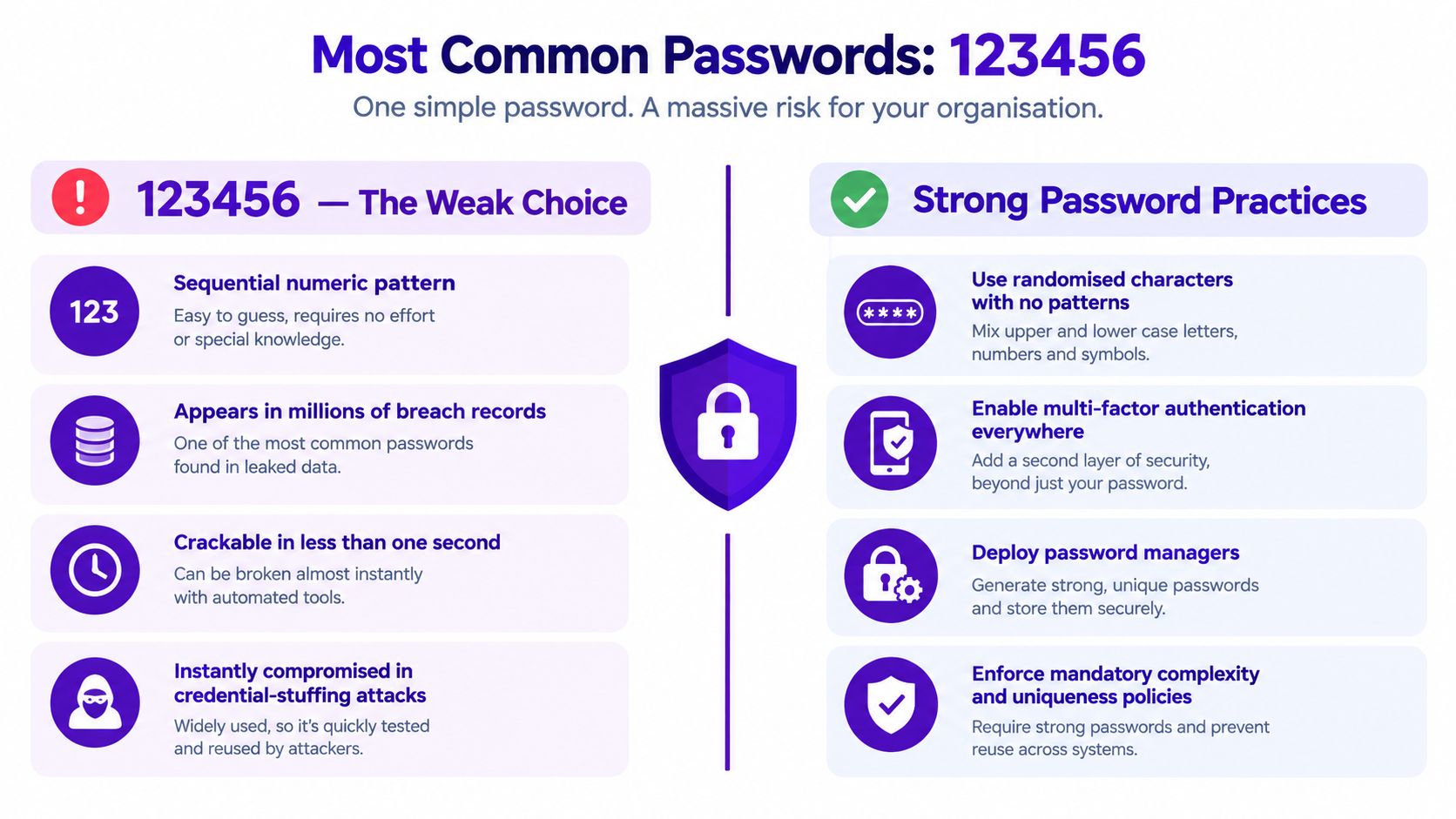
“123456” is the clearest example of a password chosen for convenience rather than protection. The UK breach analysis recorded it in 23.2 million accounts, making it the single most commonly exposed password in that dataset. That figure doesn't prove every account remains active or vulnerable, but it shows the scale at which a simple sequence has been reused.
The pattern reveals a control failure as much as an individual mistake. A business that allows this password may lack effective banned-password screening, may rely on weak defaults, or may have policies that users can satisfy without creating meaningful randomness. An employee account using it shouldn't be treated as an isolated training issue if other accounts show similar behaviour.
Practical rule: An exposed “123456” credential should trigger a password reset and a review of whether the user has reused it elsewhere.
For an MSP, the alert creates a concrete conversation. Rather than presenting an abstract security warning, the provider can explain that an email address and password combination has appeared in breach data, then guide the customer through resetting affected access, checking administrator accounts and enabling multi-factor authentication where available. The provider should never circulate or reveal an exposed password unnecessarily.
A service provider can also use the discovery to discuss the commercial risk of password leaks with decision-makers. The commercial value lies in the response process, not in shaming users. GoSafe's continuous dark web scanning can help partners detect compromised email addresses, exposed passwords and breached domains, then deliver understandable alerts under the partner's own brand.
2. password
The literal word “password” points to a different problem. Users may treat it as a temporary placeholder, a default, or a choice that appears obvious only to other people. In shared service accounts and legacy systems, that habit can persist because nobody owns the account closely enough to challenge it.
This isn't merely a weak-password issue. It can indicate that an organisation has no reliable process for changing defaults, reviewing shared credentials or enforcing a denied-password list. If monitoring identifies this pattern beside a company email address, the provider should ask which systems use the account, who can access it and whether the same credential appears in other services.
What this pattern says about governance
The answer may expose a gap between written policy and technical enforcement. A policy can prohibit weak passwords, but users still need controls that block common words, support unique credentials and reduce the burden of remembering them. Password managers and single sign-on can help, but they need careful deployment around privileged, service and emergency accounts.
A dark web alert should lead to specific action:
- Confirm account ownership: Establish whether the affected address belongs to a current user, former employee or shared mailbox.
- Reset the credential: Change the password on the breached service and any other service where reuse is possible.
- Review legacy access: Check old applications, remote access tools and supplier portals that may not follow modern policy.
- Record the response: Keep evidence of the reset and access review for internal governance.
This gives an MSP a practical way to explain the commercial threat of credential leaks without overwhelming the customer with technical detail. GoSafe's alerts are designed to be clear and understandable for business users, so a reseller can provide a monthly monitoring service with minimal operational overhead rather than building its own security tooling.

3. 123456789
“123456789” looks longer than “123456”, but the extra digits don't make the pattern meaningfully unpredictable. The UK breach analysis recorded it 7.7 million times, showing that length alone doesn't protect a password when every character follows an obvious sequence. Users may believe they've improved their security by extending the same idea.
This is a classic example of compliance by appearance. A system may require a minimum length, and the user responds with more sequential digits. The organisation technically receives a longer password, but the attacker receives a familiar pattern that belongs on a short guessing list.
Length isn't the same as randomness
Service providers should explain this distinction in plain language. A long password can be valuable when it is unique and difficult to predict. A longer version of a well-known sequence is different because attackers can test it as a predictable family, especially when the associated email address has already appeared in a breach.
When this pattern appears in a customer alert, the response should include more than a single reset. Ask the customer to identify other accounts using the same password, review remote access and cloud services, and replace manual password creation with a password manager where appropriate. The customer should also understand why adding another digit or changing the final character isn't a sufficient remedy.
For resellers, this pattern supports an educational service rather than a one-off notification. A short explanation can accompany the alert, followed by an assisted remediation call or a scheduled password-policy review. That makes dark web monitoring for MSPs easier to sell because the service connects an exposed credential to a defined business process.
4. 12345678
“12345678” shows how users respond to password requirements by extending a familiar sequence. The added digits create the appearance of stronger compliance, while preserving a pattern that is easy to predict. This points to a control gap: a policy that measures length but does not screen common numeric sequences.
The exposure is relevant across banking, cloud services and employee portals. Public-facing login protections do not remove the underlying risk, which also depends on password reuse, exposed email addresses, remote access and connected services. A credential found in breach data should therefore trigger an access review, not be treated as proof of a current intrusion.
Use the pattern to test controls
An MSP can turn this finding into a practical review of the customer's identity setup. Deny-list screening should cover common numeric sequences and close variants, including longer or shortened forms that retain the same order. Reset workflows also need testing, because forced substitutions can lead users towards another predictable pattern.
Privileged accounts deserve separate attention. Administrator and service credentials should not share the same creation or recovery process as ordinary user accounts. A password manager can then generate unique credentials instead of asking staff to invent passwords under time pressure.
The alert also offers a defined customer conversation. Review whether the exposed password was reused, check relevant sign-in activity, and confirm that remote access and cloud accounts use separate credentials. The customer should understand that changing one digit is not a meaningful remediation when the sequence remains obvious.
For providers, this creates a service path beyond notification. A dark web monitoring service for businesses can identify exposed accounts, support scheduled remediation reviews and provide evidence for testing password-policy changes. GoSafe Dark Web monitoring can supply the visibility without requiring the customer to operate a complex security dashboard, while the provider focuses on interpreting findings and tracking the resulting actions.
5. qwerty
“qwerty” mirrors the physical layout of a keyboard. It is quick to type and easy to remember, yet that convenience also makes it predictable. The UK breach analysis recorded it 3.8 million times, showing how frequently keyboard familiarity appears in exposed-password data.
The pattern points to two possible control failures. Users may lack practical guidance on how attackers test passwords. The organisation may also rely on character-mix rules that accept predictable keyboard paths. In that case, formal compliance creates the appearance of protection while leaving the underlying behaviour unchanged.
Convenience is the security signal
The same choice can appear in a retail account, streaming service or corporate login. The sector changes, but the user decision does not: a physical path reduces effort during password creation, while offering little resistance to common guessing methods.
An alert should describe the exposed credential as evidence for investigation, not proof of a current intrusion. Reset the affected password, check whether it was reused, review sign-in history through the relevant identity provider and enable multi-factor authentication where available.
The response should also test whether the policy addresses the actual pattern. A denied-password list should include common horizontal, vertical and diagonal keyboard paths, including close variations. Password managers can generate unique credentials for individual and shared access, reducing reliance on memorable sequences. Administrators and service accounts need separate creation, recovery and access controls because compromise in those roles can affect more systems.
A short training message can make the risk concrete: keyboard patterns remain guessable even when they satisfy length or character requirements. Providers should record whether the customer completed the reset, checked reuse and enabled the available protections. That turns a dark web alert into an evidence-based review of identity controls, with a clear follow-up if similar credentials appear again.
6. abc123
“abc123” combines letters and numbers, which can make it look compliant. Its weakness comes from the order. The sequence follows a familiar alphabetic path and then a familiar numeric path, so the mixture of character types creates the appearance of complexity without the unpredictability that attackers have to overcome.
This is particularly revealing in organisations that publish detailed password rules but don't provide usable alternatives. Users often respond to requirements through the path of least resistance. They add a number, capitalise a first letter or append a symbol, while keeping a memorable base pattern.
Policy compliance can hide predictable behaviour
A provider that detects this pattern should review the policy itself, not just the affected user. Does the customer block dictionary words and common sequences? Does the identity platform support breached-password screening? Do employees have access to a password manager, and are service accounts managed separately?
The response should also cover account scope. Reset the exposed credential, identify every system that may have accepted it and check whether the user has used the same password for email, cloud storage, VPN access or supplier portals. Where the account has enhanced permissions, prioritise the reset and access review.
GoSafe dark web credential monitoring can support a repeatable customer service. GoSafe scans for compromised credentials and exposed data, then sends alerts that a business user can understand. A reseller can add those alerts to a managed support agreement and use them to start practical conversations about identity controls.
The commercial model remains straightforward. A technology reseller, SaaS partner or cyber consultant can brand the platform as its own, sell a monthly monitoring subscription and provide remediation guidance without developing a monitoring system internally. That creates recurring revenue security services with a defined operational task, rather than a vague promise of protection.
7. 111111
Start with remediation rather than another warning. Reset the exposed credential promptly, then establish whether the account has administrative, financial or other sensitive access. Check whether the same user appears across the customer's known domains and services, since a repeated password may have been reused beyond the account found online.
Replace shared credentials with named accounts wherever applications support them. Review recovery email addresses and phone numbers to confirm that the right people control them. A password manager can generate and store unique credentials, reducing the pressure to create something memorable. Single sign-on can reduce the number of passwords users handle, provided the central identity account and its recovery methods receive stronger protection.
“111111” removes even the appearance of variety. Repeating one digit shows that effortless recall has taken priority over security. It can also indicate that password requirements have become an administrative nuisance, particularly where users face frequent resets or lack a safe way to store unique credentials.
The pattern may occur in customer accounts, legacy applications and employee logins. A low-privilege account still deserves attention. Its password may be reused for a more important service, while the associated email address can help attackers target phishing or credential-stuffing attempts.
For an MSP, the alert provides evidence of a governance problem: the customer may have imposed password changes without providing a workable process for managing them. GoSafe dark web credential monitoring can identify compromised credentials and exposed data, then give the provider a clear reason to review password management, identity design and account ownership with the customer. The resulting service is practical, recurring support, not a standalone notification.
8. 1q2w3e4r
“1q2w3e4r” appears stronger because it combines letters and numbers while moving across the keyboard. Its route remains easy for a person to recognise and reproduce, so it reflects attempted complexity rather than random generation.
That makes the pattern useful evidence about password governance. Users may understand that simple sequences are discouraged, yet still follow a predictable keyboard path. A policy focused on length, character classes and a small list of banned words can approve this credential without addressing how people create passwords.
Treat the pattern as a control diagnostic
A dark web alert for this credential does not prove that an attacker has used the account. It does show that the password should be treated as exposed. Reset it, check whether it was reused, and review access to email, VPNs, cloud platforms and line-of-business applications. Privileged access warrants a wider check for accounts built from similar routes.
The provider can make the finding specific by asking how the customer's controls would have handled this password before exposure. A breached-password screening service should reject it regardless of its apparent length or character mix. That test examines password quality at the point of use, rather than relying on policy wording alone.
GoSafe dark web credential monitoring can identify compromised credentials and exposed data, giving an MSP a practical basis for reviewing identity controls with the customer. The follow-up can include checking password-filter results, recording exceptions in legacy systems and confirming that exposed credentials have been reset. This turns one keyboard pattern into evidence about whether preventive controls work in practice, while creating a clear reason for recurring review.
9. dragon
“dragon” shows how memorability can be mistaken for protection. A familiar dictionary word may feel personal or distinctive, yet it can still appear in attacker guessing lists and password databases. Its presence in breach data therefore points to a credential that should be treated as exposed, not merely as an example of poor user choice.
The pattern also indicates a governance gap around usability. Staff managing multiple systems may select familiar words when the organisation has not provided a password manager or a practical way to create unique credentials. Training can explain the risk, but it does not remove the burden of memorising passwords.
Memorable does not mean unique
The user may have chosen “dragon” because of personal interests, gaming or simple familiarity. That motivation is less important than the resulting exposure. If an email address and password pair appears in breach data, the organisation should assume the combination is no longer private and reset it wherever it was reused.
The response should address immediate access risk and the control that allowed reuse. Reset the affected credential, check account recovery settings, enable multi-factor authentication where supported and provide an approved password manager for staff handling several systems. Shared and legacy accounts require separate review because they can fall outside employee offboarding and ordinary reset procedures.
For an MSP, the finding creates a focused customer conversation. Ask whether the organisation blocks breached passwords at creation, supplies a manager that generates unique credentials and records ownership for shared accounts. Those answers distinguish a written policy from controls that reduce predictable human choices.
Educational material such as strong password examples can help explain the difference between memorable and unique credentials. Users should not copy examples into live accounts. The practical recommendation is a generated, unique password stored in the approved manager.
10. sunshine
“sunshine” exposes a quieter governance failure than an obviously technical password. A user may choose a positive or personal word because it feels less predictable, yet attackers only need that word to appear in password lists or breach data. The emotional reason behind the choice does not reduce its exposure.
The pattern may affect social media, email, cloud and employee accounts. An exposed password does not prove that an account is currently compromised, but it does mean the credential can no longer be trusted. The organisation should identify whether the user reused it across work and personal services, since one disclosure can extend the access risk beyond the original account.
The business response should be proportionate and specific
The replacement should come from a password manager rather than from another supposedly obscure word. Reset the credential, remove reuse, enable multi-factor authentication where supported and create a unique password in the approved manager. If the account belongs to a former employee or supports a shared function, review ownership and disable access that is no longer needed.
A “sunshine” alert can also reveal a training weakness. Users selecting meaningful words may have received guidance that is too abstract, or may not understand how attackers test predictable word families. The remedy is specific instruction linked to the observed behaviour: explain why a familiar word fails, show how to generate a unique credential and direct the user to the approved storage method.
Short guidance tied to a real alert is more useful than a generic annual reminder.
Top 10 Most Common Passwords Comparison
| Password | Implementation complexity 🔄 | Cracking resources ⚡ | Expected outcomes 📊 | Ideal use cases 💡 | Key advantages ⭐ |
|---|---|---|---|---|---|
| 123456 | Minimal, sequential numeric (very low) | <1s with standard cracking tools | Immediate account compromise; high breach risk | None, only fits legacy numeric-only constraints | Extremely easy to remember and type |
| password | Minimal, common dictionary word | <1s via dictionary attacks | Instant takeover; clear policy violation | Placeholder during setup (should be changed) | Universally memorable; minimal typing |
| 123456789 | Minimal, longer sequential (false complexity) | Milliseconds–seconds with automated tools | Rapid compromise despite length; false confidence | Meets naive length checks only | Slightly longer but still trivial to remember |
| 12345678 | Minimal, 8-digit sequential | Seconds with dedicated tools | Likely compromise; meets some legacy minima only in name | Legacy systems requiring ≥8 chars | Fits basic length requirements; easy recall |
| qwerty | Minimal, keyboard-pattern based | Immediate via pattern lists | Immediate compromise; highly prevalent in breaches | None, predictable keyboard patterns should be blocked | Quick to type; relies on muscle memory |
| abc123 | Low, simple alphanumeric pattern | Seconds with common dictionaries | Compromise likely; gives illusion of complexity | Systems enforcing mixed-char rules superficially | Meets basic complexity checks; memorable |
| 111111 | Minimal, repeated single digit | Cracked in one attempt | Zero entropy; immediate takeover | None, unacceptable for any account | Simplest to remember and never forgotten |
| 1q2w3e4r | Low, diagonal keyboard pattern | Seconds via keyboard-pattern dictionaries | Quick compromise; compliance theatre indicator | Systems accepting pattern-based complexity | More varied characters yet still memorable |
| dragon | Low, dictionary word (thematic) | Seconds with wordlists | Fast compromise in dictionary attacks | None, only for memorability without managers | Memorable and easy to recall |
| sunshine | Low, meaningful dictionary word | Seconds with standard wordlists | Rapid compromise; indicates weak guidance | None, useful only for memorability tests | Easy to remember; natural language choice |
From Weak Password Lists to Practical Protection
The ten examples fall into three repeatable failure modes. Sequential and repeated numbers include “123456”, “123456789”, “12345678” and “111111”. Keyboard patterns include “qwerty”, “abc123” and “1q2w3e4r”, although “abc123” also shows how users imitate complexity. Dictionary words include “password”, “dragon” and “sunshine”.
This grouping matters because a blacklist alone won't solve the underlying problem. Users can move from one blocked password to a close variant, especially when a policy asks them to change credentials without offering a password manager, generated passwords or simpler sign-in through a trusted identity provider. Controls must address both predictable construction and reuse.
The UK evidence also shows why this is an operational issue rather than a theoretical one. Alongside the exposed-password rankings, UK-facing reporting has identified names, football clubs, musicians and fictional characters recurring in breached credentials. Later reporting placed entries such as “guest”, “liverpool” and “arsenal” among commonly used UK passwords, suggesting that local culture and familiar roles can influence password selection as much as basic sequences.
A practical response sequence looks like this:
- Identify exposed accounts: Confirm the affected email address, domain and service, while treating breach data as an exposure signal rather than proof of live compromise.
- Reset affected credentials: Change the password on the breached service and every known service where reuse may have occurred.
- Remove reuse: Ask users to replace repeated credentials across email, cloud applications, remote access and supplier portals.
- Enable multi-factor authentication: Apply it wherever the service supports it, prioritising email, administrator and remote-access accounts.
- Deploy a password manager: Give users a safe way to create and store unique credentials without memorising every password.
- Review shared and legacy accounts: Find default credentials, group logins, former employee accounts and applications outside normal identity controls.
- Reinforce training: Explain sequences, keyboard paths, dictionary words and predictable local references using practical examples.
A one-off check can't provide ongoing visibility. New breaches can expose accounts after a customer has completed a reset, and an organisation's domains, suppliers and user base can change. Continuous monitoring therefore gives the provider a reason to revisit exposure and response rather than treating password security as an annual exercise.
GoSafe is built for that service model. Its Dark Web Monitoring tool continuously scans for compromised email addresses, exposed passwords and breached domains, then sends clear alerts through a simple dashboard and email. Partners can brand the platform as their own, sell white-label security services under their company name and add a monthly subscription to IT support, hosting, telecom, VoIP, web or cloud services.
For MSPs, IT support companies, telecom providers, hosting providers, web agencies, cyber consultants and technology resellers, the next step is to view the GoSafe Reseller Programme, learn how the platform works and book a demo. The programme lets you offer white-label dark web monitoring under your own brand, start more useful customer conversations and build a recurring service around clear, actionable alerts.
GoSafe Dark Web monitoring continuously checks for leaked passwords, compromised email credentials and breached domains, then delivers clear alerts that help businesses respond to the password risks discussed here. Visit GoSafe Dark Web monitoring to see how you can add this monitoring service to your own customer offering.