A Tuesday afternoon outage rarely starts with a dramatic alarm. More often, a customer portal just gets slower, support tickets start stacking up, and someone in operations has to answer the awkward question, is this a busy day, or are we under attack?
That's why what is DDoS protection matters to anyone selling managed services, connectivity, hosting, or security add-ons. It isn't a single box or a neat checkbox. It's the set of controls that keep a service available when malicious traffic tries to bury it, and for UK-facing organisations that usually means thinking about continuity, not just blocking packets.

What DDoS Protection Actually Means in Practice
A client's booking site slows to a crawl at 14:30 on a Tuesday. The support inbox fills, the account manager starts asking whether the platform is down, and the engineer still can't say whether it's a real traffic spike or a deliberate flood. That's the practical problem DDoS protection has to solve.
In plain English, a distributed denial-of-service attack is a coordinated attempt to overwhelm a service with traffic from many compromised sources, so genuine users can't get in. The National Cyber Security Centre treats it as a core availability threat, because the target isn't theft, it's disruption, and the goal is to make websites, applications, and online services unavailable by burying them under traffic from many places at once (SentinelOne's summary of NCSC guidance).
DDoS protection is business continuity, not a single product
That's why NCSC-style advice frames protection as a layered set of controls, not a magic appliance. Rate limiting, caching, CDNs, and traffic filtering all have a role, because a service survives better when it can absorb or shed malicious spikes before users notice an outage (SentinelOne's summary of NCSC guidance).
The commercial point is simple. If you sell services to business customers, they don't buy “packet defence”. They buy uptime, fewer escalations, and less reputational damage when a site or app goes quiet.
Practical rule: if a buyer asks whether they “need DDoS protection”, the better question is which parts of their stack still fail when traffic volume jumps suddenly.
The scale of the problem explains why this is now part of mainstream resilience planning. Cloudflare blocked 20.5 million attacks in Q1 2025 and 47.1 million in 2025 overall, while NETSCOUT recorded more than 8 million attacks worldwide in the second half of 2025 alone (SentinelOne's summary). That doesn't mean every business will face a headline attack, but it does mean protection can't be treated as an edge case anymore.
The Main Types of DDoS Attacks You Need to Recognise
A good doorway analogy helps here. One kind of attack is like a crowd blocking the entrance. Another is like people slipping in one by one and tying up the staff. The third is like callers jamming the phone line while pretending they're real customers.
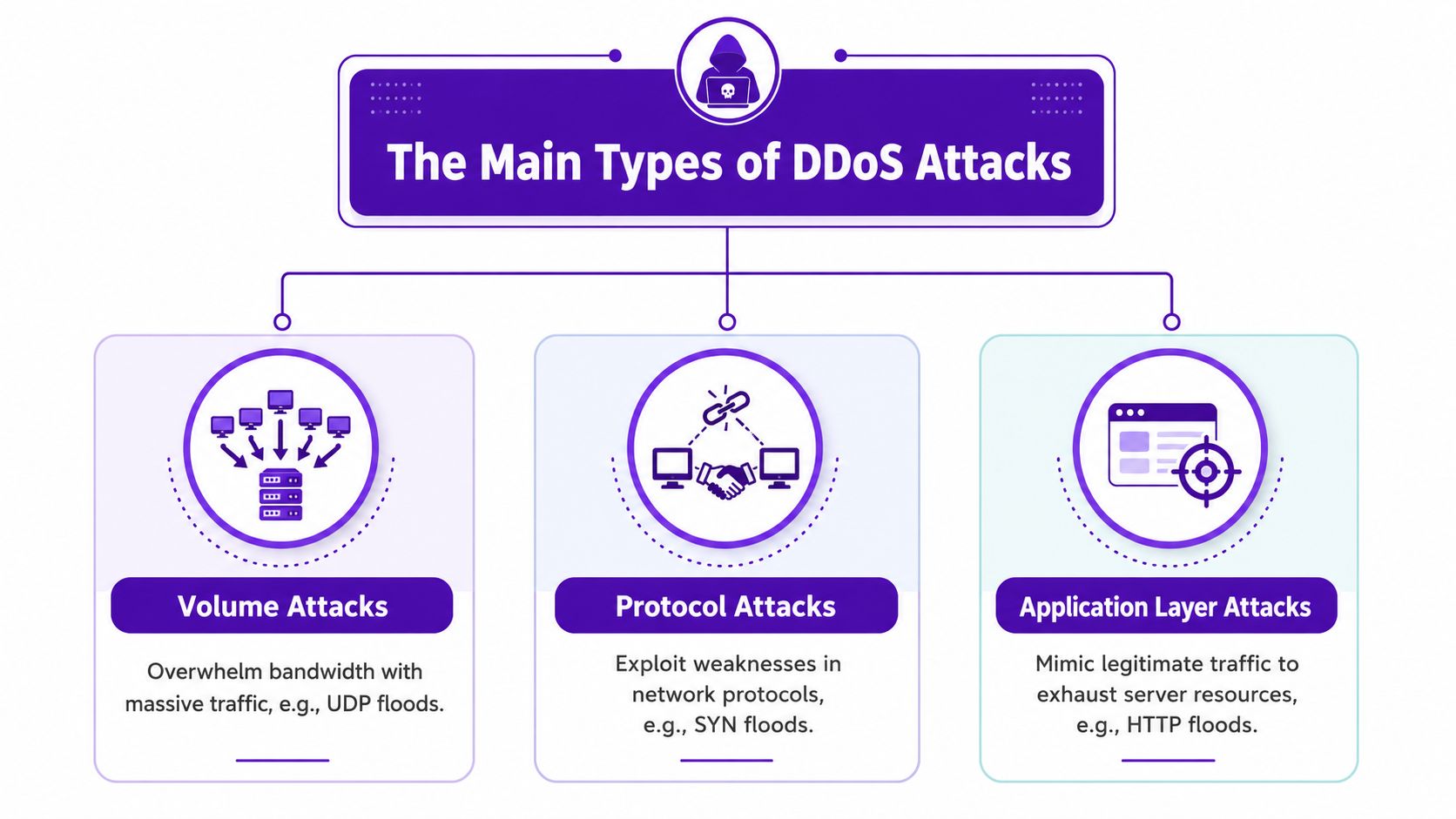
Volume, protocol, and application attacks hit different layers
Volumetric attacks try to saturate the link. They flood bandwidth so the network edge can't carry normal traffic cleanly. In practice, that means the issue is not just “too much traffic”, it's too much traffic for the available path.
Protocol attacks are different. They aim at routers, firewalls, load balancers, or server state tables, so the service gets stuck managing half-open or malformed sessions. The traffic volume might be lower than a huge flood, but the infrastructure still gets exhausted.
Application-layer attacks mimic users. They look like normal website or API requests, but they keep hitting specific pages, login endpoints, or service functions until the application runs out of capacity. That's why these attacks can be harder to spot from raw traffic alone.
The useful takeaway for buyers is that no single control handles all three neatly. A CDN may help with some edge pressure, but it won't solve every network flood or every protocol-level exhaustion problem. That's why serious resilience plans stack controls by layer, rather than assuming one product covers the lot.
For teams that already monitor UDP-heavy services, the linked GoSafe UDP vulnerability monitoring piece is a useful companion read, because UDP-centric attacks often sit near the boundary between volume and protocol abuse.
Operational insight: when you're reviewing an incident, ask whether the service was saturated, state tables were exhausted, or individual endpoints were hammered. The answer points to very different mitigations.
How DDoS Protection Works at a Technical Level
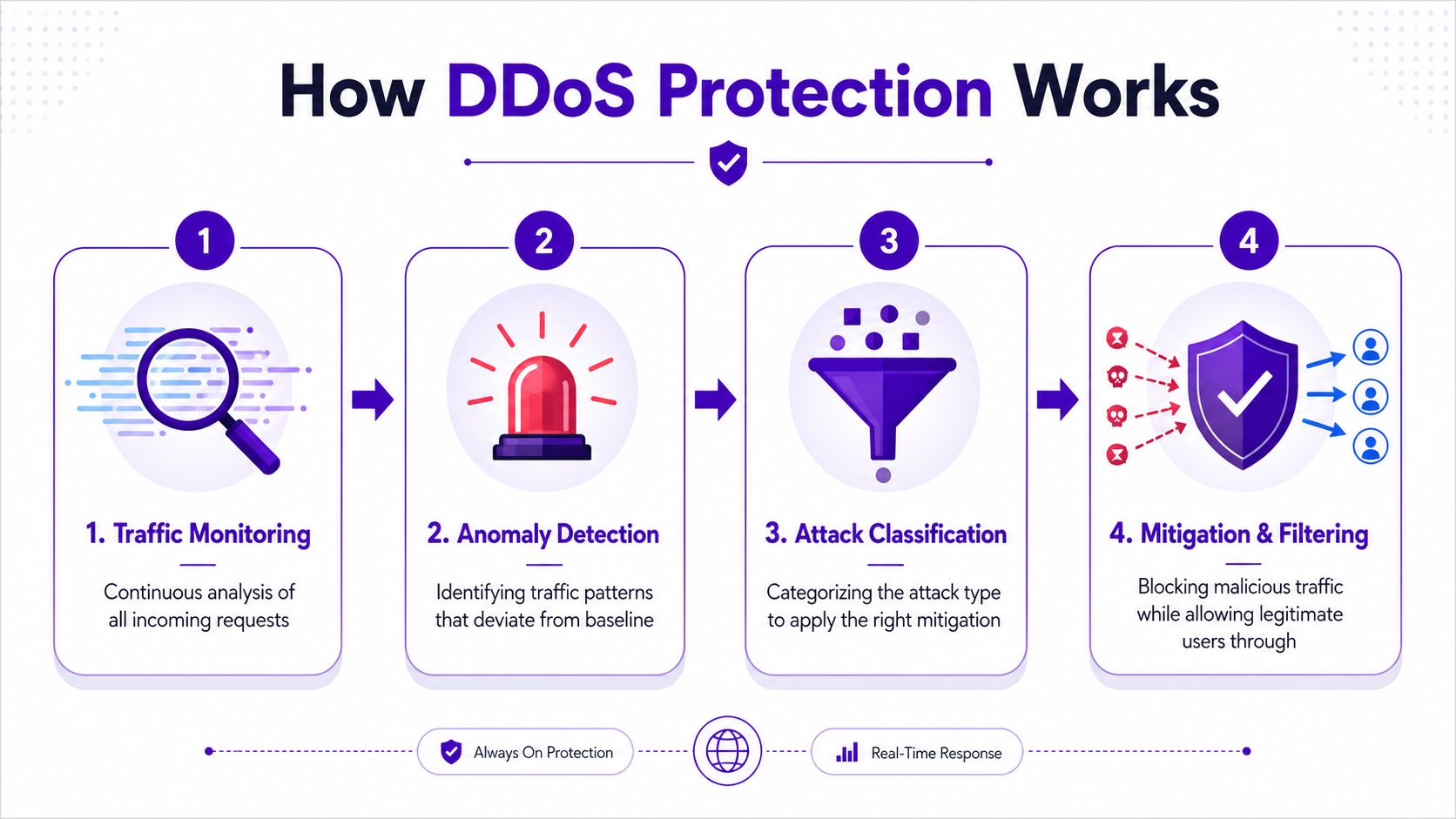
Effective defence starts with baseline traffic monitoring. You need to know what normal looks like before anything can look abnormal, and NIST's mitigation guidance puts that continuous baselining and anomaly detection at the centre of good protection (NIST advanced DDoS mitigation techniques).
Observe, classify, filter, restore
Once traffic drifts away from the baseline, the system has to classify what changed. That's where modern mitigation differs from simple blocking. It separates legitimate bursts, like a campaign launch or a real traffic spike, from malicious patterns that need filtering or rerouting (NIST).
From there, the stack usually applies one of three actions. It filters suspicious requests, reroutes traffic to an upstream scrubbing point, or both. The whole point is to absorb the surge before the ISP edge or application layer saturates, because once bandwidth or packet-processing capacity is gone, the service is already in trouble.
This is also where packets per second matters as much as bandwidth. Check Point's DDoS Protector line advertises up to 400 Gbps of mitigation throughput and up to 1.19 billion packets per second on its highest tiers, with protection triggered in under 10 seconds and latency below 60 microseconds on listed models (Check Point DDoS Protector). The reason those figures matter is that a service can still fail when the link looks fine if the packet rate overwhelms state tables or packet-processing capacity.
For a broader load-balancing angle, the explanation in scale reliably with Nerdify helps frame why traffic distribution alone isn't the same as DDoS mitigation. Load balancing spreads demand. DDoS protection decides what should never reach the resource pool in the first place.
Some buyers assume mitigation means “block bad IPs”. In reality, the job is to preserve service quality while deciding which traffic deserves to survive the path.
The Core Mitigation Methods and When Each One Helps
Different buyers need different combinations of controls, and that's where a lot of reseller conversations go wrong. A CDN, a WAF, and a cloud hosting platform might all improve resilience, but they don't solve the same problem, and they don't all work at the same layer.
The best way to frame this is by attack type, service size, and operational burden. That gives customers a reason to buy the right mix instead of assuming one security layer covers everything.
| Mitigation Methods Compared | Best Against | Strengths | Limitations |
|---|---|---|---|
| On-premise appliances | Local protocol floods, smaller attacks, rapid edge control | Fast local filtering, direct control, useful for tight latency needs | Limited by site capacity and hardware size |
| Cloud scrubbing services | Large volumetric floods, mixed attacks | Absorbs heavy traffic away from the origin, scales beyond local links | Depends on routing change and provider design |
| Web Application Firewalls | Application-layer abuse, request patterns, API misuse | Good for HTTP-level filtering and rules | Won't stop every bandwidth or protocol flood |
| Rate limiting | Bursts, repeat requests, abusive automation | Simple to apply, useful as a guardrail | Not enough against multi-vector attacks |
| ISP and CDN cooperation | Upstream saturation, edge pressure, distributed floods | Helps block traffic before it hits the customer network | Needs coordination and suitable provider support |
Match the control to the failure point
On-premise appliances suit organisations that need direct control close to the edge, but they can only absorb so much. Cloud scrubbing is better when the target is raw traffic volume, because the bad traffic is diverted away from the customer environment before it causes local exhaustion.
A WAF is valuable when the problem is request abuse at the application layer, but it isn't a cure-all. A CDN helps distribute load and cache content, yet it doesn't automatically neutralise every protocol flood or every attack on the origin, DNS, or upstream capacity. That's the gap many “we already have cloud protection” conversations miss, and Kentik's overview makes the same point about layered defence and hybrid deployment patterns (Kentik DDoS protection guide).
Rate limiting is useful, but it's a blunt instrument if used on its own. It can reduce pain, yet it doesn't solve the harder case where the attack comes from many sources, changes shape, or targets different layers at once.
For MSPs comparing platform options, the complete guide for MSPs is a useful adjacent read, because the buying conversation is often the same, choose a control that fits the operating model, not just the threat headline.
Detecting an Attack and Responding in the First Hour
The first sign is often not a screaming alert, it's a complaint. A page loads slowly, a checkout stalls, or a customer starts sending screenshots of timeouts. Then the monitoring graphs show latency rising, connection pools filling up, and traffic coming from places that don't match the service's normal pattern.
A simple first-hour playbook
- Alert received. Confirm which dashboard or alert triggered the flag, and whether the affected service is customer-facing.
- Initial assessment. Check whether the traffic spike matches a legitimate event, or whether the request pattern looks abnormal.
- Activate protection. If the evidence points to DDoS, engage the mitigation path, whether that means filtering, rerouting, or scrubbing.
- Communicate early. Tell customer-facing teams what's happening before they start guessing.
- Review and adjust. Tighten or loosen filters as the attack evolves, and keep watching for false positives.
That sequence lines up with the broader guidance from government and vendor frameworks, which stress prompt verification, escalation, and action rather than waiting for certainty that never comes (Government of Canada guidance on DDoS attacks, Microsoft Azure DDoS Protection overview).
The mistake many teams make is treating incident response as a security-only job. It isn't. Network engineers need to own the traffic decisions, customer teams need clear status language, and upstream providers may need to be involved if the attack has pushed the edge too far.
Good practice: pre-agree who can switch on scrubbing, who speaks to customers, and who records the incident. That avoids the hour disappearing into internal debate.
Best Practices for Building Real Resilience
A DDoS event rarely arrives on its own. It often lands alongside a busy sales day, a patch window, or a support queue that is already under pressure, which is why resilience has to cover more than the mitigation tool itself. For MSPs, resellers, and telecom providers, the service is the ability to keep customer-facing systems useful while the attack is being handled.
Build for the failure modes you can actually hit
Start with the limits that cause real trouble. Bandwidth matters, but so does packet rate, because a service can hit processing limits long before the link looks full. That is why capacity planning should consider the kind of traffic pattern that can exhaust routers, firewalls, and application edges even when the headline volume does not look extreme, as reflected in broader vendor and government guidance on DDoS readiness (CISA guidance on DDoS attacks).
Graceful degradation comes next. If the platform can shed non-essential features, serve cached content, or move traffic to a healthier path, customers still get a working service instead of a total outage. For a business owner, that difference matters more than any dashboard view. A site that is slower but reachable keeps calls, orders, and bookings moving.
Resilience also depends on what happens around the mitigation stack. DNS needs the same attention as the origin service, because a traffic problem can become a visibility problem if customers cannot resolve the name at all. Allowlists need periodic review too, since an old exception can create more disruption than the attack it was meant to avoid.
A practical resilience checklist looks like this:
- Test failover regularly. A backup path is only useful if it has been exercised under real conditions.
- Keep a short runbook. Engineers should know who acts, what gets checked, and how mitigation is switched on without searching through old tickets.
- Harden DNS and edges. If naming or edge handling fails, the customer may experience a complete outage even when the core service is still running.
- Review allowlists carefully. A stale exception can let bad traffic through or block legitimate users.
- Exercise communications. Customer updates should be fast, calm, and consistent, with enough detail for service teams to answer calls without guessing.
The strongest teams treat DDoS readiness as part of incident response and business continuity, not as a one-off security purchase. That approach turns mitigation into something a customer can rely on, and for an MSP or reseller it creates a service that can be supported, reviewed, and renewed instead of merely installed.
Packaging DDoS Protection as a Service for Customers
For MSPs, telecom providers, VoIP resellers, hosting firms, and web agencies, DDoS protection works best as an availability outcome wrapped into an existing service relationship. Customers buy uptime, response, and clear accountability. They rarely want to design the mitigation stack themselves, which makes this a practical recurring revenue offer alongside support, connectivity, and hosting.
The commercial shift is simple. Sell what the customer receives, not a list of tools. That means describing traffic filtering, scrubbing support, monitoring, reporting, and the escalation path that kicks in when the service starts to strain.
Turn technical controls into a service tier
A straightforward service design usually beats a complicated one. A basic tier can cover monitoring and alerting, a mid-tier can add mitigation support, and a premium tier can include upstream coordination and faster response. The customer does not need every technical detail, but they do need to know who acts when an alert fires and what happens next.
That makes onboarding easier too. Collect service details, identify critical applications, agree thresholds, and define contact paths before anything is under pressure. Then report incidents in business language, not packet counters, so the customer sees continuity, not just another dashboard.
DDoS protection also fits alongside adjacent services such as backups, managed detection, and white label dark web monitoring. GoSafe's GoSafe reseller program lets partners sell a dark web monitoring service for businesses under their own brand, with continuous scanning for compromised email addresses, exposed passwords, and breached domains. It is a different control from DDoS protection, but it belongs in the same resilience bundle because it helps customers manage exposure and early warning at the same time.
For white label security services, the value comes from keeping the customer relationship while widening the monthly stack. DDoS protects availability. Dark web monitoring tracks exposure and gives earlier notice when credentials or domains appear in the wrong places. Together, they create a clearer recurring revenue story than either service on its own.
FAQ and Next Steps for Building Your Defences
Do I still need DDoS protection if I already use a CDN or WAF? Yes, because those tools help with parts of the problem, not all of it. A CDN or WAF can improve resilience, but they don't automatically stop every protocol flood, origin saturation issue, or upstream bandwidth problem.
What size of organisation needs it? Any business that depends on being reachable online. Public-sector services, finance, telecoms, SaaS firms, and customer portals feel the impact fastest, but smaller businesses can still be hit if their website, API, or booking system becomes unavailable.
Can on-premise and cloud scrubbing be combined? Yes, and that's often the practical answer. Local controls can handle smaller or faster decisions, while upstream scrubbing deals with heavier traffic that local links can't absorb.
How is DDoS protection different from generic cybersecurity? It's focused on keeping services available under traffic pressure. That's why the controls are about filtering, rate limiting, rerouting, and scrubbing, not just detecting malware or blocking login abuse.
A sensible next step is to map which services would hurt most if they went offline, then decide which layer currently protects each one. After that, review whether your current stack covers network floods, application abuse, and upstream saturation separately.
If you sell to business customers, add a second question, what else can you bundle into a recurring service without creating a heavy support burden? For many resellers, white label dark web monitoring is the easy companion offer, because it gives you another monthly security service to sell under your own brand while DDoS protection covers availability.
GoSafe Dark Web monitoring gives you a practical way to add white label dark web monitoring to your service stack without building the platform yourself. It continuously scans for compromised credentials, exposed passwords, and breached domains, then sends clear alerts your customers can understand. If you want to offer that alongside resilience services, visit GoSafe Dark Web monitoring and see how it fits your reseller offer.