Remediation is the process of removing the root cause of a security weakness or data exposure after detection, and it isn't complete until verification proves the issue is gone. In environmental practice, the same word is used for cleaning up contamination so land or water is safe for its intended use, but in cybersecurity the focus is on closing the weakness itself, not just hiding the alert.
A client forwards a suspicious login notice, the mailbox still looks normal, and someone on your side has to decide whether this is a quick reset, a wider account review, or a full incident response. That's where many MSP conversations get muddled, because customers often want reassurance before they want detail. Clear remediation gives them both, and it does it in a way that can be documented, repeated, and billed as a service.
What Remediation Means in Cybersecurity
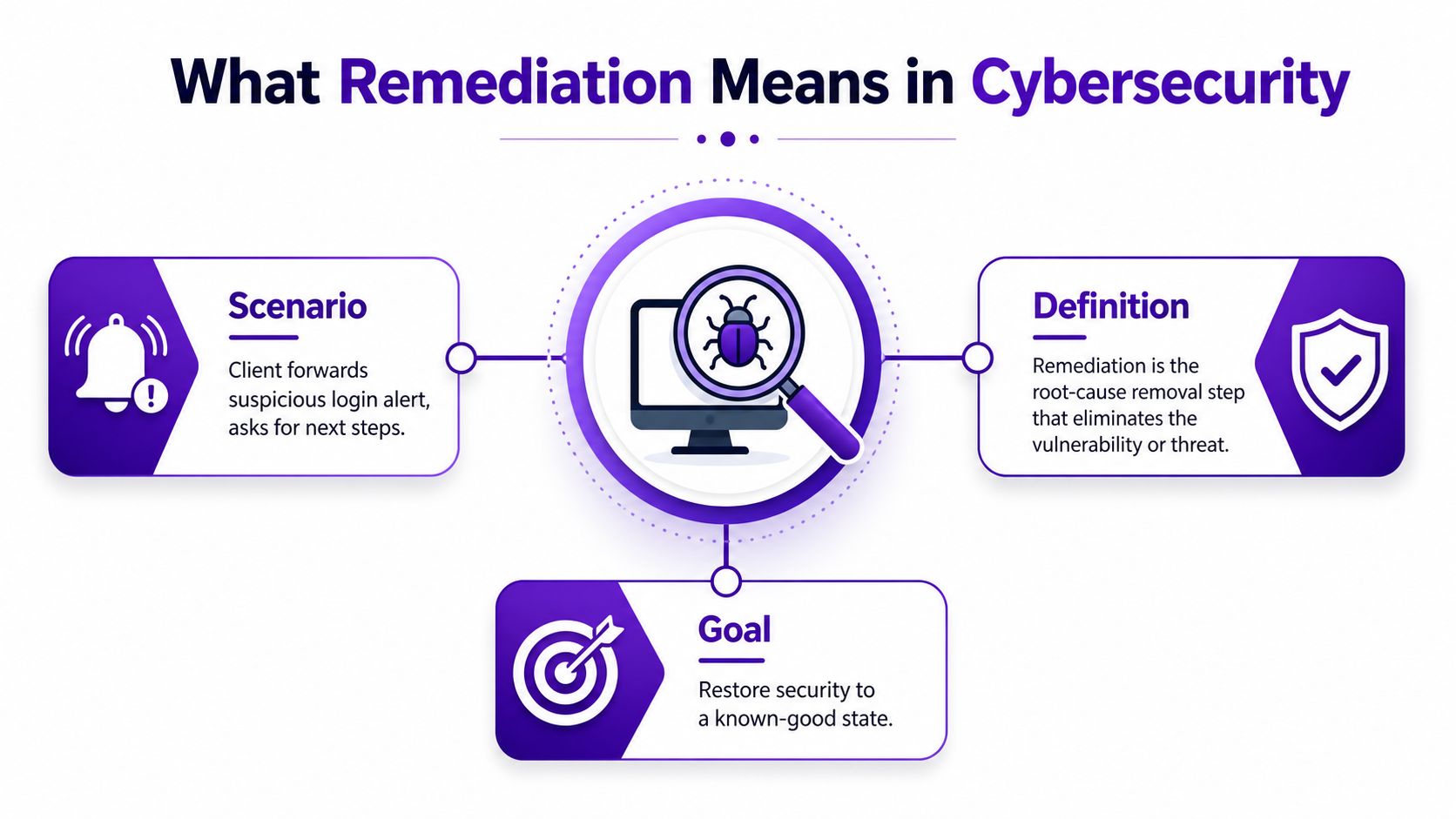
A suspicious login alert is one of those moments where a customer wants a simple answer and a fast fix. You can't give them either if you don't know whether the problem is a stolen password, a misconfigured mailbox rule, or a compromised session that's still active.
The working definition
In cybersecurity, remediation is the root-cause removal step that follows detection, assessment, and prioritisation. The point is not to calm the noise, it's to remove the weakness that made the alert possible in the first place. In practical terms, that could mean resetting exposed credentials, patching a vulnerable system, tightening access control, or removing a misconfiguration that allowed the issue to happen.
Practical rule: if the cause still exists, the job isn't finished.
That's also why remediation is different from closing a ticket. A closed ticket might only mean someone acknowledged the alert. Remediation means someone changed the environment so the same exposure is no longer present, then confirmed it with evidence.
What it is not
Remediation isn't the same as just deleting a message, disabling a user for an afternoon, or telling a client to “keep an eye on it.” Those actions may reduce immediate risk, but they don't necessarily remove the underlying problem. In service terms, that difference matters because a partner can't credibly say a risk is closed if the cause is still reachable.
The word also appears in environmental and site-cleanup work, where it means investigating, removing, containing, or reducing contamination so a site becomes fit for use. That broader meaning is useful because it shows the logic clearly, remediation is about achieving a safe residual condition, not moving the problem somewhere else. The same principle applies to cybersecurity and data exposure, even though the mechanics are different.
For MSPs and resellers, this distinction is commercially important. Customers don't just want a scan result, they want confidence that someone owns the fix, proves the fix, and can explain the outcome without jargon. That's why remediation is a service outcome, not just a technical action.
Remediation vs Mitigation vs Recovery
Teams often use these three words interchangeably, then wonder why the customer thinks the case is still open. They're related, but they do different jobs at different moments.
The clean split
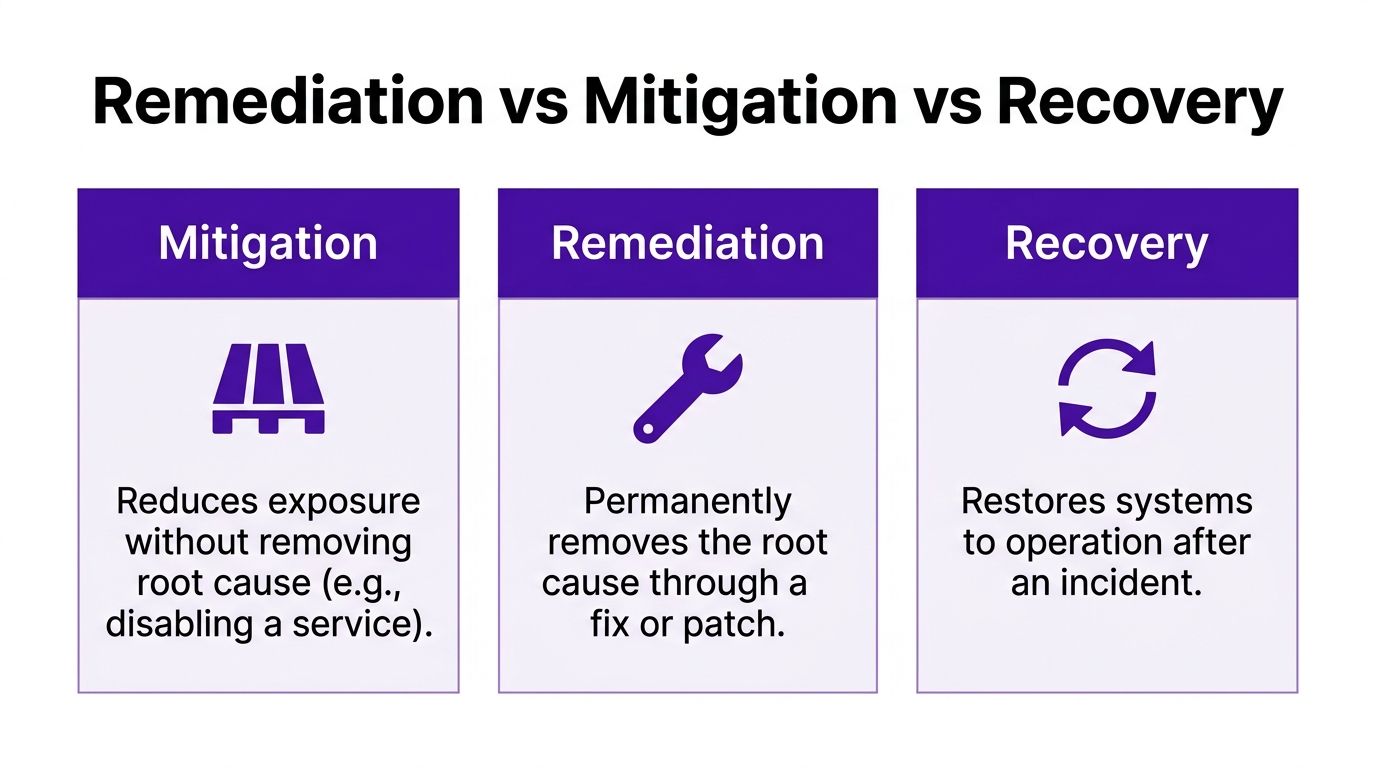
Mitigation reduces exposure without removing the root cause. If you disable a compromised account while you investigate, you've limited damage, but you haven't yet fixed the reason the compromise happened.
Remediation removes the root cause itself. That might mean patching the vulnerable component, rotating exposed credentials, changing a risky configuration, or fixing a broken access control rule.
Recovery restores normal operations after the incident. If a system was taken offline or data was restored from backup, recovery is about getting the business moving again.
A fix can be technically correct and still be the wrong response if it happens in the wrong phase.
A single credential leak shows the difference cleanly. First, you might mitigate by locking the account or blocking session access. Then you remediate by resetting the password, enforcing MFA, and removing any unsafe mailbox rules or access paths. After that, recovery might involve restoring business usage, confirming the user can work again, and making sure the customer's service hasn't been disrupted longer than necessary.
For account managers, the distinction helps in customer conversations and audit reporting. A mitigation can be the right short-term choice if the customer needs breathing room. But if you say the issue is remediated, you're telling them the root cause has been removed and checked.
If you also need a practical reminder that some response actions happen after the technical clean-up, recover data before resale is a useful adjacent reference when you're explaining how restoration and remediation differ.
The Phases of a Remediation Workflow
A good workflow stops people from guessing. It also gives the customer a visible path from alarm to closure, which matters when they're nervous and everyone's inbox is already full.
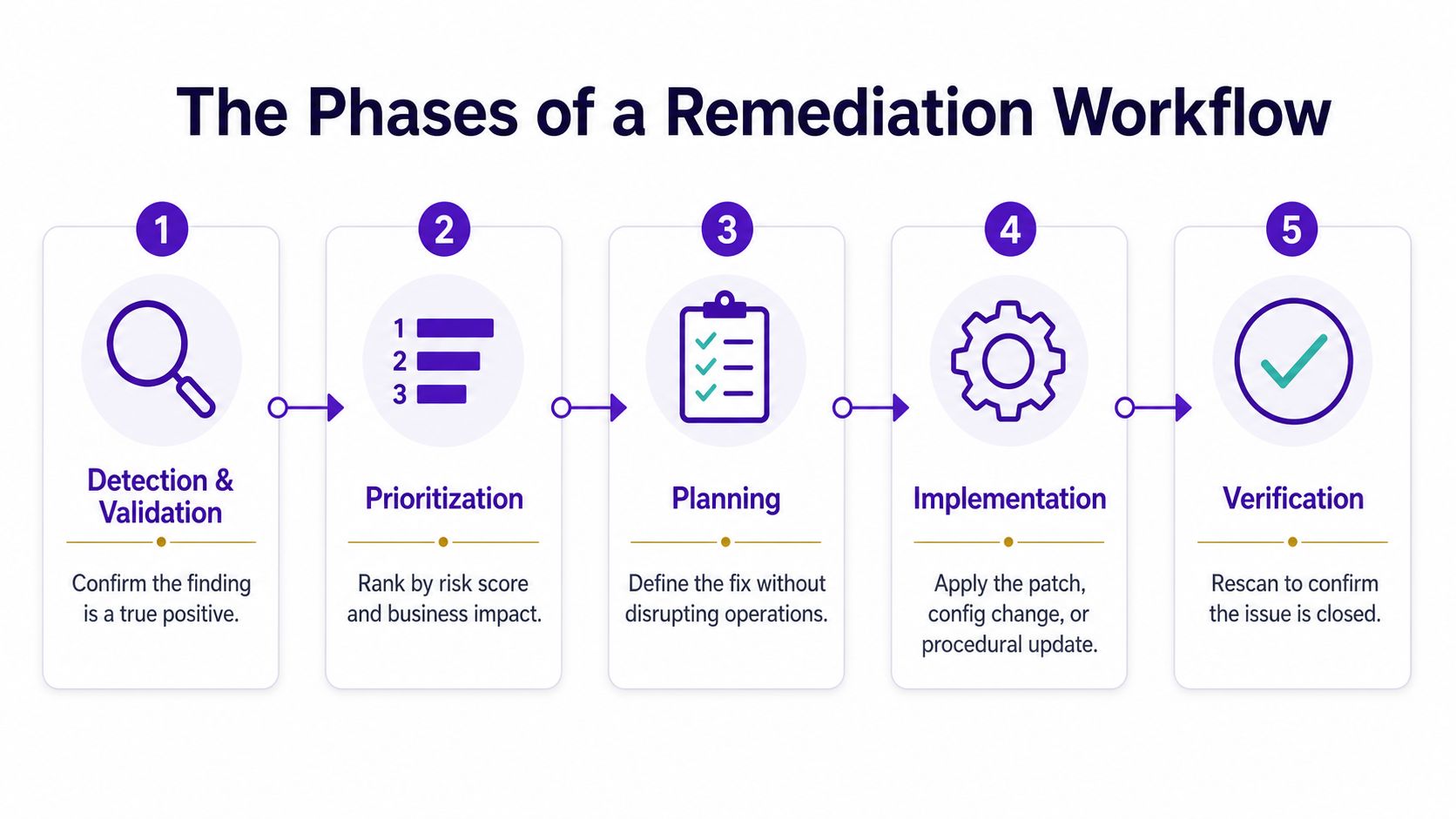
Detection and validation
The first step is confirming the finding is real. That could mean checking a SIEM alert, validating a vulnerability scan, or confirming a dark web notification matches a live customer identity. If the finding is false, you don't remediate it, you record why it was rejected and move on.
Prioritisation and planning
Once the issue is confirmed, rank it by risk and business impact. A low-value asset with a noisy issue doesn't get the same urgency as a finance user's exposed credential or a high-risk system tied to customer data.
Then build the plan before making changes. That means agreeing who owns the fix, what needs to happen, what might break, and how to avoid disrupting production.
Implementation and verification
The actual change might be a password reset, a patch, a configuration fix, or a procedural change. Under the UK's Network and Information Systems Regulations 2018, operators of essential services and digital service providers must notify the competent authority without undue delay and, in any event, within 72 hours of becoming aware of a reportable incident, so the workflow is running against a real clock as well as a technical one. That timeline makes disciplined triage and evidence capture part of remediation, not an optional extra.
Verification is the final gate. You rescan, recheck the account state, or confirm the risky condition no longer appears. If you can't show that, you haven't finished remediation.
For teams building their own service stack, the operational sequence lines up well with the broader GoSafe Dark Web monitoring insights on cyber, especially where discovery and closure need to happen in the same customer workflow.
A Real-World Remediation Example
An MSP gets a dark web alert for a senior finance director. The email address appears in a breach dump, and the exposed password still matches an active account. Nobody has reported a problem yet, which is exactly why the alert matters.
The first move is validation. The analyst checks the finding against a trusted breach database, confirms the account is live, and asks whether the password is being reused anywhere else the customer manages. That gives the account team enough confidence to treat it as a real exposure instead of a noisy hit.
The fix starts immediately. The MSP resets the password, forces MFA enrolment, and reviews inbox rules for signs of business email compromise. They also scan connected sessions to see whether there's any active access that shouldn't be there.
The fastest clean-up is still a bad clean-up if you don't check what the attacker could have touched.
The customer then gets a simple explanation. The exposed credential has been replaced, the user's access has been re-secured, and the mailbox has been checked for persistence. The account manager doesn't need to sell the logic as a technical masterpiece, they just need to explain that the root cause has been removed and the environment has been verified.
The final step is to add the user to a watch list. That keeps the customer visible if the same identity turns up again in another breach or if a related account starts showing signs of compromise. It also gives the MSP a clear follow-up point instead of leaving the issue buried in a closed ticket.
That sequence is what remediation looks like when it's working well. The alert is found, the risk is confirmed, the cause is removed, and the result is checked before anyone says the job is done.
Typical Remediation Actions and Playbook Steps
A good remediation playbook saves time because the same failure patterns keep coming back in different clothes. The details change from customer to customer, but the work usually follows the same order.
| Common Remediation Actions by Incident Type | |||
|---|---|---|---|
| Incident type | Root cause | Typical remediation actions | Verification step |
| Credential exposure | Leaked or reused passwords, stolen credentials | Reset passwords, enforce MFA, revoke sessions, review mailbox rules | Confirm old credentials no longer work and no suspicious access remains |
| System weakness | Vulnerable software or weak configuration | Patch, harden settings, isolate affected endpoint if needed | Rescan or recheck the vulnerable condition |
| People issue | Phishing, unsafe handling, repeat mistakes | User retraining, policy change, tighter approval steps | Confirm the process changed and the same error is less likely to recur |
Password-related work usually comes first because exposed accounts are often the quickest path into a customer environment. Reset the password, revoke active sessions, and force MFA where it is not already in place. If there are signs of mailbox tampering, review forwarding rules and inbox rules right away. The goal is simple, close the door the attacker is most likely using, then check that nothing was left behind.
System fixes follow a different rhythm. Patching and configuration hardening need change control, especially when production services are involved. A rushed fix that breaks a service often leaves the customer remembering the outage more than the clean-up, so the playbook should spell out who approves the change, who makes it, and how the result gets checked after the work is done.
Containment still matters when the risk is active. If an endpoint looks compromised, isolate it first, then handle patching or rebuild work in a controlled way. If the issue is really a wider policy problem, update the policy and document the change so it does not drift back. That same evidence trail helps the account team explain why the action was chosen, not just what was done.
People-focused actions belong in the same playbook too. Phishing simulation follow-up, short user guidance, and tighter approval checks often stop repeat incidents better than a single warning email. For MSPs, that is the service side of remediation. The work is not only technical clean-up, it is also a repeatable response model that the customer can understand and trust.
Dark web monitoring makes those steps faster because it gives the team evidence before the customer reports a problem. A leaked credential, exposed mailbox, or reused password can be validated earlier, which means the MSP can move straight into fix, verification, and follow-up. The risk scoring for resellers guide helps frame which findings need priority treatment, while the metrics reporting for SaaS teams article is a useful reference for how to present the outcome clearly. The same logic applies when you package the workflow under your own brand through View the GoSafe reseller programme, because the customer sees a managed service, not a loose set of ad hoc tasks.
KPIs and Reporting That Prove Remediation Worked
If you can't show evidence, a customer will assume the issue is still open. That's why remediation reporting has to prove what changed, when it changed, and how you know the risk dropped.
The numbers that matter
Track mean time to detect, mean time to remediate, the percentage of high-risk findings closed within SLA, and the rescan pass rate. These aren't vanity metrics. They tell you where the workflow slows down, whether your queue is getting under control, and whether the fix held.
Ticket timestamps matter because they show the sequence, not just the outcome. Before-and-after configuration snapshots matter because they show what was changed. A rescan pass gives the cleanest confirmation that the issue no longer appears, which is the point where remediation becomes defensible to an auditor or insurer.
A green dashboard isn't enough if you can't produce the proof behind it.
For customer-facing reporting, keep the language plain. Say what was found, what was changed, what was checked, and whether the issue is closed. Technical evidence can sit behind that summary for compliance contacts who need the detail.
If you're building this into a partner service, it helps to think like a reporting team as much as a technical one. The metrics reporting for SaaS teams article is a useful adjacent read if you want to sharpen how you present operational evidence without overwhelming non-technical stakeholders. For prioritisation logic, the risk scoring for resellers guide is a practical companion because it helps separate urgent findings from low-value noise.
How Dark Web Monitoring Speeds Up Remediation
A customer calls because a mailbox was used for a suspicious login. By the time the report reaches your team, the exposure may already be wider than the original complaint, and remediation begins with incomplete information.
Dark web monitoring changes that sequence. A finding arrives before the customer can explain the symptoms, so your team can validate the exposure, decide what needs to be fixed, and document the result with evidence instead of guesswork. That makes remediation a service-led workflow, not an emergency search through support tickets.
For MSPs, the value sits in the handoff. A finding from dark web scans for company data gives the service desk something concrete to work from, such as a compromised email address, exposed password, or breached domain. GoSafe is a white-label dark web monitoring tool that continuously scans for compromised email addresses, exposed passwords, and breached domains, then sends clear alerts that a service desk or account manager can act on without specialist security training. It is designed to be sold under the partner's own brand, which makes it a fit for reseller dark web monitoring and broader white label security services.
Clear alerts create faster fixes than noisy dashboards ever do.
The operational benefit is easy to see. A partner can open a ticket, confirm whether the alert matches a real account or domain, decide the right fix, and then verify that the issue no longer appears. That process shortens the gap between discovery and closure, which is where remediation usually loses time.
The commercial case is just as practical. You can package the service as a monthly subscription, keep the delivery overhead low, and use it as an upsell alongside IT support, hosting, cloud, connectivity, or telecom services. That is why dark web monitoring for MSPs works well as a recurring offer, it gives the account manager a clear reason to start a conversation before the customer reports an incident themselves.
For businesses, the payoff is early warning and better evidence. For partners, the payoff is a repeatable service that feeds remediation with facts instead of late-stage complaints. That is a stronger starting point for both operations and the customer relationship.
Remediation Checklist and Next Steps for Service Providers
A customer gets an alert. An account manager asks whether it is real. An engineer needs to know who owns the fix, what evidence supports the finding, and how to close it without leaving risk behind. That is the point where a remediation service either feels orderly or turns into a string of handoffs.
Start with a clear remediation SLA. Define how fast triage begins, who owns the fix, and when verification must happen. Put those steps in writing so account managers and engineers use the same terms when a finding arrives, much like a checklist used in a service desk before a ticket is marked complete.
Set the workflow before the first alert lands. If one person opens the case, another makes the change, and a third confirms the result, the customer should still be able to see a single path from alert to closure. That path also helps prevent the common confusion between closing a ticket and proving the risk is gone.
Align your KPIs to customer outcomes, not just internal activity. Closure without verification leaves tidy records and unresolved exposure. Validated closure gives compliance contacts something they can trust and gives the service provider a cleaner way to show that the fix held.
Use dark web monitoring as the first signal in the workflow. It gives the team more time to confirm the finding, more context for the fix, and a better chance of acting before the customer sees signs of damage in their own systems or inboxes. In practice, that means remediation starts with evidence, not with a client reporting a problem after it has spread.
Package the service as a monthly recurring offer under your own brand. That makes the commercial story easier to explain to non-technical buyers, and it gives the account manager a practical way to frame what is remediation as an ongoing service rather than a one-time task. It also keeps the conversation focused on repeatable process, which is usually what customers want once they have seen a real exposure.
If your team is meeting on Monday, the agenda is straightforward. Define the SLA, standardise the workflow, decide how you will prove closure, and decide how monitoring feeds the front of the process. Once those pieces are in place, the service becomes easier to deliver, easier to report, and easier for the customer to understand.
GoSafe Dark web monitoring helps service providers spot compromised emails, exposed passwords, and breached domains early, then turn that visibility into a cleaner remediation workflow. If you want to offer white-label dark web monitoring under your own brand, visit GoSafe Dark Web monitoring for more information.