Privileged account management is the discipline of locking down admin-level credentials and access with vaults, just-in-time access, and session monitoring. It matters because 80% of security breaches involve privileged credentials, and 82% of insider-misuse breaches took more than a week to detect according to the industry summary and Verizon-linked reporting cited here.
A lot of MSPs recognise the pattern straight away. A client says the admin password is “just in the team chat”, a contractor still has access after the project ended, and nobody's quite sure who used which account last week. That's where what is privileged account management stops being jargon and starts being a control that decides whether a stolen password becomes a minor issue or a full compromise.
The Privileged Account Management Problem
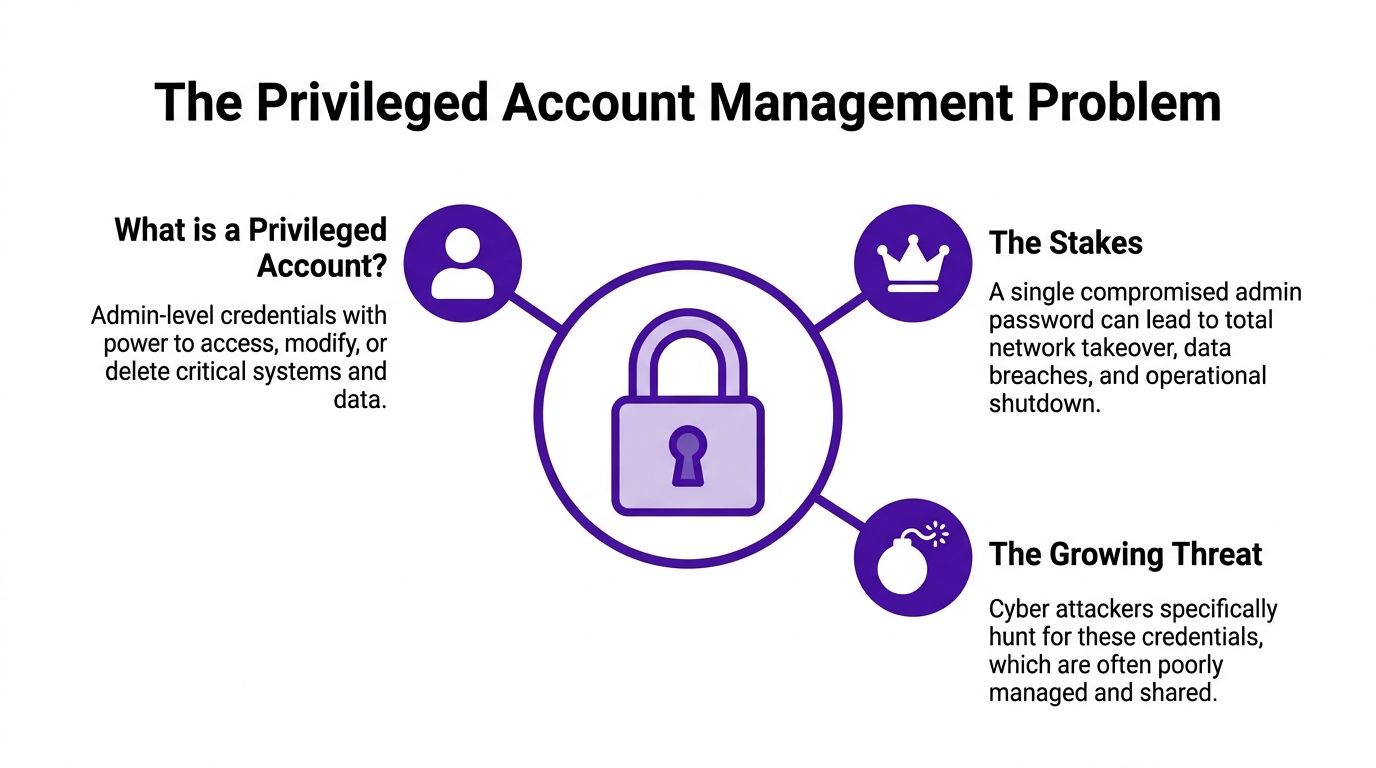
An MSP engineer logs into a client's server after a routine ticket, changes a setting, closes the work, and moves on. The client sees nothing unusual, which is exactly the problem, because the same admin account might later be the easiest route in for an attacker who has already stolen credentials elsewhere. Privileged access is powerful by design, so when it's loose, it becomes a shortcut to the crown jewels.
What counts as privileged access
A privileged account is an account with more power than a normal user account. It can change settings, alter permissions, reach sensitive data, or administer systems in ways an ordinary mailbox login never should as defined in the privileged account guidance.
That includes obvious things like domain admins, but it also includes the accounts people forget about. Service accounts, application identities, emergency break-glass accounts, and vendor accounts all sit in that category when they can alter system state or security policy as set out in NIST's financial-services PAM guidance.
Why this matters for UK businesses
In UK environments, the issue isn't just that admin passwords are powerful. It's that they're often handled informally, then left to drift across shared notes, scripts, or old support arrangements. Palo Alto Networks' cyberpedia summary notes that 31% of businesses were still using manual methods to manage privileged accounts, 1 in 25 organisations didn't manage administrative accounts at all, and 75% of IT security professionals admitted to sharing privileged passwords at least sometimes source.
For MSPs, that creates a clear risk narrative. If a business treats admin credentials like ordinary IT plumbing, a single compromise can become lateral movement, data exposure, or operational disruption. PAM exists to make that harder by reducing standing access and forcing privileged activity into controlled, auditable paths.
Practical rule: if an account can change system-wide settings, it needs governance, not tribal knowledge.
Core Components Every PAM Strategy Needs
A useful PAM programme isn't one tool with a fancy dashboard. It's a set of controls that work together, so a stolen credential is harder to reuse, easier to spot, and less useful once it's been captured. NIST's PAM fact sheet frames the discipline as monitoring and controlling administrative accounts inside an organisation, which is the right starting point for any service provider building a managed offer NIST fact sheet.
The controls that do the heavy lifting
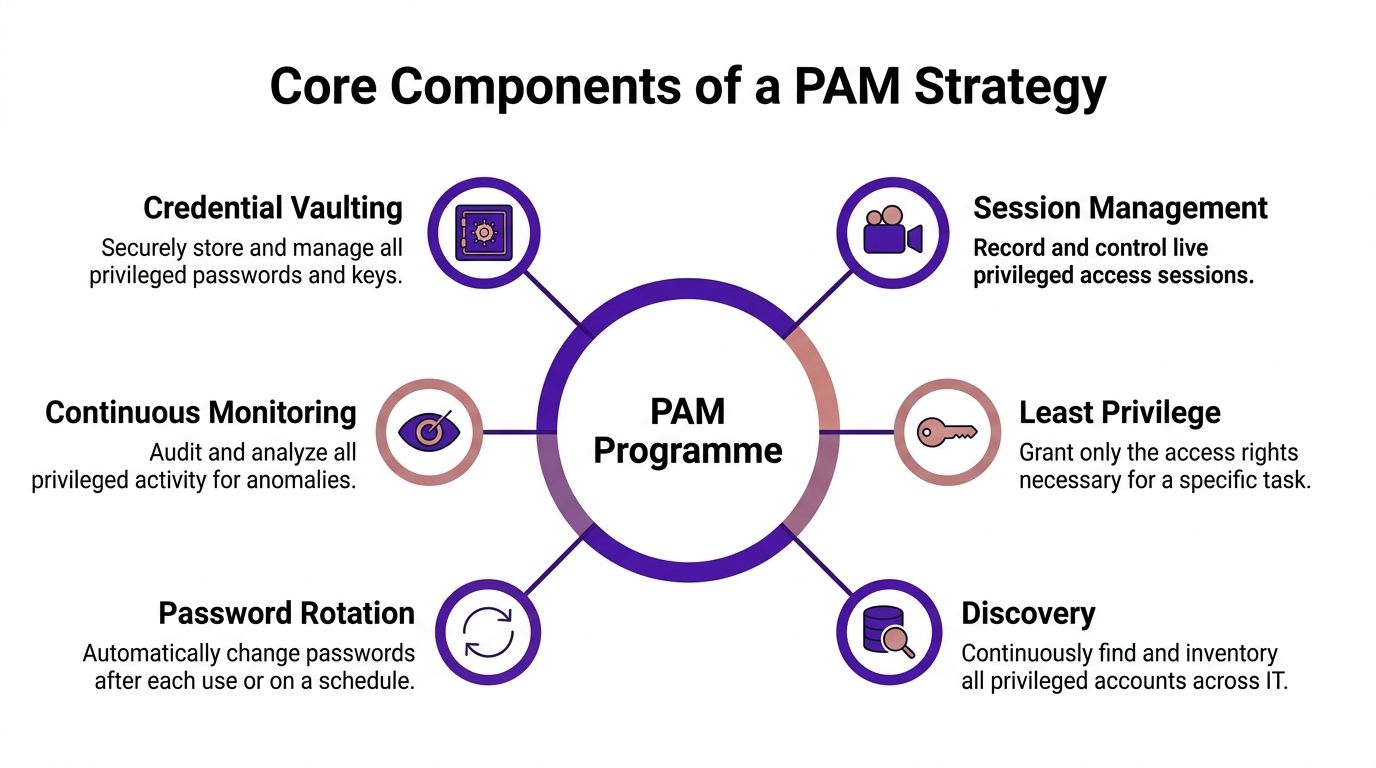
Credential vaulting is the locked safe. It stores privileged passwords and keys so people aren't sharing them in tickets or messaging threads.
Session management is the CCTV overlay. It records what happened during the privileged session, which matters both for deterrence and for later investigation.
Least privilege is the spare-key policy. Users get only what they need for the task in front of them, not a permanent all-access badge.
Discovery is the inventory pass. It finds the accounts people forgot existed, which is often where risk hides.
Password rotation is the habit of changing the locks after use. If a password leaks, its shelf life is short.
Continuous monitoring is the guard rail. It keeps an eye on privileged activity so odd behaviour doesn't vanish into generic log noise.
Why the pieces need to stay connected
If you vault passwords but never rotate them, you've only hidden the problem. If you rotate them but don't monitor sessions, you still won't know who did what. If you discover accounts but never enforce least privilege, the attack surface stays broad.
For readers comparing tooling, a good overview of adjacent identity controls can help separate PAM from broader access management. A practical resource like top IAM tools for SMBs shows how IAM is the wider access layer, while PAM stays focused on the accounts that can do the most damage.
Field note: a weak PAM rollout usually fails because one of these controls is missing, not because the whole idea is wrong.
For MSPs, there's also a useful bridge into process design. If you're already standardising permissions, the MSP permission management guide is a sensible companion to this control set.
Why Privileged Credentials Keep Ending Up on the Dark Web
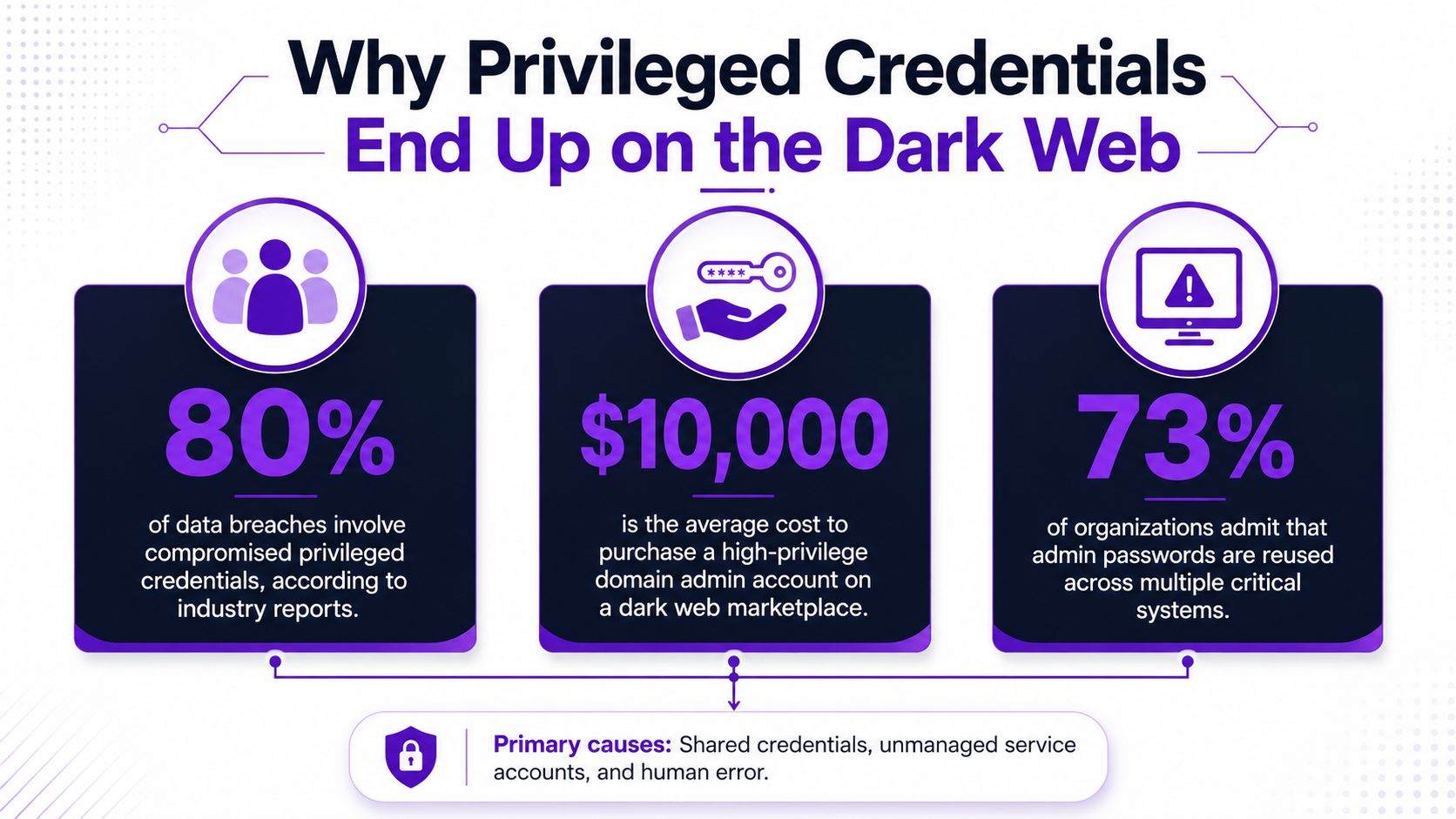
Privileged credentials reach the dark web through ordinary organisational failures, shared passwords, unmanaged service accounts, and old access that was never removed. Once a single admin password leaks, an attacker may already have the shortcut they need, because that credential can sit outside the usual control path and open doors far wider than a standard user login.
The control failures behind the exposure
One Identity's survey summary found 66% of respondents granted privileged account access to third-party partners, contractors, or vendors, 13% were completely confident in their PAM programmes, and 22% were not confident at all source. That mix points to a wide access surface and uneven confidence in the controls meant to contain it.
The same survey summary reported that 97% of surveyed organisations maintained at least some standing privileged accounts, while 54% had granted privileged access on business systems to users who were not direct employees. In plain terms, many environments still rely on permanent elevation and indirect trust, which gives attackers more room to move once they get a foothold.
Why this turns into a breach problem
Most of the damage starts after the first password is exposed. A phished user, a contractor account left active, or a reused admin password in a script can give an intruder enough access to pivot into systems that matter. The Open Security Architecture pattern for the UK context points to phishing and credential compromise as common attack paths, and that fits the PAM problem closely, because stolen credentials become the bridge from initial access to deeper compromise pattern reference.
For MSPs, the practical lesson is straightforward. PAM reduces the chance that a leaked password still works across the environment, while dark web monitoring shows when credentials may already be exposed. Used together, they cover both sides of the problem, prevention and detection.
Useful lens: PAM narrows the blast radius. Monitoring tells you when the blast radius has already started.
Deploying PAM as a Managed Service
PAM works best when it's rolled out like a service, not a one-off licence sale. MSPs already know how to run controls through discovery, policy, implementation, and review, so PAM fits naturally into the same operating rhythm as patching, backup, and endpoint work. The difference is that privileged access touches every other control, which is why the deployment order matters.
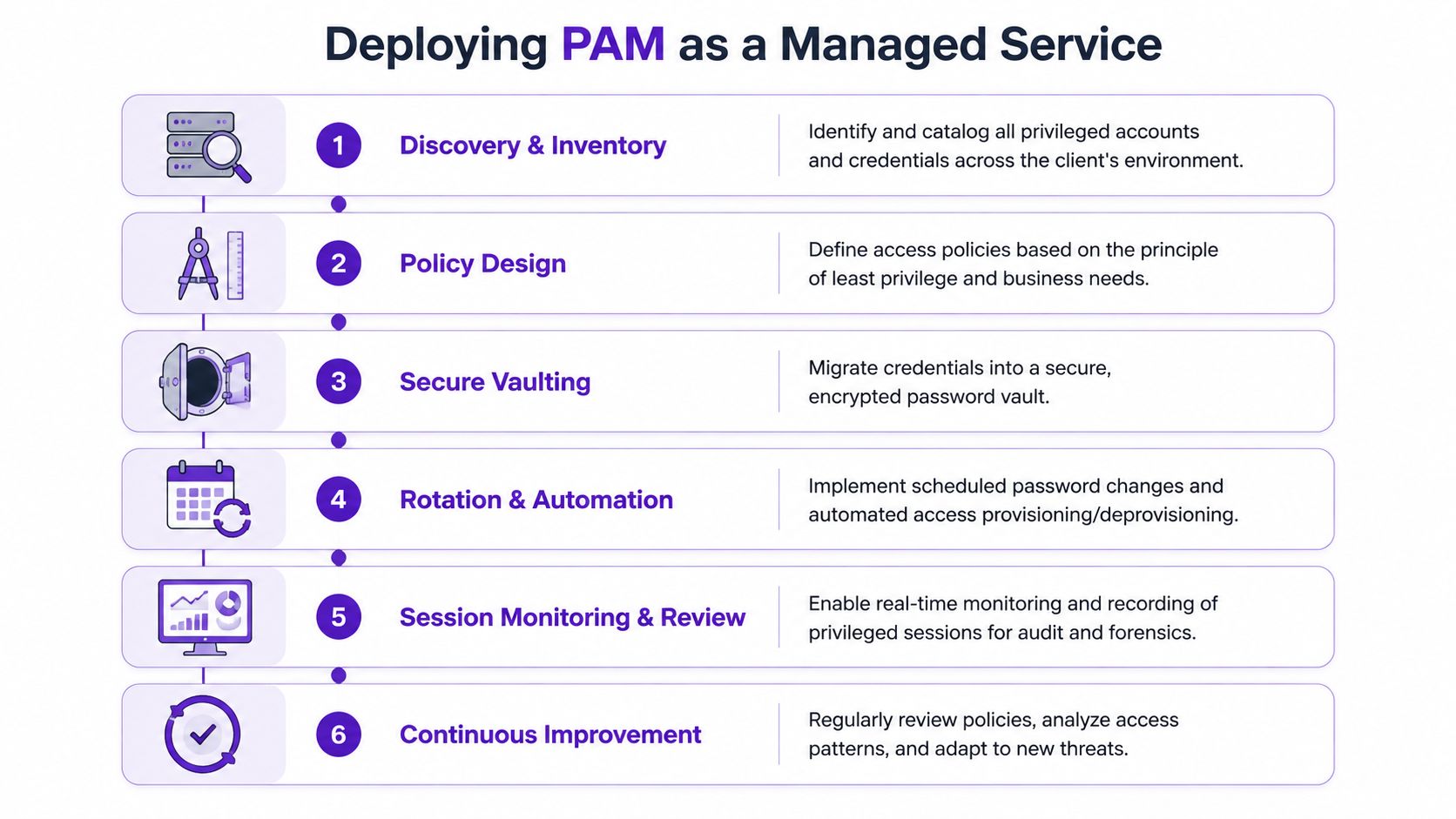
Start with discovery, not policy
You can't govern what you haven't found. The first job is to inventory privileged accounts across the estate, including local admins, domain admins, vendor access, service accounts, and emergency accounts. That discovery step should also cover cloud services and directories, because a narrow view misses the identities that carry the risk.
Once the inventory exists, classify the accounts by business impact. A production domain admin isn't the same as a low-risk development service account, and a managed service provider should treat them differently.
Roll out controls in a practical order
Policy design comes next, with least privilege as the rule, not the slogan. Then vault the credentials, switch on rotation, and move high-risk users or systems onto monitored sessions before broadening the scope. This staged approach is more realistic than trying to enforce every control on day one.
If you want a helpful reference point for how identity controls sit within broader managed services, the managed IT security services provider article is a useful companion read. It helps frame PAM as part of a service stack, not as a standalone niche.
What good looks like
Good deployment means privileged access is visible, requests are controlled, passwords aren't sitting around indefinitely, and sessions can be reviewed after the fact. Bad deployment usually looks like a vault that exists in theory but still leaves admins with standing access, or a monitoring layer no one checks until something goes wrong.
MSP benchmark: if a client still depends on memory, sticky notes, or ad hoc exceptions for admin access, the rollout isn't finished.
Where PAM Meets Dark Web Monitoring for MSPs
PAM and dark web monitoring solve different parts of the same problem. PAM tries to stop privileged access from being casually abused, while dark web monitoring tells you when credentials may already be circulating outside the client's environment. For MSPs, that combination is easier to package than a broad security platform because the customer outcome is simple, clear, and recurring.
A white label dark web monitoring service can sit alongside PAM-grade controls as a monthly subscription. The client gets early alerts when compromised email addresses, exposed passwords, or breached domains show up in the places they shouldn't, while the MSP keeps the relationship under its own brand. That makes it a strong fit for white label security services and other recurring revenue security services that don't require a security engineer in every account review.
The commercial logic is straightforward. Existing customers already buy IT support, cloud services, hosting, connectivity, telecom systems, or web services, so a dark web monitoring service for businesses is a natural add-on rather than a hard sell. It also gives the account manager a credible reason to start a security conversation without leading with jargon or a giant dashboard nobody wants to learn.
Commercial reality: customers understand alerts far faster than they understand architectures.
For MSPs building reseller dark web monitoring offers, the advantage is not technical complexity. It's clarity, repeatability, and the ability to sell dark web monitoring under your own brand without building the monitoring stack yourself. That keeps the partner in control of the customer relationship, which is where recurring revenue tends to stick.
Policies, KPIs, and Compliance Drivers That Matter
A PAM rollout becomes defensible when the policy layer is explicit. The governance questions are simple to ask and hard to fake, which is why boards and auditors care about them. Who can use privileged access, when can they use it, how is it approved, and what evidence exists afterwards?
| Policy Area | Measurable KPI | Compliance Relevance |
|---|---|---|
| Just-in-time access | Number of privileged sessions granted with time-bound approval | Supports least-privilege controls and auditability |
| Segregation of duties | Count of requests blocked because the requester lacked a second approval path | Helps demonstrate control separation |
| Password rotation | Number of privileged credentials rotated after use or on schedule | Reduces standing exposure and supports strong access governance |
| Session review | Percentage of privileged sessions reviewed within the agreed window | Creates a defensible audit trail |
| Access recertification | Number of accounts removed after role change or inactivity review | Shows ongoing lifecycle control |
| Break-glass accounts | Frequency of emergency account use and follow-up review completion | Important for resilience and incident response evidence |
UK organisations often need to map PAM into wider compliance language, especially where security controls are expected to support meet ISO 27001 compliance. That doesn't mean every client needs the same depth, but it does mean the client should be able to show governance, evidence, and review discipline rather than relying on informal admin habits.
A board-ready PAM conversation should sound like operations, not fashion. If the client can't answer who approved access, which accounts are still standing, and how often privileged sessions are reviewed, the programme isn't mature yet.
Common Pitfalls and Misconceptions to Avoid
One common mistake is buying PAM as a tool and treating that as the finish line. The tool is only the container, the control model still has to be designed, owned, and reviewed. Without that, the client gets a vault and no operating discipline.
Another trap is ignoring non-human identities. Service accounts, application accounts, cloud roles, and break-glass access all fall into the privileged bucket when they can change state or reach sensitive data, so a human-only view leaves blind spots. That oversight is especially awkward in hybrid and supplier-heavy environments, where machine identities are often the quiet path through the estate.
The final misconception is that PAM only matters in large, highly regulated organisations. Mid-market firms have the same credential exposure, but fewer people watching it. That's why a phased model, paired with simple dark web alerts, usually lands better than a heavyweight suite that nobody can explain at a client meeting.
Frequently Asked Questions About PAM
People often ask how PAM fits alongside IAM. IAM is the broader access layer for all users, while PAM is the tighter control layer for accounts that can do serious damage if compromised. That distinction matters when you're scoping services for a client, because not every access issue needs the same level of control.
Another frequent question is whether PAM is just a password manager. It isn't. A password manager helps store credentials, but PAM also governs when access can be used, records sessions, rotates credentials, and supports review and audit. If you're comparing how teams package and answer operational questions in other fields, the style of common hiring questions answered is a useful model for keeping things direct and practical.
For a small UK business, minimum viable PAM usually means finding the privileged accounts, removing casual standing access where possible, putting the highest-risk credentials into a vault, and monitoring sessions that matter most. That's enough to start reducing exposure without trying to build a perfect enterprise control room on day one.
If you're an MSP, the cleanest next move is to pair PAM with simple credential exposure alerts and make the offer easy to understand for non-technical buyers. Customers don't need a lecture, they need to know whether their admin credentials are being watched and whether someone can act before those credentials are reused.
GoSafe Dark Web monitoring gives you a simple way to spot compromised email addresses, exposed passwords, and breached domains before they turn into a bigger incident. It fits neatly alongside PAM because it helps you catch leaked credentials early, then package that protection as a clear service your customers can understand. Visit GoSafe Dark Web monitoring to see how it can support your security offer.