Your customer swears they're secure. The firewall's up, the endpoint agent's running, and nobody's shouted about ransomware this morning. Then you find an employee email address and password sitting in a leaked database, and the conversation changes fast.
That's the bit too many service providers miss. Attack surface reduction isn't about collecting more alerts, it's about removing the doors attackers can use before they walk through them. For an MSP, that makes it a service line, not a theory, because customers will pay for anything that cuts risk without drowning them in dashboards.
What Attack Surface Reduction Actually Means
A customer doesn't care that you've got a neat spreadsheet of controls if an old account is still live, a forgotten service is still exposed, or a password has already turned up in a breach dump. They care that an attacker had a route in and you didn't close it soon enough. Attack surface reduction is the discipline of shrinking those routes.
The simple way to explain it to a client
Think of the attack surface as every digital doorway your customer has left open. That includes identities, devices, services, applications, and the behaviour that makes those things easier to abuse. It's broader than patching, because patching only fixes known flaws, while attack surface reduction removes unnecessary exposure altogether.
That matters in the UK because the threat environment is already noisy. The National Cyber Security Centre handled 2,005 cyber incidents in the 12 months to September 2024, including 89 nationally significant cases, which is a strong reminder that exposed access points are not theoretical. UK government breach reporting also found that 50% of businesses identified some kind of cyber security breach or attack in the previous 12 months, so this is a live operational problem, not a boardroom buzzword, as recorded in the cited report.
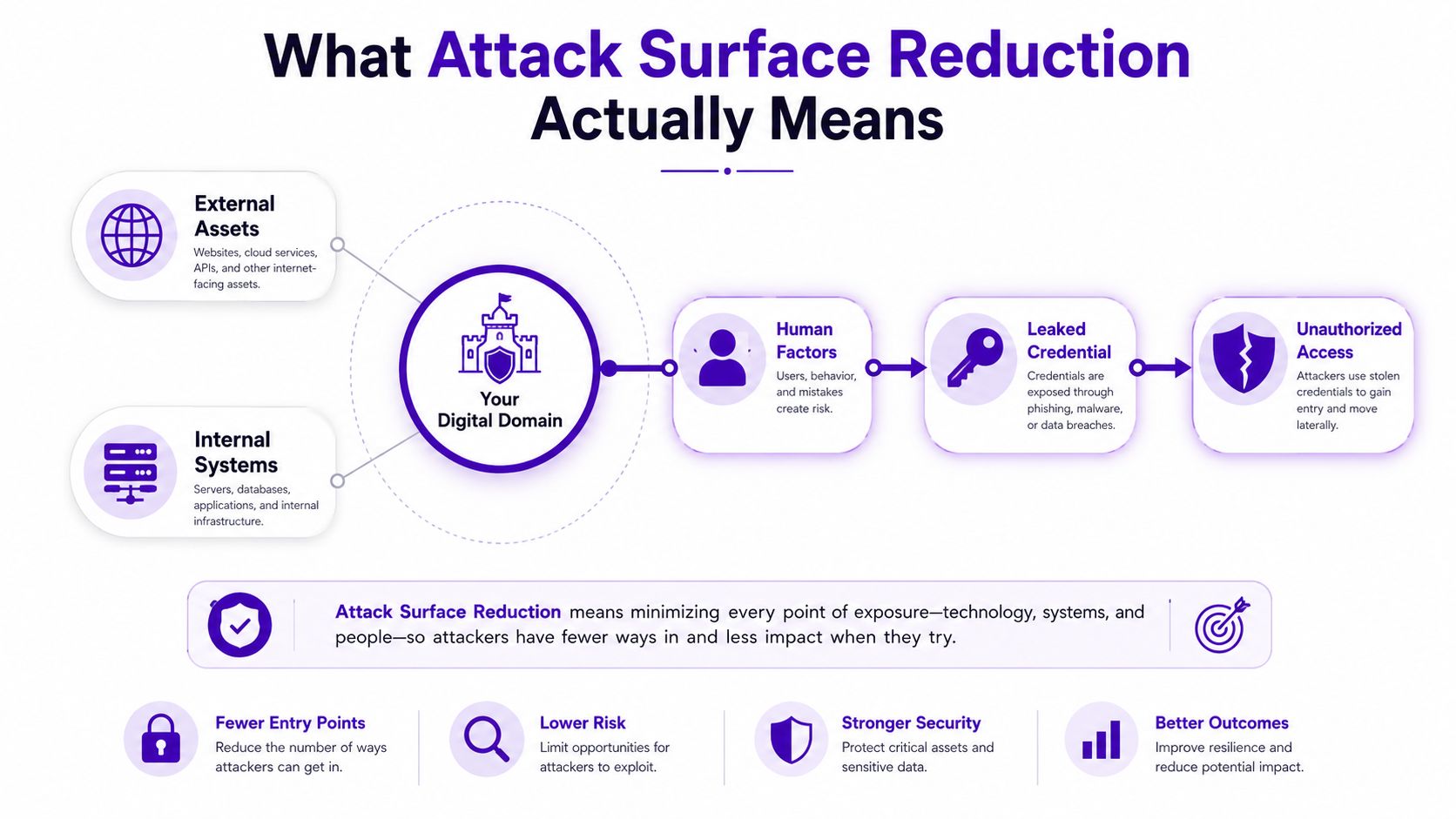
Practical rule: if a system, account, or service doesn't need to be reachable, authenticated, or remembered, it shouldn't be part of the customer's exposed surface.
For an MSP owner, that's the commercial angle. You're not selling fear, you're selling a tighter, more defensible environment. The customer gets fewer ways in for an attacker, and you get a service you can explain in plain English.
The Three Parts of Every Customer's Attack Surface
If you want to sell this properly, stop talking about “surface area” like it's one giant blob. Break it into the three things you can assess with a customer. That gives you a cleaner conversation, a better report, and a service that feels concrete instead of abstract.
Identity, assets, and behaviour
First is identity exposure. That means email addresses, passwords, domains, and accounts that may already be known to criminals. If a customer's staff reuse passwords, keep stale accounts alive, or expose domains across too many systems, you've got a direct route into their business.
Second is internet-facing assets. These are services, apps, ports, subdomains, and SaaS tools that are visible from outside. A forgotten remote access portal or an old public app is still part of the customer's attack surface, whether anyone remembers it or not.
Third is user behaviour. Phishing susceptibility, weak password hygiene, and over-privileged access all turn a small mistake into a bigger incident. The UK Cyber Security Breaches Survey 2024 found that phishing remains the most common attack vector and that 32% of charities reported a breach or attack in the previous 12 months, which is exactly why identity and user controls can't be treated as an afterthought, as noted in the UK survey summary.
A customer-friendly way to phrase it is this, identity gives attackers a way in, internet-facing assets give them something to hit, and behaviour gives them a way to trick people into helping.
| Surface Component | What It Includes | Evidence That Proves Exposure |
|---|---|---|
| Identity exposure | Email addresses, passwords, domains, accounts | Breach listings, leaked credentials, reused logins |
| Internet-facing assets | Services, ports, subdomains, SaaS tools | Public scans, forgotten services, exposed login pages |
| User behaviour | Phishing susceptibility, weak passwords, over-privileged access | Training failures, risky access patterns, suspicious sign-ins |
The point of the table isn't academic neatness. It's to help you tell a client what you found, where it sits, and why it matters without drifting into jargon.
How to Assess and Prioritise Exposures
Most organizations make this harder than it needs to be. They try to inventory everything, argue about completeness, and end up fixing whatever is loudest rather than what is riskiest. That's how customers get a polished report and no meaningful reduction.
Start with what is easiest to exploit
Begin with forgotten internet-facing services. These are the things nobody actively uses but attackers can still reach. Then move to stale identities, because old accounts and reused credentials are cheap wins for criminals. After that, deal with shadow assets and anything the customer forgot to tell you about.
That order is sensible because the UK data shows the environment is already busy. 50% of businesses and 32% of charities reported a breach or attack in the previous 12 months, so there's no value in waiting for a perfect asset list before you act. If the customer is already dealing with regular noise, your job is to cut the most obvious routes first, not admire the mess.
Use three scoring questions for each finding:
- Exposure reach, how many users, systems, or external services does it touch?
- Exploitability, is it a common target or something attackers regularly abuse?
- Business impact, what happens if that path is used, from downtime to data access to reputation damage?
Score those in simple terms, then rank the list from highest to lowest. Don't hide behind a security dashboard when you're talking to the client's finance director, because they need a commercial answer, not a tool tour. If you want a cleaner way to justify the numbers, use this risk scoring for MSPs approach as the back-end logic, then present the output in business language.
For a practical external view of the same problem, a service such as safeguard your business in 2026 shows how exposure assessment works when it's framed for business owners rather than security specialists.
Operational rule: fix the obvious, reachable, and reusable exposure first. Anything else is a distraction until those are under control.
If you're running this as a service, the output should be a short ranked action list, a clear owner for each item, and a target date. That's what customers will pay for, because it turns risk into decisions.
The Mitigation Playbook You Can Apply This Week
Generic advice usually falls apart. Lots of guides tell you to “harden systems” or “reduce exposure”, then leave you to guess what that means in a live customer account. A service provider needs a playbook that can be repeated, sold, and billed.
Turn the NCSC guidance into deliverables
The UK National Cyber Security Centre's Secure by Design guidance gives you five named actions that mean something in customer terms, blocking access to corporate apps, minimising connectivity to external networks and internet services, securely connecting to administration targets, removing unnecessary device features and applications, and applying equivalent controls to third parties, as set out by the NCSC. That's not a slogan, it's a shortlist of controls you can package into a monthly service.
Then look at Microsoft's 16 Attack Surface Reduction rules for Defender for Endpoint. Microsoft says those rules are designed to block or restrict behaviours used by malware, including executable content from email and webmail, Office child processes, and script abuse, and they can be run in Audit mode before you switch them to Block mode, as documented by Microsoft. That matters because you don't need to break a customer's workflow to start shrinking risk.
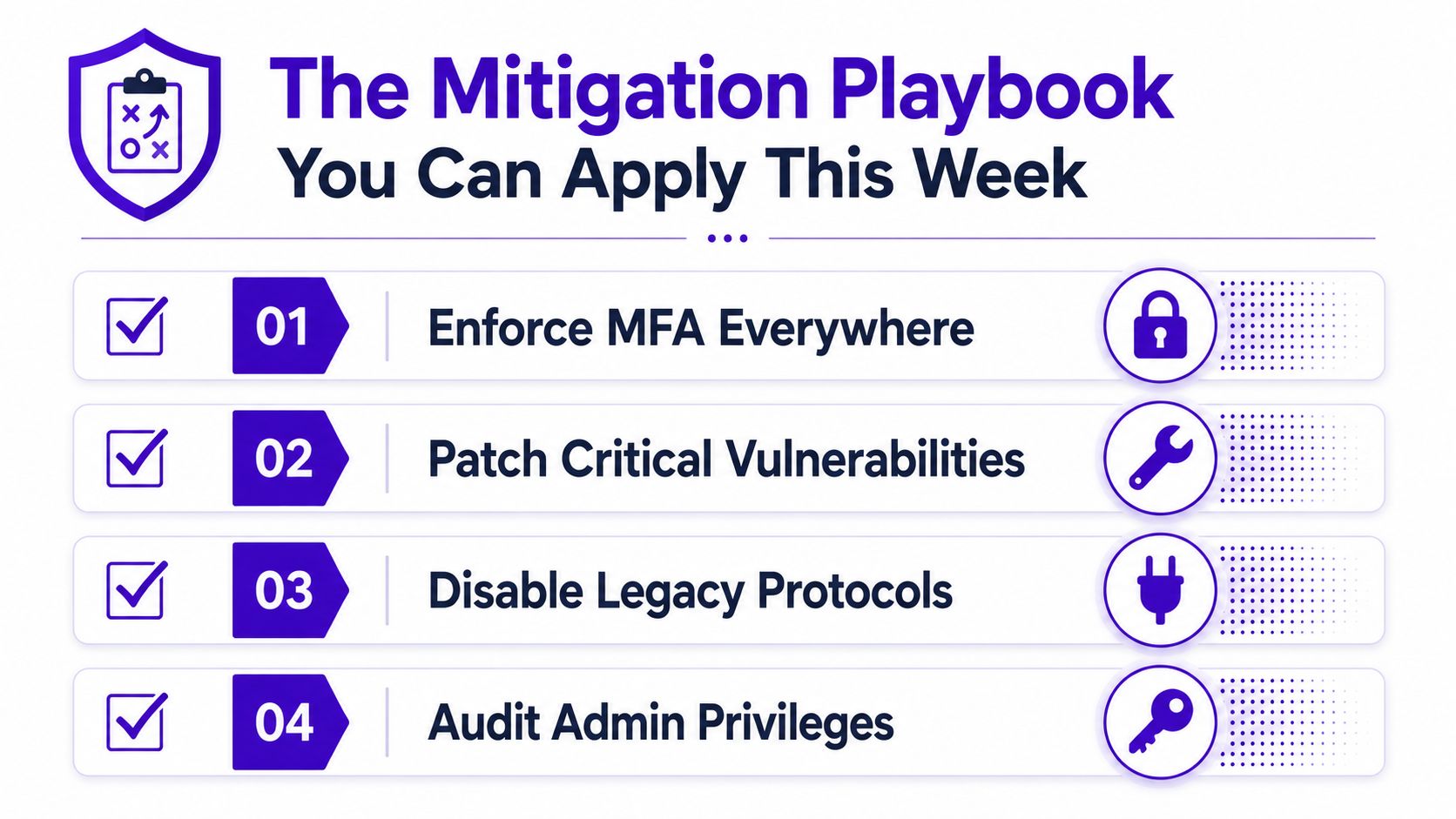
A workable weekly playbook looks like this:
- External review: scan for exposed services, forgotten subdomains, and obsolete remote access paths.
- Identity review: check for leaked credentials, dormant accounts, and admin sprawl.
- Endpoint policy: validate which ASR rules can move from audit to block without disrupting users.
- Third-party review: confirm contractors and suppliers are under the same control expectations.
The mistake is to treat this as a one-off cleanup. It isn't. Continuous reduction beats heroic one-time hardening, because customer environments change every month.
Mitigation without visibility is guesswork. If you can't see what's exposed, you're only hoping the customer's environment stayed still.
That's the point where a managed service becomes commercially useful. You can standardise the playbook, apply it across your base, and sell a clear outcome rather than a pile of technical tasks.
Where Dark Web Monitoring Fits in Continuous Attack Surface Reduction
Dark web monitoring isn't a separate conversation when you're serious about attack surface reduction. It's the identity feed that tells you what has already escaped the customer's control and is now being traded around. External scanning tells you what's exposed today, while dark web monitoring tells you what leaked yesterday and still matters now.
That's why credential exposure is so important. If a customer's email address appears in a breach dump, you don't just send an alert and move on. You rotate the password, check access logs, brief the user, and decide whether that identity needs tighter controls. The finding only becomes useful when it triggers a response.
GoSafe fits naturally here because it continuously scans for compromised email addresses, exposed passwords, and breached domains. That lines up with the identity side of attack surface reduction, which is where many MSPs can create the fastest visible value for customers. If you want a broader view of how service providers approach this, protect your business with dark web monitoring is a useful example of how the market explains the need.
There's a wider commercial lesson here too. Most customers don't want another complex console, they want simple alerts they can understand and act on. That's why boost MSP recurring revenue with monitoring works as a service model, because it ties continuous signal to a repeatable monthly conversation.
For GoSafe specifically, I'd treat it as one option in a wider service stack, not a silver bullet. It's a white-label dark web monitoring tool, so you can sell it under your own brand, but the value is in the workflow behind the alert, not the alert itself.
Commercial Mechanics for MSPs and Resellers
The idea either becomes a product or stays a nice conversation. If you can't package attack surface reduction as a service, it's just another security project that eats time and doesn't land commercially.
Sell the outcome, not the tooling
The cleanest model is white label security services with your brand on the front and the engine behind the scenes. That lets you sell attack surface reduction for MSPs as a monthly subscription, whether you price per seat, per domain, or per customer bundle. The customer doesn't need to know the mechanics, they need to know you'll keep looking for exposed identities and obvious external paths.
The operational overhead should stay low. No security team is required to launch a basic offer, and you don't need specialist knowledge to explain it if your service language is clear. That's exactly why reseller dark web monitoring sits well beside support contracts, hosting, connectivity, VoIP, and cloud services, it adds value without forcing a major delivery change.
A practical positioning line is simple, “we'll monitor for exposed credentials and risky exposure, then tell you what needs fixing in plain English.” That's easier to buy than a generic cyber platform and easier to renew than a one-off scan. Customers stick with services that keep producing useful alerts and obvious next steps.
Commercially, the best upsell path is already in your account base. Existing IT support customers, hosted service customers, and connectivity customers already trust you, so you're not starting from zero. Add the service as a low-friction monthly line item, then use the findings to start better conversations about access, identity, and exposure reduction.
If you want a white-label route that supports that model, the GoSafe white-label security program is built for partners who want to sell dark web monitoring under their own name and keep the customer relationship.
GoSafe Dark Web monitoring is a white-label dark web monitoring tool that continuously scans for compromised email addresses, exposed passwords, and breached domains, then sends clear alerts your team can act on.
Customers buy clarity. They don't buy another dashboard unless it helps them make a decision.
That's the commercial truth. Keep the offer simple, keep the reporting readable, and you'll have something your sales team can pitch.
A 90-Day Plan to Launch Attack Surface Reduction Under Your Brand
Don't overcomplicate the rollout. A good offer launched badly still struggles, so the first 90 days need a tight sequence and a clear owner for each step.
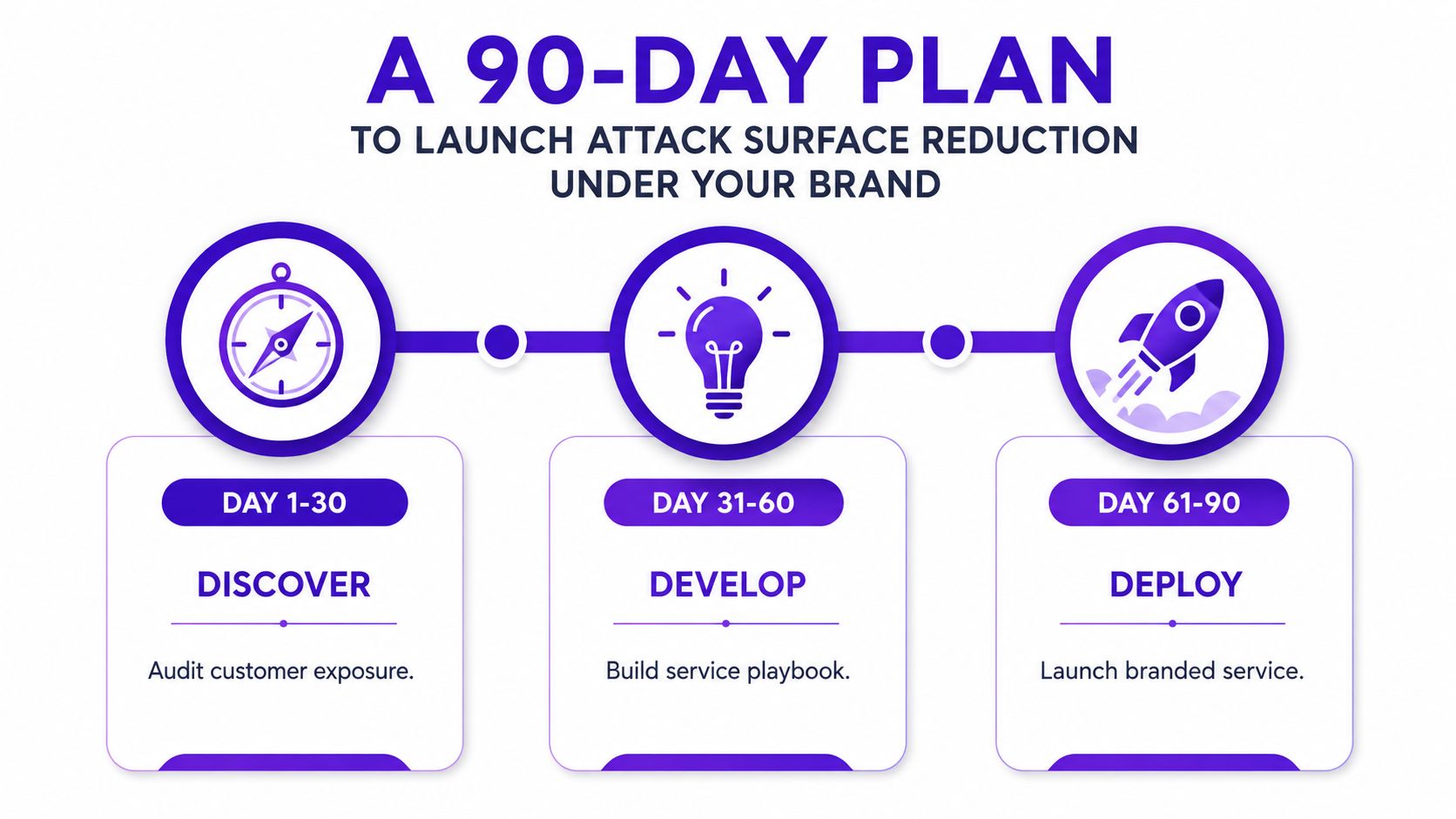
Days 1 to 30
Audit a small set of existing customers for exposed identities and obvious external exposure. Pick the accounts most likely to value a quick win, then build a baseline report that says what was found, what was fixed, and what remains open. You're looking for proof that the service creates action, not a perfect catalogue of everything.
Days 31 to 60
Set up the white-label platform under your brand and define the monthly reporting format. Train two engineers on triage, response notes, and how to explain a finding without jargon. If your team can't explain one alert clearly, the service isn't ready.
Days 61 to 90
Roll the offer out to a pilot group and tighten the commercial packaging. Refine the monthly subscription, build the upsell conversation into support reviews, and use early findings to create momentum with the rest of your customer base. At this stage, the service should feel routine, not experimental.
The best launch metric is simple, do customers understand the alert, and do they act on it quickly? If the answer is yes, you've got a service worth scaling.
If you want to add a practical, white-label dark web monitoring service to your portfolio, start with GoSafe and see how it fits under your own brand. Visit GoSafe Dark Web monitoring to review the platform and book a demo for your team.